In this, the conclusion of our lesson focusing on JUnit, we will develop a test driver for the LineGenerator class. Along the way, we’ll also learn a couple of new features offered by JUnit.
GitHub repository: Cartesian Plane Part 6
Previous lesson: Cartesian Plane Lesson 6: Unit Testing (Page 1)
Unit Testing LineGenerator
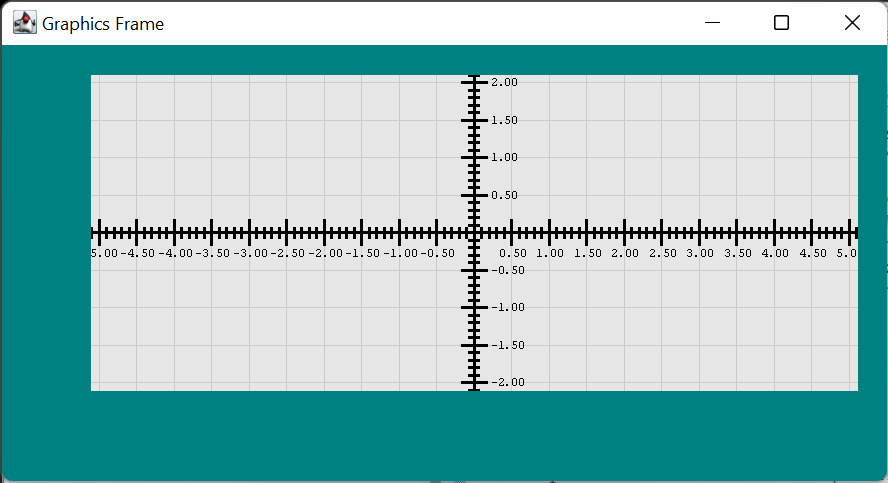
The LineGenerator class can distinguish between axial- and nonaxial- lines but nothing else; for example, it doesn’t know what a tic mark or a gridline is. And it doesn’t know anything about weight or color. It generates Line2D objects of a given length at a position relative to the axes and the edges of the enclosing rectangle. So a major focus of our testing is on position and length.
Since we have many constructors*, we must ensure that all constructors implement the correct default values. For example, when we invoke LineGenerator(Rectangle2D rect, float gridUnit, float lpu) we have to verify that the length defaults to -1 and the orientation defaults to BOTH.
*Two thoughts on constructors in the context of testing:
-
If multiple constructors
are complicating the testing process,
we might consider eliminating
some of the constructors.
We have to balance convenience
to the developer
with the cost of development and maintenance.
Consider:
- How often are developers going use a given constructor?
-
How much convenience
do developers derive
from all those constructors?
On this topic let’s acknowledge that:
- All those constructors might reduce development time significantly.
- If instantiating a particular class entails a complex calculation for a parameter, multiple constructors can be helpful in confining the calculation to a single place (the constructor) rather than requiring the developer to perform the calculation. This would reduce the complexity of the code, leading to a product that is easier to maintain and enhance.
- How difficult will it be to write a unit test for a particular constructer?
- What impact does unit test development have on the overall development schedule?
The LineGeneratorTest Class
Reviewing this lesson a considerable time after it was first written, I find myself tempted to change a lot of the original code. And eventually perhaps I will. You should keep an eye out for improvements that you might wish to make; in particular, testing the constructors can be simplified.
Below, find the details of the LineGenerator JUnit test class, LineGeneratorTest.
Infrastructure
In the following paragraphs, we will discuss the fields and private methods of LineGeneratorTest, in addition to its @BeforeEach method.
⬛ Fields
Here is an annotated list of the LineGeneratorTest class’s fields. See also the @BeforeEach method.
1 2 3 4 5 6 7 8 9 10 11 12 13 14 | private static final int baseRectXco = 100; private static final int baseRectYco = 2 * baseRectXco; private static final float baseWidth = 200; private static final float baseHeight = baseWidth + 100; private static final float baseGPU = 50; private static final float baseLPU = 1; private static final float baseLen = 15; private Rectangle2D testRect; private float testWidth; private float testHeight; private float testGPU; private float testLPU; private float testLen; |
- Lines 1-7: Default test parameters:
- Lines 1,2: Default coordinates of the rectangle where the lines are to be drawn.
- Lines 3,4: Default dimensions of the rectangle where the lines are to be drawn.
- Line 5: Default GPU for drawing lines.
- Line 6: Default LPU for drawing lines.
- Line 7: Default line length.
- Lines 9-14: Test parameters. These fields are set to their default values at the start of every test. They may be modified during test execution. See also the @BeforeEach method.
- Line 9: The rectangle where the lines are to be drawn.
- Lines 10,11: Dimensions of the rectangle where the lines are to be drawn.
- Line 12: GPU for drawing lines.
- Line 13: LPU for drawing line.
- Line 14: Line length.
⬛ Private Methods
Following is a discussion of the helper methods in the LineGeneratorTest class.
🔲 private void validateLength( Iterator<Line2D> lineIter, double expLen )
This method verifies that every line produced by a Line2D iterator, such as that provided by LineGenerator.axesIterator, produces lines of the expected length (expLen). The conditional logic at lines 11-19 below determines whether the generated line is horizontal or vertical, then determines its length based on the coordinates of its endpoints. The assertion at line 22 verifies that the iterator generated at least one line.
1 2 3 4 5 6 7 8 9 10 11 12 13 14 15 16 17 18 19 20 21 22 23 | private void validateLength( Iterator<Line2D> lineIter, double expLen ) { int count = 0; while ( lineIter.hasNext() ) { ++count; Line2D line = lineIter.next(); Point2D point1 = line.getP1(); Point2D point2 = line.getP2(); double actLen = 0; if ( point1.getX() == point2.getX() ) { actLen = point2.getY() - point1.getY(); } else { assertEquals( point1.getY(), point2.getY() ); actLen = point2.getX() - point1.getX(); } assertEquals( expLen, actLen ); }; assertTrue( count > 0 ); } |
🔲 private void validateOrientation( LineGenerator lineGen, int orientation )
This method verifies that every line produced by a given LineGenerator produces a line in the given orientation, HORIZONTAL and/or VERTICAL. Here’s the code.
private void
validateOrientation( LineGenerator lineGen, int orientation )
{
    boolean             actHasHor   = false;
    boolean             actHasVert  = false;
    Iterator<Line2D>    iter        = lineGen.iterator();
    while ( iter.hasNext() )
    {
        Line2D  line    = iter.next();
        Point2D point1  = line.getP1();
        Point2D point2  = line.getP2();
        if ( point1.getX() == point2.getX() )
            actHasVert = true;
        else if ( point1.getY() == point2.getY() )
            actHasHor = true;
        else
            fail( "Strange orientation" );
    }

    boolean expHasHor   =
        (orientation & LineGenerator.HORIZONTAL) != 0;
    boolean expHasVert  =
        (orientation & LineGenerator.VERTICAL) != 0;
    assertEquals( expHasHor, actHasHor );
    assertEquals( expHasVert, actHasVert );
}
🔲 private void validateAxes( Iterator<Line2D> iter )
Verifies that the Line2D iterator provided by LineGenerator.axesIterator() correctly produces the x- and y-axes. Here is an annotated listing.
1 2 3 4 5 6 7 8 9 10 11 12 13 14 15 16 17 18 19 20 21 22 23 24 25 26 27 28 29 30 31 32 | private void validateAxes( Iterator<Line2D> iter ) { double centerY = testRect.getCenterY(); Point2D xco1 = new Point2D.Double( testRect.getMinX(), centerY ); Point2D xco2 = new Point2D.Double( testRect.getMaxX(), centerY ); Line2D xAxis = new Line2D.Double( xco1, xco2 ); double centerX = testRect.getCenterX(); Point2D yco1 = new Point2D.Double( centerX, testRect.getMinY() ); Point2D yco2 = new Point2D.Double( centerX, testRect.getMaxY() ); Line2D yAxis = new Line2D.Double( yco1, yco2 ); Comparator<Line2D> comp = (l1, l2) -> (int)(l1.getX1() - l1.getX2()); List<Line2D> expSet = new ArrayList<>(); expSet.add( xAxis ); expSet.add( yAxis ); expSet.sort( comp ); List<Line2D> actSet = new ArrayList<>(); actSet.add( iter.next() ); actSet.add( iter.next() ); assertFalse( iter.hasNext() ); actSet.sort( comp ); assertLineEquals( expSet.get( 0 ), actSet.get( 0 ) ); assertLineEquals( expSet.get( 1 ), actSet.get( 1 ) ); } |
- Line 3-8: Generate the expected coordinates of the x-axis:
- Line 3: Get the y-coordinate of the x-axis.
- Lines 4,5: Calculate the left endpoint of the x-axis.
- Lines 6,7: Calculate the right endpoint of the x-axis.
- Line 8: Instantiate a line corresponding to the x-axis.
- Line 10-15: Generate the expected coordinates of the y-axis:
- Line 10: Get the x-coordinate of the y-axis.
- Lines 11,12: Calculate the top endpoint of the y-axis.
- Lines 13,14: Calculate the bottom endpoint of the y-axis.
- Line 15: Instantiate a line corresponding to the y-axis.
- Lines 17,18: Create a Comparator for two Line2Ds based on the length of the lines. The line with the shorter length is less than the line with the longer length.
- Lines 18-21: Create a list of the lines we expect to be generated by the iterator.
- Line 22: Sort the list of expected lines.
- Lines 24-26: Create a list of the lines actually generated by the iterator.
- Line 27: Verify that the iterator produced exactly two lines.
- Line 28: Sort the list of actual lines.
- Lines 30-31: Verify that the expected list of lines equals the actual list.
🔲 private void assertLineEquals( Line2D expLine, Line2D actLine )
This method verifies that a given line has the expected coordinates. Here’s a listing.
private void assertLineEquals( Line2D expLine, Line2D actLine )
{
    assertEquals( expLine.getX1(), actLine.getX1() );
    assertEquals( expLine.getX2(), actLine.getX2() );
    assertEquals( expLine.getY1(), actLine.getY1() );
    assertEquals( expLine.getY2(), actLine.getY2() );
}
🔲 private float calcFromExpCount( int expCount )
Calculate the width or height of a rectangle so that a) the rectangle will contain the given number of lines (expCount), and b) no line will fall on the edge of the rectangle. Here’s an example of how it’s used:
@Test
public void testNewLineGenRectangle2DFloatFloatFloat()
{
    int     expHorCount     = 4;
    int     expVertCount    = 8;
    testWidth = calcFromExpCount( expVertCount );
    testHeight = calcFromExpCount( expHorCount );
    makeRect();
    // ...
}
The code looks like this:
private float calcFromExpCount( int expCount )
{
    testGPU = baseGPU;
    testLPU = 1;
    float   dim = expCount * (1.1f * testGPU);
    return dim;
}
🔲 private void makeRect()
The makeRect method instantiates the test rectangle based on the default x- and y-coordinates and the current width and height test parameters. The method is listed below.
private void makeRect()
{
    testRect = new Rectangle2D.Double(
        baseRectXco,
        baseRectYco,
        testWidth,
        testHeight
    );
}
🔲 private Line2D getVertLine( double xOffset )
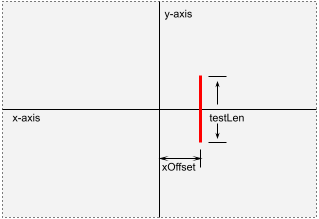
Given the current test parameters (testRect, testLen), generate a vertical line centered on the x-axis at a given offset (xOffset) from the y-axis. The annotated code follows.
1 2 3 4 5 6 7 8 9 10 11 12 13 | private Line2D getVertLine( double xOffset ) { double centerX = testRect.getCenterX(); double centerY = testRect.getCenterY(); double xco = centerX + xOffset; double halfLen = testLen / 2; double yco1 = centerY - halfLen; double yco2 = centerY + halfLen; Point2D point1 = new Point2D.Double( xco, yco1 ); Point2D point2 = new Point2D.Double( xco, yco2 ); Line2D line = new Line2D.Double( point1, point2 ); return line; } |
- Line 3: Get the x-coordinate of the y-axis.
- Line 4: Get the y-coordinate of the x-axis.
- Line 5: Get the x-coordinate of the target line.
- Lines 6-8: Get two y-coordinates, one-half the length of the target line above the x-axis and one-half the length below the x-axis.
- Lines 9-12: Instantiate and return the target line.
🔲 private Line2D getHorLine( double yOffset )
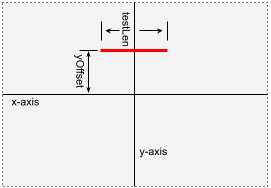
Given the current test parameters (testRect, testLen), generate a horizontal line centered on the y-axis at a given offset (yOffset) from the x-axis. This method is very similar to getVertLine; its implementation is an exercise for the student, and the solution can be found in the GitHub repository.
⬛ JUnit @BeforeEach Method
This method is executed immediately before the start of every test method. It initializes test parameters to their default values. It is shown below.
@BeforeEach
public void setUp() throws Exception
{
    testWidth = baseWidth;
    testHeight = baseHeight;
    testGPU = baseGPU;
    testLPU = baseLPU;
    testLen = baseLen;
    makeRect();
}
Test Methods
Following is a description of the test methods (those marked @Test) in the LineGeneratorTest class.
⬛@Test public void testNewLineGenRectangle2DFloatFloat()
This method validates the constructor to which we pass the rectangle to contain our drawing, the grid unit (pixels per unit), and the lines per unit. In this test, we will verify that the object produced by the constructor can correctly generate the axes and horizontal and vertical lines of the correct length. Refer to the figure below.
In lines 4-7, we create the rectangle to pass to the constructor (see makeRect). In lines 10-12, we verify that the LineGenerator correctly produces the axes, nonaxial lines of correct length, and both horizontal and vertical lines (see validateAxes, validateLength, and validateOrientation).
1 2 3 4 5 6 7 8 9 10 11 12 13 | @Test public void testNewLineGenRectangle2DFloatFloat() { float dim = 300; testWidth = dim; testHeight = dim; makeRect(); LineGenerator lineGen = new LineGenerator( testRect, testGPU, testLPU ); validateAxes( lineGen.axesIterator() ); validateLength( lineGen.iterator(), dim ); validateOrientation( lineGen, LineGenerator.BOTH ); } |
⬛@Test public void testNewLineGenRectangle2DFloatFloatFloat()
This method validates the constructor to which we pass the rectangle to contain our drawing, the grid unit (pixels per unit), the lines per unit, and the line length. As in the previous test (testNewLineGenRectangle2DFloatFloat ), we wish to verify that the object produced by the constructor can correctly generate the axes and horizontal and vertical lines of the correct length. We will also verify that the LineGenerator object produces the correct number of horizontal and vertical lines. We execute the test 48 times, with a different length each time. The code looks like this.
@Test
public void testNewLineGenRectangle2DFloatFloatFloat()
{
    int     expHorCount     = 4;
    int     expVertCount    = 8;
    testWidth = calcFromExpCount( expVertCount );
    testHeight = calcFromExpCount( expHorCount );

    makeRect();
    for ( int len = 2 ; len < 50 ; ++len )
    {
        LineGenerator   lineGen =
            new LineGenerator( testRect, testGPU, testLPU, len );
        assertEquals( expHorCount, lineGen.getHorLineCount() );
        assertEquals( expVertCount, lineGen.getVertLineCount() );
        validateAxes( lineGen.axesIterator() );
        validateLength( lineGen.iterator(), len );
        validateOrientation( lineGen, LineGenerator.BOTH );
    }
}⬛@Test public void testNewLineGenRectangle2DFloatFloatMinus1()
This test is very similar to testNewLineGenRectangle2DFloatFloatFloat, but this time, we pass a length of -1. We wish to verify that the LineGenerator produces horizontal and vertical lines whose length spans the test rectangle’s length and height. Here’s the code.
@Test
public void testNewLineGenRectangle2DFloatFloatMinus1()
{
    int     expCount    = 4;
    float   dim         = calcFromExpCount( expCount );

    testWidth = dim;
    testHeight = dim;
    makeRect();
    LineGenerator   lineGen =
        new LineGenerator( testRect, testGPU, testLPU, -1 );
    assertEquals( expCount, lineGen.getHorLineCount() );
    assertEquals( expCount, lineGen.getVertLineCount() );
    validateAxes( lineGen.axesIterator() );
    validateLength( lineGen.iterator(), dim );
    validateOrientation( lineGen, LineGenerator.BOTH );
}⬛@ParameterizedTest public void
testNewLineGenRectangle2DFloatFloatFloatInt( int orientation )
This method exercises the “big” constructor, specifying all the line generation parameters. It’s a parameterized test that executes three times, one for each possible orientation parameter: HORIZONTAL, VERTICAL, and BOTH.
1 2 3 4 5 6 7 8 9 10 11 12 13 14 15 16 17 18 19 20 21 22 | public void testNewLineGenRectangle2DFloatFloatFloatInt( int orientation ) { int expHorCount = 4; int expVertCount = 8; testWidth = calcFromExpCount( expVertCount ); testHeight = calcFromExpCount( expHorCount ); makeRect(); LineGenerator lineGen = new LineGenerator( testRect, testGPU, testLPU, testLen, orientation ); assertEquals( expHorCount, lineGen.getHorLineCount() ); assertEquals( expVertCount, lineGen.getVertLineCount() ); validateAxes( lineGen.axesIterator() ); validateLength( lineGen.iterator(), testLen ); validateOrientation( lineGen, orientation ); } |
⬛@ParameterizedTest public void
testNewLineGenRectangle2DFloatFloatMinus1Int( int orientation )
This method is virtually the same as testNewLineGenRectangle2DFloatFloatFloatInt. The main difference is that we pass -1 for the constructor’s length parameter and verify that it produces lines that span the width and height of the enclosing rectangle. A listing of this method follows.
@ParameterizedTest
@ValueSource( ints= {
    LineGenerator.HORIZONTAL,
    LineGenerator.VERTICAL,
    LineGenerator.BOTH
})
public void
testNewLineGenRectangle2DFloatFloatMinus1Int( int orientation )
{
    int     expCount    = 4;
    float   dim         = calcFromExpCount( expCount );
    testWidth  = dim;
    testHeight = dim;

    makeRect();
    LineGenerator   lineGen = new LineGenerator(
        testRect,
        testGPU,
        testLPU,
        -1,
        orientation
    );
    assertEquals( expCount, lineGen.getHorLineCount() );
    assertEquals( expCount, lineGen.getVertLineCount() );
    validateAxes( lineGen.axesIterator() );
    validateLength( lineGen.iterator(), dim );
    validateOrientation( lineGen, orientation );
}⬛@Test public void testAxesIterator()
This method validates the LineGenerator’s axesIterator() class method overload. The code follows. See also validateAxes.
@Test
public void testAxesIterator()
{
    LineGenerator   lineGen =
        new LineGenerator( testRect, testGPU, testLPU );
    validateAxes( lineGen.axesIterator() );
}⬛@Test public void testAxesIteratorRectangle2D()
This method validates the LineGenerator’s axesIterator(Rectangle2D) class method overload. The code follows. See also validateAxes.
@Test
public void testAxesIteratorRectangle2D()
{
    Iterator<Line2D>    iter    =
        LineGenerator.axesIterator( testRect );
    validateAxes( iter );
}⬛@Test public void testIterator()
This method validates the LineGenerator’s iterator method. It establishes a test rectangle and calculates the position of every expected horizontal and vertical line to be drawn within it. Then, it generates actual horizontal and vertical lines using a LineGenerator object and compares them to the expected lines. The annotated code follows.
1 2 3 4 5 6 7 8 9 10 11 12 13 14 15 16 17 18 19 20 21 22 23 24 25 26 27 28 29 30 31 32 33 34 35 36 37 38 39 40 41 42 | @Test public void testIterator() { int expHorCount = 4; int expVertCount = 8; testWidth = calcFromExpCount( expVertCount ); testHeight = calcFromExpCount( expHorCount ); makeRect(); LineGenerator lineGen = new LineGenerator( testRect, testGPU, testLPU, baseLen ); List<Line2D> expList = new ArrayList<Line2D>(); int halfHorCount = expHorCount / 2; IntStream.rangeClosed( -halfHorCount, halfHorCount) .filter( i -> i != 0 ) .mapToDouble( i -> i * testGPU ) .mapToObj( this::getHorLine ) .forEach( expList::add ); int halfVertCount = expVertCount / 2; IntStream.rangeClosed( -halfVertCount, halfVertCount) .filter( i -> i != 0 ) .mapToDouble( i -> i * testGPU ) .mapToObj( this::getVertLine ) .forEach( expList::add ); List<Line2D> actList = new ArrayList<Line2D>(); lineGen.forEach( actList::add ); Comparator<Line2D> comp = (l1, l2) -> l1.getX1() == l1.getX2() ? 1 : 0; expList.sort( comp ); actList.sort( comp ); int expSize = expList.size(); assertEquals( expSize, actList.size() ); IntStream.range( 0, expSize ) .forEach( i -> assertLineEquals( expList.get( i ), actList.get( i ) ) ); } |
- Lines 4,5: Establish the number of vertical and horizontal lines we want to be generated by a LineGenerator iterator.
- Lines 6-8: Calculate the width and height for the test rectangle. These values will be the correct size to contain the desired number of horizontal and vertical lines while ensuring that no line falls on the edge of the rectangle; see calcFromExpCount.
- Line 13: Create a list to hold the expected lines.
- Line 14: Calculate half the expected horizontal line count (half the lines will be above and x-axis and half below).
- Lines 15-19: Generate the expected horizontal lines:
- Line 16: Don’t expect a horizontal line to be generated at the origin.
- Line 17: Calculate the y-coordinate of the expected horizontal line; note that half the y-coordinates will be negative.
- Line 18: Get the horizontal line at the given y-coordinate; see getHorLine.
- Line 19: Add the line to the expected line list.
- Lines 21-26: Calculate the expected vertical lines using an algorithm similar to the one to generate horizontal lines (lines 15-19).
- Lines 28,29: Use the LineGenerator (lines 9,10) to compile an actual list of lines.
- Lines 31,32: Create a comparator to sort the expected and actual line lists. The comparator will position all horizontal lines before all vertical lines.
- Lines 33,34: Sort the expected and actual line lists.
- Lines 35,36: Verify that the lists contain the same number of lines.
- Lines 37-40: Verify that the corresponding lines in the two lists are equal.
⬛@Test public void testGetHorLineCount()
⬛@Test public void testGetVertLineCount()
These tests validate the LineGenerator’s testGetHorLineCount and testGetVertLineCount methods. Following is the annotated listing for testGetHorLineCount . The implementation of testGetVertLineCount is an exercise for the student; the solution can be found in the GitHub repository.
1 2 3 4 5 6 7 8 9 10 11 12 13 14 15 16 17 18 19 20 21 | @Test public void testGetHorLineCount() { testLPU = 2f; String comment = "GPU=" + testGPU + ",LPU=" + testLPU + ",Height="; for ( float height = 10 ; height < 500 ; ++height ) { testHeight = height; makeRect(); LineGenerator lineGen = new LineGenerator( testRect, testGPU, testLPU ); float halfHeight = height / 2; int halfCount = (int)((halfHeight / testGPU) * testLPU ); if ( (height % testGPU) == 0 ) --halfCount; int expCount = halfCount * 2; int actCount = (int)lineGen.getHorLineCount(); assertEquals( expCount, actCount, comment + height ); } } |
- Line 4: Set the test LPU parameter to 2 (any integer greater than 1 will do).
- Line 5,6: Create a comment that will be used to improve the assertion output at line 19.
- Lines 7-20: Using rectangles with a width between 10 to 500 pixels in height.
- Lines 9,10: Create a test rectangle of the desired height.
- Lines 11,12: Create a LineGenerator.
- Lines 13-15: Calculate the expected number of horizontal lines for half the rectangle. If the rectangle’s height is a multiple of the test GPU parameter, there will be one line less than the count calculated in line 14.
- Line 16: The count calculated above was for half the rectangle; refine the count to reflect the complete rectangle.
- Lines 17,18: Get the actual count from the LineGenerator and compare it to the expected count.
Code Coverage
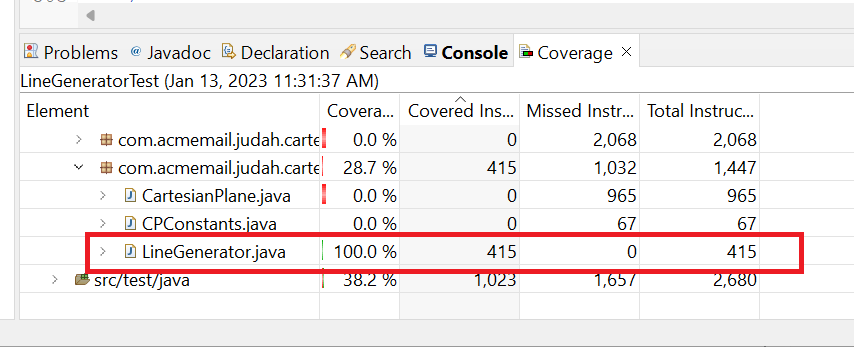
LineGeneratorTest gives us 100% code coverage on the LineGenerator class.
Summary
So, in summary, what are some of the major takeaways from this lesson?
- Unit testing is the responsibility of the developer, not the test group. Having said that, I would encourage the developer to work closely with the test group. If the developer knows what and how the test group is performing their tests, the developer might be able to make their job easier by some painless code restructuring. And the test group might very well have tools that the developer would find helpful in unit testing and/or debugging.
- Unit testing is an integral part of the development process. In fact, some strategies call for writing unit tests before writing any of the code they’re intended to validate. See:
- Test-driven development, on Wikipedia
- Test Driven Development for Java using JUnit | Quick Guide, on the Big Data Engineering website
- If a project manager asks you for a time estimate for developing a particular piece of code, your estimate should include the time it will take to develop the unit tests, which, as you can see from this lesson, can be a significant effort.
- Unit testing targets the public elements of your code. Students often ask me, “But how am I supposed to test my private methods?” My answer to that is always:
- Are you really talking about unit testing, or are you talking about debugging? If you’re debugging, you have several strategies unavailable for unit testing, including temporarily modifying the code to investigate particular aspects of the problem.
- You should be able to reach the code for all of your private methods by testing your public methods (yes, there are occasional, infrequent exceptions to this). If you can’t reach the code in your private methods via your public methods ask yourself: why is that private method there?
- JUnit is a terrific tool for developing unit tests. Use it. Study it. Read a textbook or take a tutorial more focused on JUnit than this one. See the list of recommended resources at the top of the previous page.
- Unit test code is “real” code. If your organization has coding standards, they should apply to your unit test code. Take as much care with your test code as you do with your production code; to paraphrase the punchline to the joke about getting to Carnegie Hall, encapsulate, encapsulate, encapsulate. Your unit tests should be under source control, and your unit test code has to be updated when the associated production source code is changed.