Here, we will begin testing for the PropertyManager class. Testing the PropertyManager is a big job, and we’ve divided it into two classes: PropertyManagerGetPropertyTest, which validates the PropertyManager’s facility for obtaining property values, and PropertyManagerTest, which validates everything else. On this page, we will discuss PropertyManagerGetPropertyTest. We’ll address PropertyManagerTest on a separate page.
Testing the PropertyManager’s getProperty facility is a big task with some interesting problems to overcome, particularly in manipulating environment variables*. Our strategy for dealing with the environment will involve Interprocess Communication, which we introduced on the previous page of this lesson.
*I recently became aware of a JUnit add-on that can make working with environment variables considerably easier. See JUnit Pioneer.
For additional background on the Java facilities discussed below, see:
- From the Oracle Java Help Center:
GitHub repository: Cartesian Plane Part 7b
Previous lesson: Cartesian Plane Lesson 7 Page 3, Digression: Interprocess Communication
The PropertyManagerGetPropertyTest Class
Before discussing the details of the PropertyManagerGetPropertyTest JUnit test class, let’s review the initialization procedure, where the PropertyManager discovers initial property values by interrogating the command line, environment, user configuration file, and application configuration file.
PropertyManager Initialization
Recall the hierarchy for finding initial property values:
- First, look for a -D option on the command line; if not found there,
- Look for an environment variable with the name of the property; if not found,
- Look for an initializer in the user ini file; if still not found,
- Look for an initializer in the application ini file; as a last resort,
- Use the default value from CPConstants.
To test the PropertyManager’s interaction with ini files, we will dynamically create the files as needed.
To test the PropertyManager’s interaction with the environment, we will have to modify the environment occasionally. After a process starts, Java doesn’t allow this. To get around that problem, we will use a child process, which can be started at the beginning of each @Test method. The child process can be started with any environment we like. Once it’s started, we can ask it for the value of a property, which it will obtain using PropertyManager. Then, we can compare the value returned by the child with the expected value to determine whether the PropertyManager obtained the value from the correct source.
We will use Java’s interprocess communication (IPC) facility to interact with the child process. For an introduction to IPC, see the previous page of this lesson.
⬛ The Unit Test Child Process
The child process for unit testing will be PropertyTesterApp, which I have put in the util package on the test source tree. As you examine the code below, remember that when our JUnit test process starts the child process:
- The stdin stream (System.in) is attached to an output stream in the JUnit test process (the parent process).
- The stdout stream (System.out) is attached to an input stream in the JUnit test process.
The code for the child is pretty simple. It reads a command from stdin (the unit test process); if the command is exit, it terminates; otherwise, it treats the input as a property name and attempts to get the associated value (as a string) from PropertyManager. The response from PropertyManager is written to stdout (the unit test process).
Note: To become more familiar with how this process works, run it from the command line or your IDE.
1 2 3 4 5 6 7 8 9 10 11 12 13 14 15 16 17 18 19 20 21 22 | public static void main(String[] args) { System.err.println( "child: main" ); try ( Reader reader = new InputStreamReader( System.in ); BufferedReader bufReader = new BufferedReader( reader ); ) { String propName = ""; while ( !(propName = bufReader.readLine()).equals( EXIT_COMMAND ) ) { String propValue = pMgr.asString( propName ); System.out.println( propValue ); } } catch ( IOException exc ) { exc.printStackTrace(); System.exit( EXIT_FAILURE ); } System.exit( EXIT_SUCCESS ); } |
⬛ Managing the ini Files
To perform our testing, we need control over the ini files. We will create the user’s ini file in the system’s temporary file directory (Windows and Unix/Mac both have a designated directory for storing temporary files); the Java File class has a method to do this for us. Once we’ve done so, we will extract the path to the temporary directory and put the app ini file there as well. A convenient feature of the Java File class is the ability to mark it as delete-on-exit, so the files will be automatically cleaned up once the test is over. The logic to create the files will go in a @BeforeAll method in the JUnit test class (recall that this method will be executed once, before any test method is invoked.) Creating a temporary file with the File class requires us to specify a prefix and a suffix for the file name; the part of the name between the prefix and the suffix is automatically generated and guaranteed to be unique (see the @BeforeAll method).
⏹ Child Process Access to INI Files
To validate our property initialization logic, we have to be able to force the child process to access the ini files created by the test driver. Doing this for the user ini file is easy: we determine the path to the ini file and add the appropriate -D option to the command line that starts the child process, for example: -DuserProperties=C:\Temp\CartesianPlaneTempFile2957063433Ini.tmp
Forcing the child process to work with the app ini file for testing is quite different. By default, PropertyManager uses the app ini file in the resources directory; we want it to use the ini file that we create in the temporary directory. Recall that we access the app ini file using the ClassLoader: ClassLoader loader = PropertyManager.class.getClassLoader();
InputStream inStream = loader.getResourceAsStream( appPropertiesName );
Digression:
How ClassLoader.getResourceAsStream Finds Resources
 Recall that, previously,
we went into our project build configuration
and made src/main/resources a source folder.
Recall that, previously,
we went into our project build configuration
and made src/main/resources a source folder.
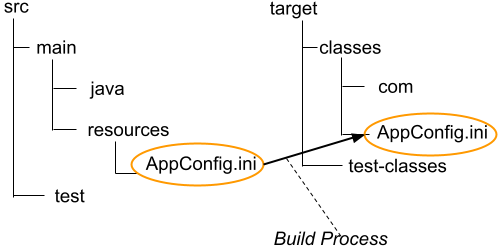 Suppose we put the file AppConfig.ini
into the directory src/main/resources
in the project root.
Because Eclipse is aware that src/main/resources is a source folder,
and AppConfig.ini is not a .java file,
during the build process
it copies the contents of the resources folder
into the project’s binary folder
(target/classes).
Now, if we look at our application’s classpath:
Suppose we put the file AppConfig.ini
into the directory src/main/resources
in the project root.
Because Eclipse is aware that src/main/resources is a source folder,
and AppConfig.ini is not a .java file,
during the build process
it copies the contents of the resources folder
into the project’s binary folder
(target/classes).
Now, if we look at our application’s classpath:
String  classPath   =
    System.getProperty( "java.class.path" );
System.out.println( classPath );
>>> projectRoot/target/classes;lib/...
We see that the target/classes directory is part of the classpath. The ClassLoader.getResourceAsStream method searches through all the directories in the classpath until it finds the file we’re looking for. If you package your project in a jar file, Eclipse will copy target/classes/AppConfig.ini into the jar file so that it gets distributed along with the rest of your code.
When you build your project, Eclipse copies your resource files into the directory that contains your classes. If you have an appProperties.ini file in your main resource directory, src/main/resources, after building you will find a copy in your project’s target/classes directory. If you examine the classpath in any of your applications, you should find that target/classes directory is in your classpath.
The getResourceAsStream method in ClassLoader looks sequentially through your classpath for the target file. So what we’ll do is create an appProperties.ini for testing and put it in the system’s temp directory (along with the user’s ini file), then add the temp directory to the beginning of the classpath that is used to start the child process (see startChildProcess below). Then, when looking for the appProperties.ini file, it will look in the temp directory, first.
⬛ The JUnit Test Class for Property Initialization, PropertyManagerGetPropertyTest
Below is a discussion of the JUnit test class for property manager initialization, beginning with the class’s infrastructure.
⏹ The Pair Nested Class
Part of our test driver will be a simple class that encapsulates a name/value pair, where name and value are both type String. The most helpful thing about it is that it overrides toString, which produces a string of the form name=value, for example: gridUnit=64
This makes it helpful for creating ini files, where every line is of the form name=value. Here is the Pair class in its entirety.
private static class Pair
{
    /** Name of the encapsulated property. */
    public final String propName;
    /** Value of the encapsulated property. */
    public final String propValue;

    /**
     * Constructor.
     *
     * @param propName      name of the encapsulated property
     * @param propValue     value of the encapsulated property
     */
    public Pair( String propName, String propValue )
    {
        this.propName = propName;
        this.propValue = propValue;
    }

    @Override
    public String toString()
    {
        StringBuilder   bldr    =
            new StringBuilder( propName )
                .append( "=" ).append( propValue );
        return bldr.toString();
    }
}
⬛ The ChildProcess Class: see below.
⬛ Fields
Following is an annotated list of PropertyManagerGetPropertyTest’s fields.
1 2 3 4 5 6 7 8 9 10 11 12 13 14 15 16 17 18 19 20 21 22 23 24 25 26 27 28 29 30 | class PropertyManagerGetPropertyTest { private static final String classPathSep = System.getProperty( "path.separator" ); private static final String userFilePrefix = "CartesianPlaneTempFile"; private static final String userFileSuffix = "Ini.tmp"; private static final String cmdIdent = "_cmd"; private static final String envIdent = "_env"; private static final String userIdent = "_user"; private static final String appIdent = "_app"; private static File userIniFile = null; private static File appIniFile = null; private static String iniDir = null; private static final long waitForTimeout = 500; private static final TimeUnit waitForTimeUnit = TimeUnit.MILLISECONDS; private static final List<Pair> allProps = new ArrayList<>(); private Process childProcess = null; private BufferedReader childStdout = null; private PrintWriter childStdin = null; .. } |
- Lines 3,4: The classpath separator for the host operating system, ‘;’ for Windows, ‘:’ for Unix.
- Lines 6-8: Prefix and suffix for the temporary file in which the user ini file will be stored.
- Lines 10-13: Property name suffixes to be used when we want to ensure a name is unique:
- Line 10: This suffix is used with properties uniquely declared on the command line. A name with this suffix is guaranteed not to appear in the environment or an ini file.
- Line 11: This suffix is used with properties uniquely declared in the environment. A name with this suffix is guaranteed not to appear on the command line or in an ini file.
- Line 12: This suffix is used with properties uniquely declared in the user ini file. A name with this suffix is guaranteed not to appear on the command line, in the app ini file, or in the environment.
- Line 13: This suffix is used with properties uniquely declared in the app ini file. A name with this suffix is guaranteed not to appear on the command line, in the user ini file, or in the environment.
- Line 15: File object to encapsulate the user’s ini file. This object is instantiated in the @BeforeAll method and never changed, but the file’s content is changed as needed by test methods.
- Line 17: File object to encapsulate the application ini file. This object is instantiated in the @BeforeAll method and never changed, but the file’s content is changed as needed by test methods.
- Line 19: The name of the directory in which the ini files are stored; initialized in the @BeforeAll method and never changed.
- Lines 21,22: The time unit and length that define the timeout period when waiting for an instance of the child process to terminate.
- Line 24: A list of all property names represented in CPConstants (except for APP_PROPERTIES_NAME; see initTestData). This list is used in test methods to choose property names to test against. See, for example, testComprehensive and testUserIniFile. Initialized in the @BeforeAll method and never changed. See also initTestData.
- Line 26: Object to encapsulate the child process used to obtain properties. It is instantiated in startChildProcess every time it is needed.
- Lines 27,28: The reader and writer attached to the child process’s stdout and stdin streams. They are instantiated in startChildProcess every time they are needed.
⬛ Helper Methods
Following is a discussion of PropertyManagerGetPropertyTest’s helper methods.
🔲 The @BeforeAll Method
The @BeforeAll method is invoked once before executing the PropertyManagerGetPropertyTest class’s first test method. It is responsible for creating the user and application ini files and initializing test data. Here is an annotated listing.
1 2 3 4 5 6 7 8 9 10 11 12 13 14 | @BeforeAll public static void beforeAll() throws IOException { userIniFile = File.createTempFile( userFilePrefix, userFileSuffix ); userIniFile.deleteOnExit(); iniDir = userIniFile.getParent(); appIniFile = new File( iniDir, CPConstants.APP_PROPERTIES_NAME ); appIniFile.deleteOnExit(); emptyFile( appIniFile ); initTestData(); } |
- Line 2: If this method encounters an I/O error, it will throw an exception, terminating the test.
- Line 4: Create the user ini file in the OS’s temporary directory. The file will have a unique name with CartesianPlaneTempFile as a prefix and Ini.tmp as a suffix, for example:
CartesianPlaneTempFile6159092748542627038Ini.tmp - Line 5: Tell Java to delete this file after the program (as encapsulated in PropertyManagerGetPropertyTest) exits. Note that if the program crashes, the file might not be deleted.
- Line 7: Get the path to the directory that contains userIniFile (this will be the OS’s temporary directory).
- Line 9: Get a file object encapsulating the path to the application ini file. Recall that we can instantiate the File whether the encapsulated path exists or not.
- Line 10: Mark the file for deletion at the end of the test.
- Line 11: Create an empty app ini file
- Line 13: Initialize the test data (below).
🔲 The @BeforeEach Method
This method is executed immediately before each test method is executed. It ensures an empty app ini file resides in the temporary directory. The listing for this method follows.
@BeforeEach
public void beforeEach()
{
    // Ensure there's an empty app ini file in the
    // temporary directory.
    emptyFile( appIniFile );
}
🔲 The @AfterEach Method
This method is executed after each test method has been completed. It performs necessary cleanup activities such as terminating the child process and closing I/O streams. The listing for this method follows.
1 2 3 4 5 6 7 8 9 | @AfterEach public void afterEach() { killChildProcess(); closeResource( childStdout ); childStdout = null; closeResource( childStdin ); childStdin = null; } |
🔲 private static void emptyFile( File file )
This method creates an empty physical file in the location designated by file. If necessary, it first deletes the target file and then creates it (note: if a file exists, the method createNewFile does nothing, so if we want to ensure that the file is empty, we must delete it first). Here’s the code.
private static void emptyFile( File file )
{
    try
    {
        if ( file.exists() )
            file.delete();
        file.createNewFile();
    }
    catch ( IOException exc )
    {
        exc.printStackTrace();
        System.exit( 1 );
    }
}
🔲 private static void initTestData()
Our tests need to start with test data formulated as name/property pairs derived from CPConstants. With one exception, this method reads all the pairs into memory for use when each test method starts. The exception is USER_PROPERTIES_PN, the property that defines the location of the user ini file; this property is sometimes defined on the command line even if we’re not testing the command line, so we don’t want it to be part of our miscellaneous test data. This method is invoked from the @BeforeAll method; you’ll recognize some of the logic from the PropertyManager constructor. Following is an annotated listing.
1 2 3 4 5 6 7 8 9 10 11 12 13 14 15 16 17 18 19 20 21 22 23 24 25 26 27 28 29 30 31 32 33 34 35 36 | private static void initTestData() { final String userPropsName = CPConstants.USER_PROPERTIES_PN; // Get all property names and their default values. for ( Field pnField : CPConstants.class.getFields() ) { String fieldName = pnField.getName(); if ( fieldName.endsWith( "_PN" ) ) { int pNameLen = fieldName.length(); String pNamePrefix = fieldName.substring( 0, pNameLen - 3 ); String dvName = pNamePrefix + "_DV"; try { Field dvField = CPConstants.class.getField( dvName ); String propName = (String)pnField.get( null ); if ( !propName.equals( userPropsName ) ) { String propDefault = (String)dvField.get( null ); allProps.add( new Pair( propName, propDefault ) ); } } catch ( NoSuchFieldException | IllegalAccessException exc ) { // These exceptions are fatal. String msg = dvName + ": field not found"; System.err.println( msg ); exc.printStackTrace(); System.exit( 1 ); } } } } |
- Line 3: Shorthand for the name of the name of the property that specifies the location of the user ini file; declared here for convenience.
- Lines 6-35: Iterate over the descriptors for all fields in CPConstants. If the name ends with _PN:
- Lines 11-18: Formulate the name of the _PN constant’s corresponding _DV constant.
- Line 18: Get the field descriptor for the _DV constant.
- Line 19: Get the value of the _PN field (the property’s name).
- Line 16: Get the value of the _DV field (the property’s default value).
- Lines 20-24: If the property is not USER_PROPERTIES_PN, create a Pair from the property name and default value, and add the pair to the list of test data.
- Lines 26-33: Exception processing for getField(String) and get(Object) (lines 18,19). It is a serious malfunction if one of these methods throws an exception; print a stack trace and exit.
🔲 private void makeUserIniFile( List<Pair> properties )
🔲 private void makeAppIniFile( List properties )
We have two methods to write content to an ini file, both very similar. They require a List<Pair> as an argument. They use try-with-resources blocks to a) create an OutputStream attached directly to a file and b) transform the OutputStream to a PrintStream which will be used to write to the file. Note that the constructor FileOutputStream(File) creates a new file; if the file already exists, it will be overwritten. If an I/O error is encountered, the test being executed will terminate with a fail(), but the test process will not be aborted. Here’s the method for initializing the user ini file. The method for initializing the app ini file is similar; it is left as an exercise for the student. The solution can be found in the GIT repository.
1 2 3 4 5 6 7 8 9 10 11 12 13 14 15 16 17 18 19 20 21 22 | private void makeUserIniFile( List<Pair> properties ) { assertNotNull( userIniFile ); assertTrue( userIniFile.exists() ); assertTrue( userIniFile.canWrite() ); try ( FileOutputStream outStream = new FileOutputStream( userIniFile ); PrintWriter writer = new PrintWriter( outStream ) ) { for ( Pair pair : properties ) writer.println( pair ); } catch ( IOException exc ) { exc.printStackTrace(); String msg = "Initialize app ini file failure: " + exc.getMessage(); fail( msg ); } } |
🔲 getPropVal(String name)
This method has two lines of code that we care about, which send a property name to the child process (childStdin.println(propName)) and get the child’s response (propVal = childStdout.readLine()). The main advantage of this method is that it encapsulates the required try/catch logic, which reduces the clutter we would otherwise have in our main test methods. It looks like this:
1 2 3 4 5 6 7 8 9 10 11 12 13 14 15 16 17 18 19 20 21 22 23 24 25 26 | /** * Given a property name, get the corresponding value * from the child process. * An IOException will cause the test to fail. * * @param propName the given property name * * @return the value corresponding to propName */ private String getPropVal( String propName ) { String propVal = null; try { childStdin.println( propName ); propVal = childStdout.readLine(); } catch ( IOException exc ) { String msg = exc.getMessage(); exc.printStackTrace(); fail( msg ); } return propVal; } |
🔲 killChildProcess()
This method sends an exit message to the child process and waits for it to terminate. We use the overload of the waitFor method that allows us to specify a maximum time to wait before we decide that something’s wrong, print an error message, and continue. The waitForTimeout argument is a long value that says how many units of time to wait, and the waitForTimeUnit argument says in what unit the timeout is defined; options include nanoseconds, milliseconds, seconds, minutes, etc. The arguments we’re passing here are defined as named constants at the top of the class: private static final long waitForTimeout = 500;
private static final TimeUnit waitForTimeUnit = TimeUnit.MILLISECONDS;
Once again, the main advantage of this method is the encapsulation of the error processing logic, which would otherwise clutter the code in the caller. Ideally, the method would look something like this:
if ( childProcess != null )
{
    childStdin.println( PropertyTesterApp.EXIT_COMMAND );
    childProcess.waitFor();
    childProcess = null;
}
But that leaves open all the questions regarding exception and error handling (refer to the listing below):
- The waitFor method potentially throws an InterruptedException, so we must add try/catch blocks (if the exception is thrown, we fail the test).
- What if childProcess is non-null, but childStdin is null? That shouldn’t happen, but we should still be prepared for it (we fail it, line 5).
- What if we tell the child process to terminate, but it fails to do so? To handle the issue, we add timeout logic (line 10); if the timeout occurs, we kill the child and fail the test (we haven’t discussed the destroyForcibly method; if you want more information, you can look it up).
1 2 3 4 5 6 7 8 9 10 11 12 13 14 15 16 17 18 19 20 21 22 23 24 25 26 27 | private void killChildProcess() { if ( childProcess != null ) { assertNotNull( childStdin ); childStdin.println( PropertyTesterApp.EXIT_COMMAND ); boolean status = false; try { status = childProcess.waitFor( waitForTimeout, waitForTimeUnit ); if ( !status ) childProcess.destroyForcibly(); childProcess = null; assertTrue( status, "Child process failed to terminate" ); } catch ( InterruptedException exc ) { String msg = "Unexpected exception while closing " + "child process"; exc.printStackTrace(); childProcess = null; fail( msg, exc ); } } } |
🔲 closeResource( AutoCloseable closeable )
This method closes a resource and handles any errors that occur. The parameter is declared AutoCloseable, so we are assured that the resource has a close() method. The closeResource method is mainly to close the connections to the child process’s stdin and stdout streams; it is called from the afterEach method. The code follows.
1 2 3 4 5 6 7 8 9 10 11 12 13 14 15 16 17 18 19 20 21 22 23 | /** * Close a given resource. * The given resource may be null, * in which case the operation is skipped. * * @param closeable the given resource; may be null. */ private void closeResource( AutoCloseable closeable ) { try { if ( closeable != null ) closeable.close(); } catch ( Exception exc ) { String className = closeable.getClass().getName(); String msg = "Unexpected error attempting to close " + className; exc.printStackTrace(); fail( msg ); } } |
The ChildProcess Class
This nested class encapsulates the child process and all interactions with the child process. It is instantiated as needed by individual test methods; there should never be more than one instance of this class. Here is a detailed look at the ChildProcess class.
⬛ Infrastructure
Following is an annotated list of the ChildProcess class’s fields.
1 2 3 4 5 6 7 8 9 10 | private class ChildProcess { private final List<Pair> cmdPairs = new ArrayList<>(); private final List<Pair> envPairs = new ArrayList<>(); private final String classPath = System.getProperty( "java.class.path" ); private final StringBuilder classPathBldr = new StringBuilder( classPath ); ... } |
- Line 3: This is a list of properties to be declared on the command line that starts the child process. Each element of this will be represented on the command line in the form -Dname=value. See also addCmdProperties.
- Line 4: This is a list of properties to be declared in the child process’s environment. See also addEnvProperties.
- Lines 5,6: The base classpath to use when starting the child process.
- Lines 7,8: StringBuilder that is used to formulate the final classpath when starting the child process. See also addClassPath.
⬛ Public Methods
Below is a description of the ChildProcess class’s public methods.
🔲 public void addCmdProperties( List pairs )
🔲 public void addEnvProperties( List pairs )
These methods add elements to the cmdPairs and envPairs lists, respectively. The code for addCmdProperties is shown below; the code for addEnvProperties is similar and is in the GitHub repository.
public void addCmdProperties( List<Pair> pairs )
{
    for ( Pair pair : pairs )
        cmdPairs.add( pair );
}
🔲 public void addClassPath( String path )
This method adds a new classpath element to classPathBldr. Here’s the code.
public void addClassPath( String path )
{
    classPathBldr.insert( 0, classPathSep );
    classPathBldr.insert( 0, path );
}
🔲 public void addUserIniOption()
This method adds to cmdPairs the option to locate the user’s ini file. Here’s the code.
public void addUserIniOption()
{
    Pair    pair    =
        new Pair( CPConstants.USER_PROPERTIES_PN,
                  userIniFile.getAbsolutePath()
                );
    cmdPairs.add( pair );
}
🔲 public void startChildProcess()
This is the method that starts the child process. If you read the previous page in this lecture, you should recognize most of it from the demos that we examined. Here’s the annotated code.
1 2 3 4 5 6 7 8 9 10 11 12 13 14 15 16 17 18 19 20 21 22 23 24 25 26 27 28 29 30 31 32 33 34 35 36 37 38 39 40 41 42 43 44 45 46 47 48 49 50 | public void startChildProcess() { assertNull( childProcess ); assertNull( childStdin ); assertNull( childStdout ); String javaHome = System.getProperty( "java.home" ); StringBuilder bldr = new StringBuilder( javaHome ); bldr.append( File.separator ).append( "bin" ) .append( File.separator ).append( "java" ); String javaBin = bldr.toString(); addClassPath( iniDir ); List<String> command = new ArrayList<>(); command.add( javaBin ); command.add( "--class-path" ); command.add( classPathBldr.toString() ); for ( Pair pair : cmdPairs ) { StringBuilder prop = new StringBuilder( "-D" ).append( pair ); command.add( prop.toString() ); } command.add( PropertyTesterApp.class.getName() ); ProcessBuilder procBldr = new ProcessBuilder(command); Map<String, String> env = procBldr.environment(); for ( Pair pair : envPairs ) env.put( pair.propName, pair.propValue ); try { childProcess = procBldr.start(); InputStream inStream = childProcess.getInputStream(); InputStreamReader inReader = new InputStreamReader( inStream ); childStdout = new BufferedReader( inReader ); OutputStream outStream = childProcess.getOutputStream(); childStdin = new PrintWriter( outStream, true ); } catch ( IOException exc ) { String msg = "Failed to create child process " + exc.getMessage(); exc.printStackTrace(); fail( msg ); } } |
- Lines 3-5: Sanity check. When startChildProcess is called, it is expected that no child process exists and no I/O streams are open.
- Lines 7-11: Create a string that resolves to the executable java file in the active JDK installation. File.separator is the OS-dependent file separator, ‘\’ on Windows, ‘/’ on Unix/Mac. After execution of line 11, javaBin should look something like this (on Windows):
C:\Program Files\Java\jdk-17\bin\java - Line 13: Add the location of the application ini file to the child process’s classpath. iniDir is initialized in the @BeforeAll method; the addClassPath method will add iniDir to the front of the classpath.
- Lines 15-18: Create a list of elements to formulate the command that will start the child process. After line 18, command should look something like this:
    [0]= "C:\Program Files\Java\jdk-17\bin\java"
    [1]= "--class-path"
[2]= [... a very long classpath string ...] - Lines 20-25: For every Pair in cmdPairs, add to the command line the option -Dname=value.
- Line 26: Add to the command line the name of the PropertyTesterApp class.
- Lines 28,29: Create a ProcessBuilder object and the Map it will use to formulate the child process’s environment.
- Lines 30,31: For every Pair in envPairs, add to the Map the entry key = pair.propName, value = pair.propValue.
- Line 34: Start the child process, assigning the subsequent Process object to childProcess; see PropertyManagerGetPropertyTest Fields.
- Lines 36-38: Connect a BufferedReader to the child process’s stdout stream.
- Lines 40,41: Connect a PrintWriter to the child process’s stdin stream.
- Lines 43-49: If an exception is thrown, fail the current test.
The Test Methods
We have several test methods in PropertyManagerGetPropertyTest, notably testComprehensive, which validates all different levels of property initialization. Arguably, this is the only test method we need. However, this method works simultaneously on so many different aspects of the PropertyManager algorithm that, if an error occurs, it may be difficult to determine the cause. So, we will also have several additional tests that validate functionality at a much finer level of granularity. Following is a list of our test methods, followed by a detailed discussion of testComprehensive and a selection of the additional tests.
testBase(): verify that the get-property algorithm works when only default values are available to the PropertyManager (no properties in the environment, in a -D option on the command line, or an ini file).
testUserIniFile(): verify that all properties can be read from the user ini file.
testAppIniFile(): verify that all properties can be read from the application ini file.
testEnv(): verify that all properties can be read from the environment.
testCmdLine(): verify that properties can be successfully declared on the command line with a -D option. In this test, only a subset of properties are utilized because declaring all properties on the command line is unrealistic.
testUserOverAppIniFile(): verify that properties defined in the user ini file are prioritized over properties defined in the app ini file.
testEnvOverIniFiles(): verify that properties defined in the environment are correctly prioritized over properties defined in the ini files.
testCmdOverEnv(): verify that properties defined on the command line are correctly prioritized over properties defined in the environment.
testComprehensive(): define some properties in the application ini file, the user ini file, the environment, and the command line; make sure some properties will be associated only with a default value. Verify that the PropertyManager finds property values according to the correct priority:
- If a property is defined on the command line, it is prioritized over a property defined by any other source;
- Else, if a property is defined in the environment, it is prioritized over a property defined by any other source;
- Else, if a property is defined in the user ini file, it is prioritized over a property defined by any other source;
- Else, if a property is defined in the app ini file, it is prioritized over a property defined by any other source;
- Else, verify that the initial value of a property is taken from the default value for that property as declared in CPConstants.
⬛ Testing Strategy
All the tests treat property values as strings. When we declare a property in a given source, its value is given a unique suffix; after retrieving a property value via the PropertyManager, we can determine its source by examining its suffix (see also PropertyManagerGetPropertyTest Fields). For example:
List<Pair>  envList     = new ArrayList<>();
List<Pair>  appList     = new ArrayList<>();
String      baseName    = CPConstants.AXIS_WEIGHT_PN;
String      baseValue   = "test value ";
appList.add( new Pair( baseName, baseValue + appIdent ) );
envList.add( new Pair( baseName, baseValue + envIdent ) );

ChildProcess    childProcess    = new ChildProcess();
childProcess.addEnvProperties( envList );
makeAppIniFile( appList );
childProcess.startChildProcess();
String      actVal      = getPropVal( baseName );
assertTrue( actVal.endsWith( envIdent ) );
⬛ Methods
Following is a discussion of selected test methods in the PropertyManagerGetPropertyTest class. The code for all test methods can be found in the GitHub repository.
🔲 public void testBase()
This method verifies that the default values of all properties can be retrieved. It reads all the properties in allProps and verifies that PropertyManager returns their default values. It looks like this:
@Test
public void testBase()
{
    // work with an empty application ini file
    // do not declare the location of the user ini file
    // put nothing in the environment
    // add nothing to the command line
    // verify that all properties map to their default values
    ChildProcess    childProcess    = new ChildProcess();
    childProcess.startChildProcess();
    for ( Pair pair : allProps )
    {
        String  name        = pair.propName;
        String  expValue    = pair.propValue;
        String  actValue    = getPropVal( name );
        assertEquals( expValue, actValue, name );
    }
}
🔲 public void testUserIniFile()
Declare all properties in the user ini file, and define the location of the user ini file on the command line. Verify that all properties map to the values declared in the ini file. Following is the annotated listing of this method.
1 2 3 4 5 6 7 8 9 10 11 12 13 14 15 16 17 18 19 20 21 22 23 24 25 26 27 | @Test public void testUserIniFile() { List<Pair> testProps = new ArrayList<>(); for ( Pair pair : allProps ) { String name = pair.propName; String value = pair.propValue + userIdent; testProps.add( new Pair( name, value ) ); } makeUserIniFile( testProps ); ChildProcess childProcess = new ChildProcess(); // add the -D option that identifies the location // of the user's ini file childProcess.addUserIniOption(); // start the child process; interrogate PropertyManager childProcess.startChildProcess(); for ( Pair pair : allProps ) { String name = pair.propName; String actVal = getPropVal( name ); assertNotNull( actVal ); assertTrue( actVal.endsWith( userIdent ), name ); } } |
- Line 4: This list will contain a Pair corresponding to every property in allProps. The property’s value will be its default value plus an identifying suffix (line 8).
- Lines 5-10: For every Pair in allProps, create a new Pair containing the name of the property and a value consisting of its default value plus an identifying suffix; add the new Pair to the list of test properties.
- Line 11: Create the user ini file.
- Line 12: Instantiate a ChildProcess object; note that this does not start the child process.
- Line 16: Add to the child process’s command line the option that declares the location of the user ini file:
-DuserProperties=C:\Temp\CartesianPlaneTempFile2957063433Ini.tmp - Line 18: Start the child process.
- Lines 20-26: For each Pair in testProps:
- Line 22: Get the name of the test property.
- Line 23: Ask the PropertyManager for the value of this property.
- lines 24,25: Verify that the PropertyManager returns the expected value (see also line 8).
🔲 public void testUserOverAppIniFile
Verify that a property declared in the user ini file is given priority over the same property declared in the application ini file. Here’s the annotated code.
1 2 3 4 5 6 7 8 9 10 11 12 13 14 15 16 17 18 19 20 21 22 23 24 25 | public void testUserOverAppIniFile() { ChildProcess childProcess = new ChildProcess(); List<Pair> testProps = new ArrayList<>(); for ( Pair pair : allProps ) { String name = pair.propName; String value = pair.propValue + userIdent; testProps.add( new Pair( name, value ) ); } makeUserIniFile( testProps ); makeAppIniFile( allProps ); childProcess.addUserIniOption(); childProcess.startChildProcess(); for ( Pair pair : testProps ) { String name = pair.propName; String actVal = getPropVal( name ); assertNotNull( actVal ); assertTrue( actVal.endsWith( userIdent ), name ); } } |
- Line 3: Create (but don’t start) the object encapsulating the child process.
- Line 5: This list will contain the name and expected value of every property under test.
- Lines 6-11: For every property in allProps create a new Pair with the name of the property and a unique value; add the new Pair to the list of properties under test.
- Line 12: Use the test properties to create the user ini file.
- Line 13: Create the application ini file using all the properties and their default values.
- Line 15: Add the command line option that identifies the location of the user ini file.
- Line 16: Start the child process.
- Lines 18-24: For every Pair in the list of test properties, get the value of the property from the PropertyManager and verify that it is correct.
🔲 public void testComprehensive()
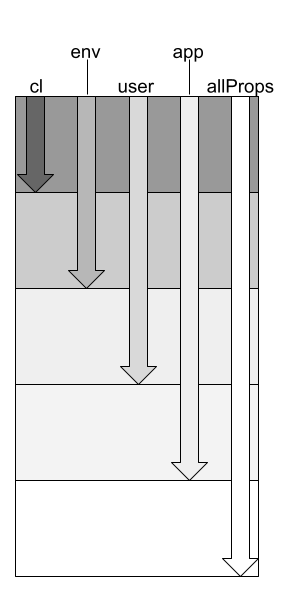
For this test, we’ll divide the properties in allProps into approximately equal-sized chunks labeled chunk 0, chunk 1, chunk 2, chunk 3, and chunk 4. We’ll declare values for the properties in the first four chunks in the application ini file and those in the first three chunks in the user ini file. At this point, every property value declared in the environment is also declared in the user ini file, but some properties are only declared in the user ini file.
Next, we’ll add property values for chunks 0 and 1 to the environment and values for chunk 0 to the command line. Properties in chunk 4 will not be declared anywhere outside of CPConstants, where they are given their default values. Now:
- Properties in chunk 0 have values declared on the command line and in the environment and ini files. If we ask the PropertyManager for the value of a property in chunk 0, it should return the value declared on the command line.
- Properties in chunk 1 have values declared in the environment and ini files, but not on the command line. If we ask the PropertyManager for the value of a property in chunk 1, it should return the value declared in the environment.
- Properties in chunk 2 have values declared in the user and application ini files, but not the environment or command line. If we ask the PropertyManager for the value of a property in chunk 2, it should return the value declared in the user ini file.
- Properties in chunk 3 have values declared in the application ini file but nowhere else other than the default values from CPConstants. If we ask the PropertyManager for the value of a property in chunk 3, it should return the value declared in the user ini file.
- If we ask the PropertyManager for the value of a property in chunk 4, it should return the default value from CPConstants.
Here’s the annotated listing for this test.
1 2 3 4 5 6 7 8 9 10 11 12 13 14 15 16 17 18 19 20 21 22 23 24 25 26 27 28 29 30 31 32 33 34 35 36 37 38 39 40 41 42 43 44 45 46 47 48 49 50 51 52 53 54 55 56 57 58 59 60 61 62 63 64 65 66 67 68 69 70 71 | @Test public void testComprehensive() { List<Pair> toAddAppIni = new ArrayList<>(); List<Pair> toAddUserIni = new ArrayList<>(); List<Pair> toAddEnv = new ArrayList<>(); List<Pair> toAddCmd = new ArrayList<>(); Map<String,String> expMap = new HashMap<>(); int chunkSize = allProps.size() / 5; int mainIndex = 0; int maxInx = 4 * chunkSize; assertTrue( allProps.size() > maxInx + 1 ); for ( int inx = 0 ; inx < maxInx ; ++inx ) { int chunk = mainIndex % chunkSize; Pair basePair = allProps.get( mainIndex++ ); String baseName = basePair.propName; String baseValue = basePair.propValue; Pair workPair = null; if ( chunk >= 0 ) { workPair = new Pair( baseName, baseValue + appIdent ); toAddUserIni.add( workPair ); } if ( chunk >= 1 ) { workPair = new Pair( baseName, baseValue + userIdent ); toAddUserIni.add( workPair ); } if ( chunk >= 2 ) { workPair = new Pair( baseName, baseValue + envIdent ); toAddEnv.add( workPair ); } if ( chunk >= 3 ) { workPair = new Pair( baseName, baseValue + cmdIdent ); toAddCmd.add( workPair ); } expMap.put( workPair.propName, workPair.propValue ); } // Remaining properties default for ( ; mainIndex < allProps.size() ; ++mainIndex ) { Pair pair = allProps.get( mainIndex ); expMap.put( pair.propName, pair.propValue ); } ChildProcess childProcess = new ChildProcess(); childProcess.addEnvProperties( toAddEnv ); childProcess.addCmdProperties( toAddCmd ); makeAppIniFile( toAddAppIni ); makeUserIniFile( toAddUserIni ); childProcess.addUserIniOption(); childProcess.startChildProcess(); for ( Entry<String,String> entry : expMap.entrySet() ) { String name = entry.getKey(); String expVal = entry.getValue(); String actVal = getPropVal( name ); assertEquals( expVal, actVal, name ); } } |
- Line 4: A list to hold all the properties to be declared in the application ini file (the first four-fifths of allProps).
- Line 5: A list to hold all the properties to be declared in the user ini file (the first three-fifths of allProps).
- Line 6: A list to hold all the properties to be declared in the environment (the first two-fifths of allProps).
- Line 7: A list to hold all the properties to be declared on the command line (the first fifth of allProps).
- Line 8: This Map will help us sort out the expected value of each property in allProps; see code beginning at line 46.
- Line 10: Compute the approximate size of each partition.
- Line 11: This is the index to use in traversing allProps.
- Line 12: Calculate the end of the fourth partition.
- Line 14: Sanity check; ensure there’s at least one property in the fifth partition.
- Line 15: For every Pair in the first four chunks of allProps:
- Line 15: Figure out which chunk we’re in.
- Lines 16-20: Get the next Pair out of allProps and divide it into a name and a value.
- Line 21: Variable for use below; see especially line 46.
- Lines 23-27: If the property is in chunks 0 – 3, add it to the list of properties to add to the application ini file. Note: if chunk < 1, the value of workPair at line 46 will be the value assigned at line 25.
- Lines 29-33: If the property is in chunks 1 – 3, add it to the list of properties to add to the user ini file. Note: if 1 ≥ chunk < 2, the value of workPair at line 46 will be the value assigned at line 31.
- Lines 35-39: If the property is in chunks 2 – 3, add it to the list of properties to add to the environment. Note: if 2 ≥ chunk < 3, the value of workPair at line 46 will be the value assigned at line 37.
- Lines 41-45: If the property is in chunk 3, add it to the list of properties to add to the command line. Note: if 3 ≥ chunk, the value of workPair at line 46 will be the value assigned at line 43.
- Line 46: For the last value assigned to workPair above, map the property name to the property value.
- Lines 50-54: Add all the Pairs in allProps chunk 4 to the map of expected values.
- Line 56: Create the object to encapsulate the child process.
- Line 57: Tell the child which properties to add to the environment.
- Line 58: Tell the child which properties to add to the command line.
- Line 59: Initialize the user ini file with the designated properties.
- Line 60: Initialize the app ini file with the designated properties.
- Line 61: Add to the child process’s command line the option that specifies the location of the user ini file.
- Line 63: Start the child process.
- Lines 64-70: Traverse the expected value map and verify that the PropertyManager returns the expected value for the given property.
Disappointing Code Coverage
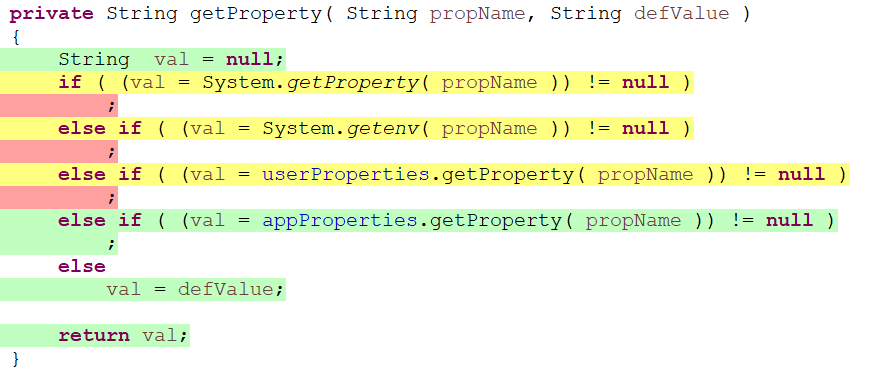
If we check the code coverage metrics, we will see we only get about 87% coverage on PropertyManager. Some of that is in the methods we have yet to test, but a lot of it is in getProperty and the property initialization logic that we tested above. Let’s review some of the places we’re missing coverage.
The getPropertyMethod
Doesn’t it seem like we spent a lot of time testing this logic in PropertyManagerGetPropertyTest? That’s because we did. However, all the code we tested was running in a subprocess, and JaCoCo didn’t record coverage metrics for it.
The PropertyManager Constructor
To test the NoSuchFieldException we would have to sneak a _PN field into CPConstants without a corresponding _DV field… or at least make PropertyManager think that we did. Also, since we’re only interrogating public fields, the IllegalAccessException will never be thrown. Unless we were somehow able to convince the code that it attempted to access a private field when, in fact, there aren’t any private fields in CPConstants.
getUserProperties
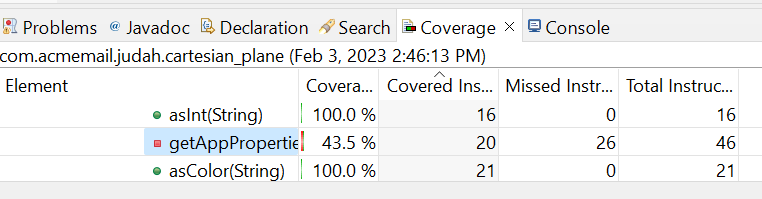
getAppProperties
All of the missing coverage in these methods is down to error processing. JaCoCo found 46 instructions in the getAppProperties method, and over half (26) are devoted to error processing. A lot of developers divide their code into working code and error processing code, and they like to think most of their time is spent on the working code. Yet we put a lot of effort into error processing; often, there is more of it, it’s more complex, harder to write, and nearly impossible to test. And when something goes wrong in the released code, it is often in the error processing logic. When programmers estimate how much time it will take to complete a task, the three places they usually underestimate are:
- Documentation
- Testing
- Error processing
As mentioned, we won’t try to improve our code coverage now. If you want a preview of how to do it, look into mocking techniques and mocking frameworks, such as Mockito. See also:
Something to Think About…
Using reflection, we automatically encapsulated setters and getters for all properties defined in CPConstants, without knowing what those properties are ahead of time. But the technique we used leaves us wishing for more. Instead of pmgr.asColor(CPConstants.GRID_LINE_WEIGHT_PN) wouldn’t it be nice if we just had a traditional getter like this one? public float getGridLineWeight()
We could have that if we wanted it. One way to do it would be to go through CPConstants by hand and write a setter and a getter for each property. But that’s not only a lot of work; it introduces dependencies that must be managed throughout the project. For example, if you change the type of a property from float to double, you have to remember to put a comment in CPConstants, and make two changes to PropertyManager (for the setter and getter). If you add a property, delete a property, or make a minor change to a property name, you have the same three changes to make.
Another way to do this would be to make a text file (or a database) describing the name, default value, and type of each property. Then, you can write a program that parses the file and, for each property, generates …_PN and …_DV declarations for CPConstants and a setter and getter for PropertyManager. Adding or removing a property, name changes, and type changes can then be managed in a single place: the text file. To make a change, you modify the text file and then run the program to regenerate all the code. It’s not that hard. The one wrinkle I can think of is how to convince your build platform (Eclipse, Maven, etc.) to recognize that the text file has changed and automatically regenerate the necessary code (this is part of the dependency management task).
Summary
On this page, we developed the JUnit test class PropertyManagerGetPropertyTest, which concentrated on testing the PropertyManager’s facility for retrieving the value of a property when the property might be defined in a hierarchy of sources. This task was made difficult because one of those sources is the environment and because Java does not allow us to modify the environment after a process is started. To circumvent this problem, our tests employed Java’s Process facility to create a child process with a command line, environment, and user and application ini files tailored to the needs of the test. When, as part of a test, we wanted to call PropertyManager.getProperty, we asked the child process to do it for us.
There remain several public methods in PropertyManager that need testing, such as addPropertyManager, asBoolean, and asFloat. We’ll put the tests for the remaining methods in the JUnit test class PropertyManagerTest, which we’ll discuss on the next page