In the previous lesson, we developed a facility for displaying a modal message dialog that can contain HTML, CSS, and hyperlinks. In this lesson, we’ll put that facility to work fashioning an About dialog.
Our About dialog will be relatively simple. We’ll have a copyright statement, a statement of the license we’re publishing under (GNU Public License V3.0), a link to the full text of the license, and a link to the GNU site that explains the license. Courtesy of the underlying MessagePane class, it will also have a Close button.
GitHub repository: Cartesian Plane Part 16
Previous lesson: Cartesian Plane Lesson 16 Page 14: Class MessagePane
Class AboutDialog
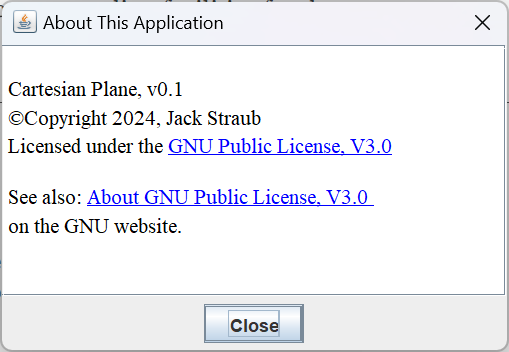
This should be a very short discussion. Our About dialog will be a MessagePane initialized from a text/html resource. It will contain a link to a text/plain resource, and a link to the GNU website. The resources reside in the MenuBarDocs subdirectory of the resources directory on the main source branch:
└──src├──main├──java
└──resources
└──MenubarDocs
├──About.html
└──gpl-3.0.txt
This class has three instance variables for storing the constituent MessagePane, the MessagePane’s dialog, and the path to the principal resource file (the file that contains the text that will be displayed every time the dialog is made visible). The instance variables are initialized during construction. It also has three class variables providing the title of the dialog, the name of the resource file, and the default path to the directory containing the resource file. The class and instance variables are listed below.
    private static final String aboutTitle  = "About This Application";
    private static final String defResDir   = "MenuBarDocs/";
    private static final String aboutFile   = "About.html";
    private final String        aboutResource;
    private final MessagePane   msgPanel;
    private final JDialog       dialog;
The main constructor allows the user to specify the owner of the dialog (most likely the application’s main JFrame) and the path to the directory containing the principal resource file:
    public AboutDialog( Window parent, String resDir )
    {
        aboutResource = resDir + "/" + aboutFile;
        msgPanel = MessagePane.ofResource( aboutResource, null );
        dialog = msgPanel.getDialog( parent, aboutTitle );
    }
For convenience there is a default constructor, which sets the owner to null and allows the resource directory path to default (to defResDir), and a constructor which let’s the user set the owner of the dialog and allows the resource directory path to default:
    public AboutDialog()
    {
        this( null,defResDir );
    }
    public AboutDialog( Window topWindow )
    {
        this( topWindow, defResDir );
    }
We have two public methods, one to set the visibility of the dialog (showDialog()), and one to obtain the dialog itself (getDialog()). The show method makes sure that the principal resource file is always loaded when the dialog is make visible:
    public void showDialog( boolean show )
    {
        if ( show )
            msgPanel.setTextFromResource( aboutResource );
        dialog.setVisible( show );
    }
    public JDialog getDialog()
    {
        return dialog;
    }
And that’s it. For an example of how to instantiate and display the About dialog, see application ShowAboutDialog in the project sandbox. It has only a few lines of code related to the dialog itself; they are shown below.
    AboutDialog about       = new AboutDialog();
    JButton     exit        = new JButton( "Exit" );
    JButton     show        = new JButton( "Show Dialog" );
    exit.addActionListener( e -> System.exit( 0 ) );
    show.addActionListener( e -> about.showDialog( true) );
Testing the About Dialog
There’s really not much here that needs testing. We’ll use a test resource to validate constructor AboutDialog( Window parent, String resDir ). As with many dialog- or frame-based facilities, we’ll need helper methods to display a dialog and to close it; and we’ll have helper methods to validate the text of the dialog when the user provides an explicit resource directory (AboutDialog( Window parent, String resDir ), again). We’ll also need an afterEach method to make sure that all dialogs are disposed after we’re done with them.
⏹ Resources
We’ll need an About.html file set up in the resources directory in the test path. We’ll use subdirectory AboutDialogTest.
└──src├──test├──java
└──resources
└──AboutDialogTest
└──About.html
⏹ Showing and Closing the Dialog
Since this is a modal dialog, we’ll need a helper method to display it in a separate thread. The thread is returned to the caller, who will eventually close the dialog and join the thread. Note that closing the dialog has been divided into two parts closeDialog which invokes closeDialogEDT on the event dispatch thread. Here’s a sketch of the three methods; the complete code can be found in the GitHub repository.
private Thread showDialog()
{
    Thread  thread  = new Thread( () ->
        GUIUtils.schedEDTAndWait( () -> about.showDialog( true ) )
    );
    thread.start();
    Utils.pause( 125 );
    return thread;
}
private void closeDialog()
{
    GUIUtils.schedEDTAndWait( () -> closeDialogEDT() );
}
private void closeDialogEDT()
{
    // pred = ComponentFinder.getButtonPredicate( "Close" );
    // dialog = about.getDialog();
    // comp = ComponentFinder.find( dialog, pred );
    // comp.doClick()
}
⏹ Text Validation
We’ll need a facility to verify that we successfully passed an explicit resource directory path to AboutDialog( Window parent, String resDir ). As when we tested MessagePane (see validateMessagePaneText) we can’t expect an exact match of the expected text with the actual text, so we’ll assert that the actual text contains the expected text. Once again we’ve divided this task into a validateText method which starts another method, validateTextEDT, on the event dispatch thread. A summary of these two methods follows; the complete code can be found in the GitHub repository.
private void validateText( String expText )
{
    GUIUtils.schedEDTAndWait( () -> validateTextEDT( expText ) );
}
private void validateTextEDT( String expText )
{
    // pred = c -> (c instanceof JEditorPane );
    // dialog  = about.getDialog();
    // comp = ComponentFinder.find( dialog, pred );
    // get the text from comp, and compare it to expText
}
⏹ Test Methods and Infrastructure
We don’t have much in the way of infrastructure for this this test. There’s an afterEach method that disposes of unnecessary dialogs, two class variables to store the path to the test resource directory and the expected text of the test resource, and an instance variable to store the AboutDialog under test. The instance variable is initialized as needed in each test method. So the entire infrastructure looks like this:
private static final String testResDir  = "AboutDialogTest";
private static final String expTestText = "AboutDialog test";
private AboutDialog about;

@AfterEach
public void afterEach() throws Exception
{
    ComponentFinder.disposeAll();
    about = null;
}
The actual test methods are pretty boring. We need one for each of the three constructors, and one each for showDialog and getDialog. Here’s the test for the default constructor. The remaining tests are left as an exercise for the student; solutions can be found in the GitHub repository.
@Test
public void testAboutDialog()
{
    about = new AboutDialog();
    Thread  thread  = showDialog();
    assertTrue( about.getDialog().isVisible() );
    closeDialog();
    Utils.join( thread );
}
Summary
On this page we used the MessagePane class as the basis for the AboutDialog class, which encapsulates the About dialog that is launched from our application menu bar. On the next page we will develop and install the application menu bar itself.