On this page, we will integrate the ProfileEditorDialog with the application menu bar. To avoid misunderstandings, by integrate, I mean write the code and test it. So, we will edit the CPMenuBar and CPMenuBarTest classes and CPMenuBarTestDialog, the support class for CPMenuBarTest.
GitHub repository: Cartesian Plane Lesson 18
Previous page: Cartesian Plane Lesson 18 Page 20: ProfileEditorDialog JUnit Test
Changes to CPMenuBar
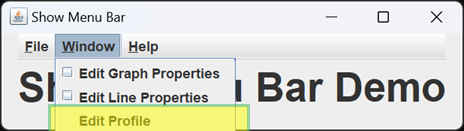
We will be adding an item to our Window menu, Edit Profile. Selecting this button will display the ProfileEditorDialog. Unlike the Graph and Line Properties dialogs, the ProfileEditor dialog is modal, so there’s no need for a check box next to its menu item to indicate that it’s posted.
⏹ New Instance Field
We will need one new field in our CPMenuBar class to hold a reference to a ProfileEditorDialog:
| Original Code | New Code |
|---|---|
private final JDialog lineDialog; private final JDialog graphDialog; private final AboutDialog aboutDialog; |
private final JDialog       lineDialog;
private final JDialog       graphDialog;
private final JDialog       profileEditorDialog;
private final AboutDialog   aboutDialog;
|
⏹ Updated Constructor
The new instance field must be initialized in our CPMenuBar constructor.
| Original Code | New Code |
|---|---|
public CPMenuBar( Window topWindow )
{
    this.topWindow = topWindow;
    lineDialog =
        LinePropertiesPanel.getDialog( topWindow );
    graphDialog =
        GraphPropertiesPanel.getDialog( topWindow );
    aboutDialog = new AboutDialog( topWindow );
    // ...
}
|
public CPMenuBar( Window topWindow )
{
    this.topWindow = topWindow;
    lineDialog =
        LinePropertiesPanel.getDialog( topWindow );
    graphDialog =
        GraphPropertiesPanel.getDialog( topWindow );
    aboutDialog = new AboutDialog( topWindow );
    profileEditorDialog =
        new ProfileEditorDialog( topWindow, new Profile() );
    // ...
}
|
⏹ Updated Helper Methods
We have no new helper methods and one updated helper method.
private JMenu getWindowMenu()
The last thing we have to do is update the method that creates the Window menu. We have to a) create a new menu item for the ProfileEditorDialog, b) add an action listener to the new menu item that will start the ProfileEditorDialog, and c) add the new menu item to the Window menu.
| Original Code | New Code |
|---|---|
private JMenu getWindowMenu()
{
    JMenu   menu    = new JMenu( "Window" );
    menu.setMnemonic( KeyEvent.VK_W );

    JCheckBoxMenuItem   graphItem   =
        new JCheckBoxMenuItem( "Edit Graph Properties", false );
    JCheckBoxMenuItem   lineItem    =
        new JCheckBoxMenuItem( "Edit Line Properties", false );
    graphItem.addItemListener( e ->
        graphDialog.setVisible( graphItem.isSelected() )
    );
    lineItem.addItemListener( e ->
        lineDialog.setVisible( lineItem.isSelected() )
    );
    lineDialog.addComponentListener( new SynchVisible( lineItem ) );
    graphDialog.addComponentListener( new SynchVisible( graphItem ) );
    menu.add( graphItem );
    menu.add( lineItem );

    return menu;
}
|
private JMenu getWindowMenu()
{
    JMenu   menu    = new JMenu( "Window" );
    menu.setMnemonic( KeyEvent.VK_W );

    JCheckBoxMenuItem   graphItem   =
        new JCheckBoxMenuItem( "Edit Graph Properties", false );
    JCheckBoxMenuItem   lineItem    =
        new JCheckBoxMenuItem( "Edit Line Properties", false );
    JMenuItem   profileItem =
        new JMenuItem( "Edit Profile" );
    graphItem.addItemListener( e ->
        graphDialog.setVisible( graphItem.isSelected() )
    );
    lineItem.addItemListener( e ->
        lineDialog.setVisible( lineItem.isSelected() )
    );
    lineDialog.addComponentListener( new SynchVisible( lineItem ) );
    graphDialog.addComponentListener( new SynchVisible( graphItem ) );
    profileItem.addActionListener(
        e -> profileEditorDialog.setVisible( true )
    );
    menu.add( graphItem );
    menu.add( lineItem );
    menu.add( profileItem );

    return menu;
}
|
⏹ Updated Public Methods
We have no new or updated public methods.
Changes to CPMenuBarTestDialog
As shown below, we must add a field to the support class to hold a reference to the ProfileEditorDialog under test and a public method to return it. We will initialize the new field in the CPMenuBarTestDialog constructor.
⏹ New Instance Field
| Original Code | New Code |
|---|---|
private final JDialog lineDialog; private final JDialog graphDialog; private final JDialog aboutDialog; |
private final JDialog       lineDialog;
private final JDialog       graphDialog;
private final JDialog       profileEditorDialog;
private final AboutDialog   aboutDialog;
|
⏹ Updated Constructor
| Original Code | New Code |
|---|---|
private CPMenuBarTestDialog()
{
    menuBar = new CPMenuBar( null );
    dialog = makeDialog();

    graphDialog = getDialog( "Graph" );
    lineDialog = getDialog( "Line" );
    aboutDialog = getDialog( "About" );
}
|
private CPMenuBarTestDialog()
{
    menuBar = new CPMenuBar( null );
    dialog = makeDialog();

    graphDialog = getDialog( "Graph" );
    lineDialog = getDialog( "Line" );
    aboutDialog = getDialog( "About" );
    profileEditorDialog =
        profileEditorDialog = getDialog( "Profile Editor" );
}
|
⏹ New Public Method
public JDialog getProfileEditorDialog()
{
    return profileEditorDialog;
}
Changes to CPMenuBarTest
The only functionality we’ve added to the menubar is the Window menu button that starts the ProfileEditorDialog. The menubar itself doesn’t interact with the dialog in any other way. The only additional tests we need are:
- Verify that the menubar’s Window menu contains the Edit Profile button.
- Verify that when we push the button, the dialog posts.
Below, we’ll discuss the changes needed to implement new testing.
⏹ New Instance Field
As shown below, we need a new instance variable which will be initialized in our Before-Each method.
public class CPMenuBarTest
{
    private CPMenuBarTestDialog tester;
    private JDialog             lineDialog;
    private JDialog             graphDialog;
    private JDialog             aboutDialog;
    private JDialog             profileEditorDialog;

    @BeforeEach
    public void beforeEach()
    {
        tester = CPMenuBarTestDialog.getTestDialog();
        lineDialog = tester.getLineDialog();
        graphDialog = tester.getGraphDialog();
        aboutDialog = tester.getAboutDialog();
        profileEditorDialog = tester.getProfileEditorDialog();
    }
    // ...
}
⏹ New Private Method
We have added a private method to CPMenuBarTest that verifies what happens when we push the menu button. It is shown below.
private void testProfileEditorDialog()
{
    JMenuItem   item    =
        tester.getMenuItem( "Window", "Edit Profile" );
    assertNotNull( item );
    tester.doClick( item );
    assertTrue( tester.isVisible( profileEditorDialog ) );
    tester.setVisible( profileEditorDialog, false );
    assertFalse( tester.isVisible( profileEditorDialog ) );
}
⏹ Modified Public Method
Now, we can modify the existing test method testWindowMenu to finish up. As shown below, we add one line of code to test the presence of the Edit Profile button in the Window menu and another to call the new helper method testProfileEditorDialog.
@Test
public void testWindowMenu()
{
    testWindowItem( "Edit Line Properties" );
    testWindowItem( "Edit Graph Properties" );
    testWindowItem( "Edit Profile" );

    testWindowDialog( "Edit Line Properties", lineDialog );
    testWindowDialog( "Edit Graph Properties", graphDialog );
    testProfileEditorDialog();
}
Summary
Above, we added a button to the application menubar that displays the modal ProfileEditorDialog. Then, we modified the menubar’s JUnit test class to validate the new functionality.
This concludes the implementation and testing of the Cartesian Plane application. On the next page, we’ll review our efforts and discuss where and how they might be improved.