In this lesson we will add more capability to the input package of our Cartesian plane project, including:
- A new implementation of the Equation interface using the Java Expression Parser (JEP) library, giving us a little more insight into the distinction between interface and implementation.
- An implementation of a set of custom functions for common operations such as converting degrees to radians, and calculation of cosecant and cotangent. This will be accomplished, in part, through the use of reflection.
- Introduction of the EquationMap class, giving our users the ability to load a set of saved equations into memory, and select one from a list. This will require more work with dialogs.
This page contains a discussion of the code to implement the above functionality. A discussion of testing for the code is found on the next page: Cartesian Plane Lesson 13: More Extensions, Testing.
GitHub repository: Cartesian Plane Part 13
Previous lesson: Cartesian Plane Lesson 12: GUI Beginnings
Introduction to the Java Expression Parser
■ Programming with JEP
To use JEP you must download it, and add it to your classpath. There are two ways to do this:
- If you are using Maven: add the following dependency to your pom.xml file:
<!-- https://mvnrepository.com/artifact/org.scijava/jep --><dependency>
<groupId>org.sci.java</groupId>
<artifactId>jep</artifactId>
<version>2.4.2</version>
</dependency>
In Eclipse, refresh your project (file->refresh), make sure project->Build Automatically is checked, and select project->clean. - Direct download: Download and open the latest Zip or Tar archive from the JEP download page. You should already have a directory for storing libraries, probably named lib. Copy the jep… jar file from the archive into this directory. If you wish you can now delete the archive. To add the jar file to your classpath, go to Eclipse, right click on your project name and select Build Path -> Configure Build Path. On the libraries tab, select Classpath, and push the Add External Jars button. Locate and select the JEP jar file.
The program Demo1JEPBasics in the project package jep_sandbox provides a simple example of parsing and evaluating an expression in JEP. Here’s the source code, followed by some notes:
1 2 3 4 5 6 7 8 9 10 11 12 13 14 15 16 | public class Demo1JEPBasics { public static void main(String[] args) { String str = "a * cos(t) + h"; JEP xExpr = new JEP(); xExpr.addStandardConstants(); xExpr.addStandardFunctions(); xExpr.setImplicitMul( true ); xExpr.addVariable( "a", 1.5 ); xExpr.addVariable( "h", -1 ); xExpr.addVariable( "t", Math.PI ); xExpr.parseExpression( str ); System.out.println( xExpr.getValue() ); } } |
- Line 5: This is the expression to be parsed; a, t and h are variables that will have to be declared to the JEP facility. The cos function is the JEP builtin function for computing cosines; to use it, builtin functions have to be enabled in the JEP object (see line 8).
- Line 6: Instantiates a JEP object.
- Line 7: Enables the standard constants, e and pi.
- Line 8: Enables the builtin functions.
- Line 9: Enables implicit multiplication (e.g. “3a” is interpreted as 3 * a).
- Lines 10-12: Declares the variables and gives them initial values. The addVariable method is also used to change the value of an existing variable.
- Line 13: Parses the given expression.
- Line 14: Uses the getValue method to evaluate the expression, and obtain the result.
■ JEP Compared to Exp4j
The Java Expression Parser (JEP) does the same job as Exp4j, and as a result they work very similarly. Naturally there are going to be differences, but the only major difference is that JEP can handle complex numbers but Exp4j cannot. For us, the most valuable thing about JEP is that it gives us a chance to see how to build an alternative implementation for the Equation interface. Let’s start with a comparison of how to parse and evaluate the same expression in Exp4j and JEP.
// EXP4J
String     str   = "a cos(t) + h";
Expression xExpr =
    new ExpressionBuilder( str )
    .variables( "a", "t", "h" )
    .build();
xExpr.setVariable( "a", 1.5 );
xExpr.setVariable( "h", -1 );
xExpr.setVariable( "t", Math.PI );
System.out.println(xExpr.evaluate());
// JEP
String str = "a cos(t) + h";
JEP xExpr = new JEP();
xExpr.addStandardConstants();
xExpr.addStandardFunctions();
xExpr.setImplicitMul( true );
xExpr.addVariable( "a", 1.5 );
xExpr.addVariable( "h", -1 );
xExpr.addVariable( "t", Math.PI );
xExpr.parseExpression( str );
System.out.println(xExpr.getValue());As you can see, there a couple of differences between the two libraries:
- Standard constants (e, π)
- Exp4j: are available by default
- JEP: have to be explicitly enabled
- Builtin functions:
- Exp4j: are available by default
- JEP: have to be explicitly enabled
- Implicit multiplication:
- Exp4j: is enabled by default
- JEP: has to be explicitly enabled
Another couple of differences:
- Implicit multiplication:
Exp4j recognizes “3ab” as 3 * a * b. JEP sees “3ab” as 3 times the variable ab. In either library you can write 3 * a * b by putting a space between a and b: 3a b - Builtin logarithm functions:
- Exp4j
- log: natural logarithm
- log10: logarithm base 10
- log2: logarithm base 2
- JEP
- ln: natural logarithm
- log: logarithm base 10
- Exp4j
- Builtin constants:
Exp4j has a constant for phi (Φ), the golden ratio; JEP does not. - Complex numbers:
- Not supported by Exp4j
- Supported by JEP
■ Iterating Over a Range
Evaluating an expression over a range of values is not substantially different between JEP and Exp4j. Demo4JEPIteration, prints the results of iterating over a range; Demo5Point2D demonstrates iterating over a range to produce a stream of Cartesian coordinates. For comparison, see Demo4Exp4jIteration. All of these programs can be found in the package jep_sandbox.
1 2 3 4 5 6 7 8 9 10 11 12 13 14 15 16 17 | public class Demo4JEPIteration { public static void main(String[] args) { JEP parser = new JEP(); parser.addStandardConstants(); parser.addStandardFunctions(); parser.setImplicitMul( true ); parser.addVariable( "x", 0 ); parser.parseExpression( "2x" ); DoubleStream.iterate( -3, d -> d <= 3, d -> d = d + .1 ) .peek( d -> parser.addVariable( "x", d ) ) .map( d -> parser.getValue() ) .forEach( System.out::println ); } } |
1 2 3 4 5 6 7 8 9 10 11 12 13 14 15 16 17 | public class Demo5Point2D { public static void main(String[] args) { JEP parser = new JEP(); parser.addStandardConstants(); parser.addStandardFunctions(); parser.setImplicitMul( true ); parser.addVariable( "x", 0 ); parser.parseExpression( "2x" ); DoubleStream.iterate( -3, d -> d <= 3, d -> d + .1 ) .peek( d -> parser.addVariable( "x", d ) ) .mapToObj( d -> new Point2D.Double( d, parser.getValue() ) ) .forEach( System.out::println ); } } |
Demo2JEPEllipse demonstrates iterating over a range to plot an ellipse using our CartesianPlane class. A parametric equation is employed. Compare this program to Demo2Exp4jEllipse which does the same thing using Exp4j.
1 2 3 4 5 6 7 8 9 10 11 12 13 14 15 16 17 18 19 20 21 22 23 24 25 26 27 28 29 30 31 32 33 34 35 36 37 38 39 40 41 42 43 44 45 46 | public class Demo2JEPEllipse { private static final CartesianPlane plane = new CartesianPlane(); private static final Root root = new Root( plane ); public static void main(String[] args) { root.start(); plane.setStreamSupplier( Demo2JEPEllipse::getEllipse ); plane.repaint(); } private static Stream<PlotCommand> getEllipse() { JEP xExpr = new JEP(); xExpr.addStandardConstants(); xExpr.addStandardFunctions(); xExpr.setImplicitMul( true ); xExpr.addVariable( "a", 1.5 ); xExpr.addVariable( "h", -1 ); xExpr.addVariable( "t", 0 ); xExpr.parseExpression( "a cos(t) + h" ); JEP yExpr = new JEP(); yExpr.addStandardConstants(); yExpr.addStandardFunctions(); yExpr.setImplicitMul( true ); yExpr.addVariable( "b", .5 ); yExpr.addVariable( "k", 1 ); yExpr.addVariable( "t", 0 ); yExpr.parseExpression( "b sin(t) + k" ); Stream<PlotCommand> stream = DoubleStream.iterate( 0, d -> d <= 2 * Math.PI, d -> d + .001 ) .peek( d -> xExpr.addVariable( "t", d ) ) .peek( d -> yExpr.addVariable( "t", d ) ) .mapToObj( d -> new Point2D.Double( xExpr.getValue(), yExpr.getValue() )) .peek( System.out::println ) .map( p -> PlotPointCommand.of( p, plane ) ); return stream; } } |
■ Validating a Parsing Operation
After parsing an expression, use JEP.hasError() to determine if the operation is a success. If this method returns true, JEP.getErrorInfo() will supply details. Here’s an example from the jep_sandbox package:
1 2 3 4 5 6 7 8 9 10 11 12 13 14 15 16 17 18 19 20 21 22 23 24 25 26 27 28 29 | public class Demo7ParametricPlot { public static void main(String[] args) { CartesianPlane plane = new CartesianPlane(); Root root = new Root( plane ); root.start(); JEP roseExpX = new JEP(); // ... roseExpX.parseExpression( "a sin(n t) cos(t)" ); JEP roseExpY = new JEP(); // ... roseExpY.parseExpression( "a sin(n t) sin(t)" ); if ( roseExpX.hasError() || roseExpY.hasError() ) { if ( roseExpX.hasError() ) System.out.println( "x: " + roseExpX.getErrorInfo() ); if ( roseExpX.hasError() ) System.out.println( "y: " + roseExpY.getErrorInfo() ); System.exit( 1 ); } plane.setStreamSupplier( () -> // ... } } |
■ Custom Functions
JEP supports custom functions. Here’s an example of one:
1 2 3 4 5 6 7 8 9 10 11 12 13 14 15 16 17 18 19 20 21 22 23 24 25 26 27 28 29 30 | public class CustomFunctionDemo1ToDegrees extends PostfixMathCommand { public CustomFunctionDemo1ToDegrees() { numberOfParameters = 1; } @SuppressWarnings({ "rawtypes", "unchecked" }) @Override public void run( Stack stack ) throws ParseException { checkStack( stack ); Object oRadians = stack.pop(); if ( !(oRadians instanceof Double) ) { String message = "To degrees: invalid argument type (" + oRadians.getClass().getName() + ")"; throw new ParseException( message ); } double radians = (double)oRadians; double degrees = radians * 180 / Math.PI; stack.push( degrees ); } // ... } |
To write your own custom function in JEP:
- Create a subclass of PostfixMathCommand (lines 1-2 of example, above).
- Write a constructor that establishes the number of arguments the function requires (lines 4-7 of example, above); numberOfParameters is a protected instance variable in the PostfixMathCommand class.
- Override the run( Stack stack ) method, which must declare that it throws ParseException (lines 9-28 of example, above). This method derives and returns the value of the function from the given arguments. Within the run method:
- Ideally, Stack (line 11) would be declared with a type parameter, for example Stack<Double>. However it’s not declared that way in the superclass, so there’s nothing we can do about it. This results in warnings from the compiler, which we can suppress with the @SuppressWarnings tag (line 9).
- We need to validate the stack using checkStack, an instance method in the superclass (line 14).
- JEP uses the stack for both input and output. Upon invocation, all the parameters we need are piled up on the stack, and they all need to be popped off (line 15). When we return, the value of the function needs to be pushed onto the stack (line 27).
- When we pop an argument off the stack, we should verify that it is the correct type (line 37); if it’s not, we throw a parseException (lines 18-22).
- The objects popped off the stack must be cast to the correct type, and the result computed (lines 25-26).
If you want to use a function in an expression, it has to be added to your JEP object using the addFunction( String name, PostfixMathCommand function) method. Following is an example (from the bottom of CustomFunctionDemo1ToDegrees):
JEP xExpr = new JEP();
xExpr.addStandardConstants();
xExpr.addStandardFunctions();
xExpr.setImplicitMul( true );
xExpr.addFunction( "toDegrees", new CustomFunctionDemo1ToDegrees() );
xExpr.parseExpression( "toDegrees( pi / 2 )" );
System.out.println( xExpr.getValue() );
■ Custom Functions with a Fixed Number of Parameters
The above example showed how to write a JEP custom function with a single parameter. You can write a function with any fixed number of parameters by following the pattern shown in the example. The only difference is that all your parameters will be on the stack, and you have to be sure to pop them all off before calculating and pushing your result…
… and you have to pop them off in the right order. Suppose I have an expression that looks like this: funk( 1, 2, 3 )
In the run method of your custom function you will need three pops; but does the first pop get the “1” or the “3”?
    Object objA = stack.pop(); // "1" or "3"?
    Object objB = stack.pop();
    Object objC = stack.pop(); // "1" or "3"

The answer depends on what calling convention JEP follows: left-to-right or right-to-left. If it goes right-to-left, then the last thing JEP pushes onto the stack will be “1”, hence the first thing you pop off will be “1”. It turns out, however, that JEP works left-to-right, therefor the last thing it pushes onto the stack, and the first thing you pop off the stack will be “3”. This doesn’t matter if you’re performing an operation like multiplication, but if you’re doing exponentiation or division you have to be sure to get the order right. The program CustomFunctionDemo5StackOrder1 from the jep_sandbox package demonstrates the correct way to order parameters in a binary function.
Digression: a stack is also called a LIFO queue, where LIFO stands for last-in, first-out; in other words, items come off the stack in the reverse order that you put them on. For a more thorough discussion of stacks, see Concepts of Stack in Data Structure, on the W3Schools web site.
1 2 3 4 5 6 7 8 9 10 11 12 13 14 15 16 17 18 19 20 21 22 23 24 25 26 27 28 29 30 31 32 33 34 35 36 37 38 39 40 41 42 43 44 45 46 47 48 49 50 51 52 53 54 55 56 57 | public class CustomFunctionDemo5StackOrder1 { public static void main(String[] args) { try { JEP expr = new JEP(); expr.addStandardConstants(); expr.addStandardFunctions(); expr.setImplicitMul( true ); expr.addFunction( "leg", new Leg() ); expr.addVariable( "h", 5 ); expr.addVariable( "l", 4 ); expr.parseExpression( "leg( h, l )" ); double leg2 = expr.getValue(); System.out.println( "leg2 = " + leg2 ); } catch ( Exception exc ) { exc.printStackTrace(); } } public static class Leg extends PostfixMathCommand { public Leg() { numberOfParameters = 2; } @SuppressWarnings({ "unchecked", "rawtypes" }) @Override public void run(Stack stack) throws ParseException { checkStack( stack ); // JEP processes function arguments from left-to-right. // Given "leg( hypot, leg1 )" first "hypot" will be pushed // and then "leg1". So the first thing popped will // be "leg1". Object oLeg1 = stack.pop(); Object oHypot = stack.pop(); if ( !(oHypot instanceof Double) || !(oLeg1 instanceof Double ) ) { String message = "hypot: invalid argument type"; throw new ParseException( message ); } double hypot = (Double)oHypot; double leg1 = (Double)oLeg1; double diffSq = (hypot * hypot) - (leg1 * leg1); double leg2 = Math.sqrt( diffSq ); stack.push( leg2 ); } } } |
■ Custom Functions with a Variable Number of Parameters
You can also have custom functions with a variable number of parameters. In the constructor of your implementation, set numberOfParameters to -1. In the run method use the variable curNumberOfParameters to figure out how many parameters are on the stack. The program CustomFunctionDemo2Varargs in the jep_sandbox package demonstrates an example of this.
Important note: the variable curNumberOfParameters is only used when you have a variable number of arguments; that is, when numberOfParameters is -1. See also JEPAbstractFunction, below.
1 2 3 4 5 6 7 8 9 10 11 12 13 14 15 16 17 18 19 20 21 22 | public static class Average extends PostfixMathCommand { public Average() { numberOfParameters = -1; } @SuppressWarnings({ "unchecked", "rawtypes" }) @Override public void run(Stack stack) throws ParseException, ClassCastException { checkStack( stack ); if ( curNumberOfParameters < 1 ) throw new ParseException( "No parameters passed" ); double avg = 0; for ( int inx = 0 ; inx < curNumberOfParameters ; ++inx ) avg += (Double)stack.pop(); avg /= curNumberOfParameters; stack.push( avg ); } } |
■ Complex Numbers
I don’t want to go into too much detail on this topic, and I have no plans to add complex numbers to our Input package. But for the sake of completeness we’ll have a quick look at it. The following discussion assumes that you are familiar with complex numbers. If you’re not, you can just skip this section of the notes, or look at the article Complex Numbers on the Math Is Fun website.
To work with complex numbers in JEP you have to be familiar with the following facilities:
- The Complex class (from the JEP library).
- The JEP
.addComplex()method. This method is in the same family as JEP.addStandardFunctions(); it enables complex number evaluation in JEP. - The JEP.addVariable overload that takes two double arguments, for the real and imaginary parts of a complex value: addVariable
(String name, double real, double imaginary)*. - The JEP.getComplexValue() method. Use this method instead of getValue() when you’re working with complex numbers.
*Note: the JEP documentation includes a description of addComplexVariable( String, double, double), but this seems to be a mistake. It also fails to document the addVariable(String, double, double) overload, but this seems to be an omission.
To support plotting with the CartesianPlane class, I have written a version of the Polar class which converts between the “usual” complex notation, (a + bi), and polar notation. This is pretty simple, since the complex number (a + bi) is generally represented using the Cartesian coordinate pair (a,b). So converting between these types of coordinates is just an extension of converting between polar and Cartesian coordinates. This class is in the jep_sandbox package.
Here is a simple example, from the jep_sandbox package, of parsing and evaluating a complex expression.
1 2 3 4 5 6 7 8 9 10 11 12 13 14 15 16 17 18 | public class DemoComplex1 { public static void main(String[] args) { JEP parser = new JEP(); parser.addStandardConstants(); parser.addStandardFunctions(); parser.addComplex(); parser.setImplicitMul( true ); parser.addVariable( "x", 0, 1 ); parser.parseExpression( "e^(i pi) + 1" ); if ( !parser.hasError() ) System.out.println( parser.getComplexValue() ); else System.out.println( parser.getErrorInfo() ); } } |
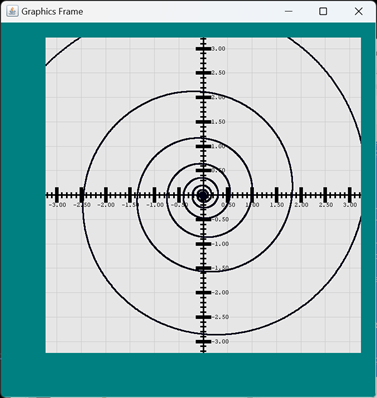
And this is an example of using JEP to plot the equation ez, where z is a complex number of the form (a + bi).
1 2 3 4 5 6 7 8 9 10 11 12 13 14 15 16 17 18 19 20 21 22 23 | public class PlotEHatZ1 { /** Euler's number, expressed in a complex format. */ private static final Complex ezed = new Complex( Math.E, 0 ); public static void main(String[] args) { CartesianPlane plane = new CartesianPlane(); Root root = new Root( plane ); root.start(); double rco = 0; double ico = 0; double xier = 10.5; plane.setStreamSupplier( () -> DoubleStream.iterate( -4, d -> d <= 8, d -> d + .0005 ) .mapToObj( d -> new Complex( rco + d, ico + d * xier ) ) .map( ezed::power ) .map( z -> new Point2D.Double( z.re(), z.im() ) ) .map( p -> PlotPointCommand.of( p, plane ) ) ); } } |
Plot of ez where z is a complex number of the form (a + bi).
JEP Implementation of the Equation Interface: class JEPEquation
JEP and Exp4j maintain essentially the same data. As a result, many methods in the JEP implementation can pretty much be copied from the Exp4j implementation. Let’s start by comparing our state variables for the Exp4j implementation, to the state variables that we´ll use for the JEP implementation.
// Exp4jEquation.java
private final Map<...> vars   =
    new HashMap<>();
private String       name     = "";
private double       rStart   = -1;
private double       rEnd     = 1;
private double       rStep    = .05;
private String       xExprStr = "1";
private String       yExprStr = "1";
private String       tExprStr = "1";
private String       rExprStr = "1";
private String       param    = "t";
private String       radius   = "r";
private String       theta    = "t";
private Expression   xExpr    = null;
private Expression   yExpr    = null;
private Expression   tExpr    = null;
private Expression   rExpr    = null;
// JEPEquation.java
private final Map<...> vars =
new HashMap<>();
private String name = "";
private double rStart = -1;
private double rEnd = 1;
private double rStep = .05;
private String xExprStr = "1";
private String yExprStr = "1";
private String tExprStr = "1";
private String rExprStr = "1";
private String param = "t";
private String radius = "r";
private String theta = "t";
private JEP xExpr = null;
private JEP yExpr = null;
private JEP tExpr = null;
private JEP rExpr = null;As you can see, the only difference in the states of the two implementations is in the type of the variable that encapsulates the expression itself (Expression vs. JEP). Likewise, the differences in the implementation of the interface’s abstract methods are likely to occur mainly where these variables are impacted. Below is a list of the methods in the two implementations that are essentially the same, and those that are going to require special attention.
Methods with littler or no differences:
- void setName( String name );
- String getName();
- void setVar(String name, double val);
- Optional<Double>
getVar(String name); - void removeVar(String name);
- Map getVars();
- String getXExpression();
- String getYExpression();
- String getTExpression();
- String getRExpression();
- String getParam();
- void setParam(String param);
- String getRadiusName();
- void setRadiusName(String radius);
- String getThetaName();
- void setThetaName(String theta);
- void setRange(double start,
double end, double step); - void setRangeStart(double rangeStart);
- double getRangeStart();
- void setRangeEnd(double rangeEnd);
- double getRangeEnd();
- void setRangeStep(double rangeStep);
Methods requiring special attention:
- Equation newEquation();
- Result setXExpression(String exprStr);
- Result setYExpression(String exprStr);
- Result setTExpression(String exprStr);
- Result setRExpression(String exprStr);
- boolean isValidName( String name );
- boolean isValidValue( String valStr );
- Optional evaluate( String exprStr );
- Stream<Point2D> yPlot();
- Stream<Point2D> yxPlot();
- Stream<Point2D> tPlot();
- Stream<Point2D> rPlot();
Given the above lists, I would say the work of implementing JEPEquation is largely done already in Exp4jEquation. Even the more difficult methods in the right-hand column are going to use the same implementation strategy, and will differ only in the way that the expression objects are addressed (see JEP Compared to Exp4j, above). I’m not going to bother discussing the implementation of the methods in the left-hand column; if you wish, you can find them in the GitHub repository. Let’s have a look at the helper methods and constructors, then move on to the methods in the right-hand column.
■ private void init()
■ private JEP newParser()
You might recognize the init method from the Exp4jEquation class. It provides a common set of initializers for use in the constructors. The newParser method is unique to JEP; it encapsulates the extra steps (e.g. addStandardConstants()) needed to initialize a JEP object.
private void init()
{
    vars.put( "x",  0. );
    vars.put( "y",  0. );
    vars.put( "a",  0. );
    vars.put( "b",  0. );
    vars.put( "c",  0. );
    vars.put( "r",  0. );
    vars.put( "t",  0. );
    setXExpression( xExprStr );
    setYExpression( yExprStr );
    setTExpression( tExprStr );
    setRExpression( rExprStr );
}
private JEP newParser()
{
JEP parser = new JEP();
parser.addStandardConstants();
parser.addStandardFunctions();
parser.setImplicitMul( true );
updateVars( parser );
return parser;
}■ private void updateVars( JEP parser )
This is a convenience method to add all the variables from the variable map to a new expression object.
private void updateVars( JEP parser )
{
    vars.forEach( (s,d) -> parser.addVariable( s,  d ) );
}
■ private static boolean isAlpha( char ccc )
Determines whether the given character is alphabetic.
■ private static boolean isAlphanumeric( int ccc )
Determines whether the given character is alphanumeric.
The above two methods are the same as those in the Exp4j implementation. They are used to validate variable names. They need no additional discussion.
■ private Result validateExpr( String exprStr, Consumer<String> strDest, Consumer<JEP> destination )
This method validates an expression. If valid, it creates a JEP object and stores it at the given destination. It is used in the setX-, setY-,setR- and setTExpression methods. This implementation is roughly equivalent to the same method in Exp4jEquation, but I added the strDest parameter to make it a bit more flexible. This parameter specifies where to store the string representation of the expression (if the expression is valid).
private Result validateExpr(
    String exprStr,
    Consumer<String> strDest,
    Consumer<JEP> objDest
)
{
    Result  result  = null;
    JEP parser  = newParser();
    parser.parseExpression( exprStr );
    if ( parser.hasError() )
        result = new Result( false, List.of( parser.getErrorInfo() ) );
    else
    {
        result = new Result( true, null );
        objDest.accept( parser );
        strDest.accept( exprStr );
    }
    return result;
}
■ Constructors
This class will have three constructors that initialize the instantiated equation in helpful ways. They have direct parallels in the Exp4jEquation class.
// Default constructor.
public JEPEquation()
{
    init();
}

// Initializes the y-expression the given value.
public JEPEquation( String yExpression )
{
    init();
    setYExpression( yExpression );
}

// Initializes the y-expression the to given value, and adds the
// given variable declarations to this equation
public JEPEquation( Map<String,Double> vars, String yExpression )
{
    init();
    this.vars.putAll( vars );
    setYExpression( yExpression );
}
■ public Equation newEquation()
Creates a new JEPEquation object.
public Equation newEquation()
{
    return new JEPEquation();
}
■ public Result setXExpression(String exprStr)
■ public Result setYExpression(String exprStr)
■ public Result setRExpression(String exprStr)
■ public Result setTExpression(String exprStr)
Each method validates and, if valid, translates the given expression string into an x-, y-, r- or t-expression. If not valid, returns a descriptive result. Here´s the code for setXExpression; the implementation of the other three methods is directly analogous.
public Result setXExpression(String exprStr)
{
    Result    result  =
        validateExpr( exprStr, s -> xExprStr = s, e -> xExpr = e );
    return result;
}
See also: Cartesian Plane Lesson 13: More Extensions, Testing: JEPEquation
Equation Map
In the last lesson we developed the ability to save an equation in a file, and to read it back later. What we want to do now is be able to load a set of equations into memory, then give the operator the opportunity to select one from a dialog. We will encapsulate this logic in the EquationMap class. This class will implement a mapping between an equation and its name.
We will assume that equation files can be organized into directories. The EquationMap should be able to load a single equation file into memory, or recursively search through a directory and load all the equation files it finds. In conjunction with this, we will add two new commands to the Command enum:
- LOAD optional argument
This command will load equation files into memory. If the optional argument is present, it will be treated as a path to a file to be loaded, or a directory to be searched. If the argument is not present, we’ll display a JFileChooser dialog and allow the operator to choose a file or directory. - SELECT optional argument
This command will select an equation from a map. If the optional argument is present, it will be treated as the name of an equation, and we’ll attempt to find the equation in the map. If the argument is not present, we’ll display an ItemSelectionDialog containing the names of all the equations in the map, and allow the operator to select one.
For the record, here’s the code from Command.java:
// ...
EXIT(
    "Application specific; probably "
    + "\"Exit from the current operation\""
),
/** Load one or more named equations into the EquationMap */
LOAD( "Load one or more equations into memory" ),
/** Select an equation from the EquationMap. */
SELECT( "Select an equation from a list" ),
/** Open a file. */
OPEN( "Application specific; probably \"open equation file\""),
// ...
The public methods providing access to the equation map will be:
- public static void init()
Restores the equation map to its initial, empty state. - public static boolean isEquationFile( File file )
Returns true if a file contains a named equation (more details, below). - public static void parseEquationFile( File file )
Loads the equation from the given file into the map. - public void parseEquationFiles()
Allows the operator to select a file or directory to be loaded. - public static void parseEquationFiles( File dir )
The argument is assumed to be a directory, which is recursively searched for equation files, which are subsequently loaded into the map. - public static Equation getEquation( String name )
Returns the equation with the given name. - public static Equation getEquation()
Displays a list of all loaded equations, and allows the operator to choose one. - public static Map<String,Equation> getEquationMap()
Returns a non-modifiable copy of the current equation map.
🟫 Class Variables
This class has two class variables, a Map<String,Equation>, which maps the name of an equation to the equation itself, and a JFileChooser. The file chooser is initialized in a static initialization block. Note that we had to set the file selection mode. By default, the file chooser won’t allow approval until the operator selects a regular file; we want to allow the user to select a regular file or a directory.
private static final JFileChooser   chooser;
private static final Map<String,Equation>   equationMap = new HashMap<>();

static
{
    String  userDir = System.getProperty( "user.dir" );
    File    baseDir = new File( userDir );
    chooser = new JFileChooser( baseDir );
    chooser.setFileSelectionMode( JFileChooser.FILES_AND_DIRECTORIES );
}
🟫 public static void init()
Implementation of this method is simply a matter of clearing equationMap:
public static void init()
{
    equationMap.clear();
}
🟫 public static boolean isEquationFile( File file )
Returns true if the given file is an equation file; the criteria for making this decision are:
- The file exists;
- It is a regular file (i.e., not a directory);
- It is readable;
- It can be accessed as a text file; and
- Its first non-blank, non-comment line designates a named equation, for example:
EQUATION parametricEllipse
The implementation of this method follows.
1 2 3 4 5 6 7 8 9 10 11 12 13 14 15 16 17 18 19 20 21 22 23 24 25 26 | public static boolean isEquationFile( File file ) { boolean isEquationFile = false; if ( file.exists() && file.canRead() && !file.isDirectory() ) { try ( FileReader fileReader = new FileReader( file ); BufferedReader bufReader = new BufferedReader( fileReader ); ) { CommandReader reader = new CommandReader( bufReader ); ParsedCommand command = reader.nextCommand( null ); if ( command.getCommand() == Command.EQUATION && !command.getArgString().isEmpty() ) isEquationFile = true; } catch ( IOException exc ) { String fmt = "Error reading file \"%s\": %s%n"; System.err.printf( fmt, file.getName(), exc.getMessage() ); } } return isEquationFile; } |
🟫 public static void parseEquationFile( File file )
Attempts to open and read the given file. If successful the equation is added to the map, otherwise it is silently ignored. The method is fairly short; most of the work is done by the FileManager class.
public static void parseEquationFile( File file )
{
    Equation    equation    = FileManager.open( file );
    if ( equation != null )
    {
        String  name    = equation.getName();
        if ( name != null && !name.isEmpty() )
            equationMap.put( name, equation );
    }
}
🟫 public void parseEquationFiles( File dir )
The given argument is assumed to be a directory. Every file in the directory is examined to see if it is an equation file and, if it is, it is read and added to the name/equation map. If the directory contains subdirectories, they are searched recursively.
public static void parseEquationFiles( File dir )
{
    File[]  fileList    = dir.listFiles();
    if ( fileList != null )
    {
        for ( File file : fileList )
        {
            if ( file.isDirectory() )
                parseEquationFiles( file );
            else if ( isEquationFile( file ) )
                parseEquationFile( file );
            else
                ;
        }
    }
}
🟫 public void parseEquationFiles()
Display a JFileChooser dialog, giving the operator the option to select a file or directory. If the operator selects a regular file, it is processed via parseEquationFile( File file ), if the operator selects a directory, it is processed via parseEquationFiles( File dir ).
public void parseEquationFiles()
{
    int choice  = chooser.showOpenDialog( null );
    if ( choice == JFileChooser.APPROVE_OPTION )
    {
        File    file    = chooser.getSelectedFile();
        if ( file.isDirectory() )
            parseEquationFiles( file );
        else
            parseEquationFile( file );
    }
}
🟫 public static Equation getEquation( String name )
Searches the map for an equation with the given name and returns it. If no equation with the given name is found, null is returned.
public static Equation getEquation( String name )
{
    Equation    equation    = equationMap.get( name );
    return equation;
}
🟫 public static Equation getEquation()
Displays a list of all the equations in the map, and allows the operator to select one. If the operator cancels the operation, null is returned.
public static Equation getEquation()
{
    List<String>        list    = new ArrayList<>( equationMap.keySet() );
    Collections.sort( list );
    String[]            names   = list.toArray( new String[0] );
    ItemSelectionDialog dialog  =
        new ItemSelectionDialog( "Select Equation", names );

    Equation    equation    = null;
    int         status      = dialog.show();
    if ( status >= 0 )
    {
        String  name    = names[status];
        equation = equationMap.get( name );
    }
    return equation;
}
🟫 public static Map<String,Equation> getEquationMap()
Returns an unmodifiable copy of the name/equation map.
public static Map<String,Equation> getEquationMap()
{
    Map<String,Equation>    map =
        Collections.unmodifiableMap( equationMap );
    return map;
}
See also: Cartesian Plane Lesson 13: More Extensions, Testing: EquationMap
class InputParser
The only change required in this class is in the parseInput( Command command, String argString ) method. We just have to add the two new Command enum constants to the list of ignored commands in the switch statement.
switch ( command )
{
case EQUATION:
    equation = equation.newEquation();
    equation.setName( argString );
    break;
    // ...
case EXIT:
case NONE:
case YPLOT:
case XYPLOT:
case RPLOT:
case TPLOT:
case OPEN:
case SAVE:
case LOAD:
case SELECT:
    // ignore these
    break;
default:
    String  error   =
        "Malfunction: " + "enum constant not recognized";
    errors.add( error );
    break;
}
See also: Cartesian Plane Lesson 13: More Extensions, Testing: InputParser
Custom Functions
In this section I am proposing that we extend our input module to allow the addition of some common functions. For example, both Exp4j and JEP have builtin functions for sine and cosine, but not for secant or cosecant. I am proposing that we establish our own set of functions that we can use to extend the capabilities of each parser’s builtin capability. In particular, I propose adding the following functions:
Note: the facility that we are looking at now will allow you, the input module developer, to automatically extend the functionality of the parser libraries. In the future, we’ll look at the ability to allow users of the input module to add their own functions.
| toDegrees( r ) | Converts radians to degrees. |
| toRadians( d ) | Converts degrees to radians. |
| sec( a ) | Calculates the secant of angle a. |
| csc( a ) | Calculates the cosecant of angle a. |
| asec( a ) | Calculates the inverse secant (secant-1). |
| acsc( a ) | Calculates the inverse cosecant (cosecant-1). |
Here is the strategy we will use for both the Exp4j and JEP implementations.
- Each implementation will have a functions class, Exp4jFunctions and JEPFunctions.
- Each functions class will have a public static nested class for each custom function.
- Each functions class will have a class variable encapsulating a list of compiled functions; the specific type of the list will depend on the implementation.
- Each functions class will have a static initializer that creates its list of functions.
- Each functions class will have a getter, getFunctions, that returns an unmodifiable copy of its list of functions.
- In addition, each functions class can have whatever public or private methods and resources it needs to accomplish the above.
In a little more detail, the static initializer for each implementation will use reflection to obtain a list of its nested classes. It will be able to tell by the class type (Function, for Exp4j, PostfixMathCommand for JEP) whether or not it encapsulates a custom function; if it does, it will be instantiated and added to the implementation’s list of functions.
Before we get to the part of the exercise that uses reflection to build its list of functions, let’s look at some of the nested classes that encapsulate custom functions for each implementation.
◼ Exp4j Functions
Here is the nested class in Exp4jFunctions that implements toDegrees, followed by some notes:
1 2 3 4 5 6 7 8 9 10 11 12 13 14 | public static class ToDegrees extends Function { public ToDegrees() { super( "toDegrees", 1 ); } @Override public double apply( double... args ) { double degrees = args[0] * 180 / Math.PI; return degrees; } } |
- Line 1: Implements net.objecthunter.exp4j.function.Function; this is a requirement for classes that encapsulate Exp4j custom functions.
- Lines 3-6: Implements the default constructor; another requirement for custom Exp4j functions.
- Line 5: Invocation of superclass constructor establishes the name of the function, and the number of required arguments.
- Line 9: Overrides the abstract apply method declared in the superclass.
- Lines 11-12: Calculates and returns the value of the function. Recall, by the way, that in Java varargs methods, a parameter of type double… is equivalent to double[].
◼ JEP Functions
Implementing custom functions in JEP is a little more tedious. To help out, we’ve provided the abstract class JEPAbstractFunction. This class also serves to keep track of the function name, which isn’t available from the JEP implementation after compilation. The implementation of this class follows, along with some notes.
Note: See also Custom Functions, above.
1 2 3 4 5 6 7 8 9 10 11 12 13 14 15 16 17 18 19 20 21 22 23 24 25 26 27 28 29 30 31 32 33 34 35 36 37 38 | public abstract class JEPAbstractFunction extends PostfixMathCommand { public abstract double evaluate( double... param ); private final String name; public JEPAbstractFunction( String name, int numParams ) { this.name = name; numberOfParameters = numParams; } public String getName() { return name; } @SuppressWarnings({ "unchecked", "rawtypes" }) @Override public void run( Stack inStack ) throws ParseException, ClassCastException { // If this number < 0, it means we're evaluating // a varargs function, and we have to use curNumberOfParameters. // If this number >= 0, curNumberOfParameters is unpredictable int actNumParams = numberOfParameters < 0 ? curNumberOfParameters : numberOfParameters; checkStack( inStack ); double[] params = new double[actNumParams]; IntStream.iterate( actNumParams - 1, i -> i >= 0, i -> i - 1 ) .forEach( i -> params[i] = (Double)inStack.pop() ); double result = evaluate( params ); inStack.push( result ); } } |
Notes:
- Lines 1-2: Implements PostfixMathCommand as required for classes that encapsulate custom functions in JEP.
- Line 4: Declares this class’s sole abstract method, evaluate( double… ). This method will have to be implemented for each class that encapsulates a custom function.
- Line 5: Declares an instance variable to keep track of this function’s name. We will need it later, when adding the custom functions to a JEP expression; note that it’s not available from the base class.
- Lines 7-11: Constructor; establishes the name, and number of arguments required by this function.
- Line 10: Variable numberOfParameters is a protected instance variable in the PostfixMathCommand class.
- Lines 13-16: Gets this function’s name.
- Line 20: Overrides the run method, as required for JEP custom functions.
- Lines 26-29: Determines the number of parameters that need to be popped of the stack:
- If this function has a variable length argument list; i.e., if numberOfParameters was set to -1 in the constructor; the number of parameters on the stack is given by the protected variable curNumberOfParameters in the superclass (line 28).
- If the function has a fixed number of arguments, the variable curNumberOfParameters is not used, so the number of parameters on the stack is given by the numberOfParameters variable (line 29).
- Line 31: Performs internal validation of this function’s stack, and throws ParseException if invalid.
- Line 32: Allocates an array to hold the parameters.
- Lines 33-34: Pops the parameters off the stack, and into the array created on the previous line. Recall that JEP pushes parameters onto the stack from left to right, therefor the first parameter you pop off the stack goes in the last element of the parameter array, and the last parameter you pop off the stack goes in the first element of the array (see JEP Parameter Stack, above). That’s why the iterator on line 33:
- Starts with the last index to the array (actNumParams – 1), and
- Counts down (i -> i – 1)…
- … until it reaches 0 (i -> i >= 0)
- Line 35: Invokes the user’s evaluate(double… params) method and saves the return value. Recall that in Java varargs functions, double… is roughly equivalent to double[].
- Line 36: Pushes the value returned by evaluate onto the stack.
With the assistance of JEPAbstractFunction, this is what the JEP implementation of toDegrees looks like:
1 2 3 4 5 6 7 8 9 10 11 12 13 14 | public static class ToDegrees extends JEPAbstractFunction { public ToDegrees() { super( "toDegrees", 1 ); } @Override public double evaluate( double... params ) { double degrees = params[0] * 180 / Math.PI; return degrees; } } |
Notes:
- Line 1: Subclasses JEPAbstractFunction, which also makes it a subclass of PostfixMathCommand as required by the JEP API.
- Lines 3-6: Default constructor; invokes the superclass constructor to establish the name of this function and the number of arguments it requires.
- Lines 9-13: Implementation of the abstract method required by the superclass; calculates and returns the value of this function.
Implementation of the remainder of the custom functions in the functions classes follows an identical pattern. You can find them in the GitHub repository.
Note: the student is encouraged to complete all of the custom function implementations in this class before checking the solution.
◼ Instantiating the Custom Function Classes: Reflection
Each of the functions implementations has a static initialization block that finds all of the class’s subclasses, then calls the method private static void verifyAndAdd( Class clazz ). The Exp4j and JEP implementations are practically identical. Here is the code for the JEP class variable declarations and initialization. There are notes following the code.
1 2 3 4 5 6 7 8 9 10 11 12 | private static final Class<AbstractFunction> funkClazz = AbstractFunction.class; private static final List<AbstractFunction> funkList = new ArrayList<>(); static { Class<JEPFunctions> clazz = JEPFunctions.class; Class<?>[] nested = clazz.getClasses(); Arrays.stream( nested ) .forEach( JEPFunctions::verifyAndAdd ); } |
Notes:
- Lines 1-2: Identifies the class class of the JEPAbstractFunction class; this is here purely for convenience.
- Lines 3-4: Instantiates the list that will contain instances of all the JEPAbstractFunctions in this class.
- Lines 6-12: The static initialization block.
- Line 8: Gets the class class of the JEPFunctions class.
- Line 9: Gets an array of all the public nested classes of the JEPFunctions class. (Digression: if you also want the private nested classes, call getDeclaredClasses).
- Lines 10-11: Iterates over the array of class classes, passing each to the verifyAndAdd method.
The verifyAndAdd method of the JEP implementation looks like this (along with some notes):
Review: the notation catch ( ExcA | ExcB | ExcC e ) means that the subsequent catch block will be executed if an exception of any of the types ExcA, ExcB or ExcC is thrown. The type of e will be the type of whatever exception thrown.
1 2 3 4 5 6 7 8 9 10 11 12 13 14 15 16 17 18 19 20 21 22 23 24 25 26 27 28 29 30 31 32 33 34 35 36 | private static void verifyAndAdd( Class<?> clazz ) { int mods = clazz.getModifiers(); boolean isPublic = Modifier.isPublic( mods ); boolean isStatic = Modifier.isStatic( mods ); boolean isAbstract = Modifier.isAbstract( mods ); boolean isFunction = funkClazz.isAssignableFrom( clazz ); if ( isPublic && isStatic && isFunction && !isAbstract ) { try { @SuppressWarnings("unchecked") Constructor<AbstractFunction> ctor = (Constructor<AbstractFunction>)clazz.getConstructor(); AbstractFunction funk = ctor.newInstance(); funkList.add( funk ); } catch ( NoSuchMethodException | InstantiationException | IllegalAccessException | IllegalArgumentException | InvocationTargetException exc ) { String className = exc.getClass().getName(); String message = "Unexpected error: " + className + ", " + exc.getMessage(); System.err.println( message ); exc.printStackTrace(); } } } |
Notes:
- Line 1: The method declaration. Note that Class is a generic type, and the notation <?> means “any parameter type.”
- Line 3: Gets the modifiers from the Class object. This is an integer property in which each individual bit represents a property of the instance. The Modifiers class has convenience methods to test the bits (see lines 4-6, immediately following).
- Line 4: Determines whether this object represents a public class.
- Line 5: Determines whether this object represents a static nested class.
- Line 6: Determines whether this object represents an abstract class.
- Line 7: Determines whether this object is a subclass of PostfixMathCommand (variable funkClazz is declared as a class variable at the top of the class implementation).
- Line 9: Eliminates any class that is abstract, or is not is not public, static or a subclass of PostfixMathCommand.
- Line 13: Suppresses an unneeded compiler warning. You and I know from line 9 (isFunction) that the cast on line 15 is perfectly safe, but the compiler doesn’t realize that, and thinks we’re leaping without looking.
- Lines 14-15: Gets the descriptor for the class’s default constructor.
- Line 16: Invokes a method in the Constructor<> class that uses the constructor to instantiate an object of that class. It’s equivalent, for example, to new ToDegrees().
- Line 17: Adds the instantiated function to our list of custom functions.
- Lines 19-25: Long list of checked exceptions that could potentially be thrown by the code in the try block immediately above. If we’ve written our code correctly, there’s no reason why any of these exceptions should be thrown.
- Lines 27-32: Prints an error message identifying the thrown exception. Note that we identify the name of the exception that was thrown.
- Line 33: Prints a stack trace, which, in this particular case, may or may not be helpful. Note, by the way, that processing the current function will be aborted, but the process will then continue with the next class in the list (from the loop in the static initialization block).
As previously mentioned, the code for the Exp4j implementation is nearly identical. If you look at the code, the reason for the differences should be obvious.
Here are the getFunctions methods for the two implementations. In addition, the JEPFunctions implementation has a convenience method to add all custom functions to a JEP object.
// Exp4jFunctions
public static List<Function> getFunctions()
{
    List<Function>  list    = Collections.unmodifiableList( funkList );
    return list;
}
public static List<JEPAbstractFunction> getFunctions()
{
List<JEPAbstractFunction> list =
Collections.unmodifiableList( funkList );
return list;
}
public static void addFunctions( JEP parser )
{
funkList.forEach( f ->
parser.addFunction( f.getName(), f )
);
}The project sandbox has a program, FunctionsDemo1, that demonstrates how to use the Exp4jFunctions and JEPFunctions classes
1 2 3 4 5 6 7 8 9 10 11 12 13 14 15 16 17 18 19 20 21 22 23 24 25 26 27 28 29 30 31 32 33 34 35 36 | public class FunctionsDemo1 { public static void main(String[] args) { jepDemo(); exp4jDemo(); } private static void jepDemo() { String exprStr = "csc( pi/4 )"; JEP expr = new JEP(); expr.addStandardConstants(); expr.addStandardFunctions(); expr.setImplicitMul( true ); expr.addVariable( "a", 1.5 ); expr.addVariable( "h", -1 ); expr.addVariable( "t", Math.PI ); JEPFunctions.addFunctions( expr ); expr.parseExpression( exprStr ); double val = expr.getValue(); System.out.println( "JEP " + exprStr + ": " + val ); } private static void exp4jDemo() { String exprStr = "csc( pi/4 )"; Expression expr = new ExpressionBuilder( exprStr ) .variables( "a", "h", "t" ) .functions( Exp4jFunctions.getFunctions() ) .build(); double val = expr.evaluate(); System.out.println( "Exp4j " + exprStr + ": " + val ); } } |
■ Updating the Equation Implementations
Lastly, all the places we generate an expression have to be updated to make sure that the custom functions are recognized. This only occurs in the Equation implementations:
- Exp4jEquation:
- evaluate(String expr) method
- validateExpr( String exprStr, Consumer<Expression> destination ) method
- JEPEquation:
- newParser() method
In Exp4jEquation there is an addition of one line of code everywhere we instantiate an ExpressionBuilder:
Expression expr = new ExpressionBuilder( exprStr )
    .variables( vars.keySet() )
    .functions( Exp4jFunctions.getFunctions() )
    .build();
In JEPEquation there is a one line addition everywhere we instantiate a JEP object:
private JEP newParser()
{
    JEP parser  = new JEP();
    parser.addStandardConstants();
    parser.addStandardFunctions();
    JEPFunctions.addFunctions( parser );
    parser.setImplicitMul( true );
    updateVars( parser );
    return parser;
}
See also:
- Cartesian Plane Lesson 13: More Extensions, Testing: JEPFunctions
- Cartesian Plane Lesson 13: More Extensions, Testing: Exp4jFunctions
Summary
In the lesson we had a chance to look at alternative implementations of an interface. We also had a second look at reflection, and working with dialogs. In the next lesson we’ll dive more deeply into the subjects of building and testing GUIs.