This page will develop and test a small class that encapsulates a panel the operator can use to edit an equation’s name.
GitHub repository: Cartesian Plane Part 17
Previous lesson: Cartesian Plane Lesson 17 Page 13: Data Organization, VariablePanel JUnit Test
Name Panel
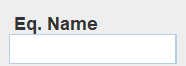
The NamePanel class is small and has only one interactive component: a text field where an equation name can be edited. Like the text fields in the Parameter and Plot panels, the text field displays uncommitted values in italics. But we will accept anything the operator can type as a valid name, so the text never changes color. You can display and interact with a sample VariablePanel by executing the application ShowNamePanel in the project’s …sandbox.app package.
GUI Composition

The NamePanel GUI begins with a JPanel with a y-axis BoxLayout (this will be displayed in the LeftPanel in the CPFrame component; see Introduction on page 1). It contains two components: a descriptive label and a JFormattedTextField.
Class NamePanel
⏹ Class and Instance Fields
Below is a list of the class and instance variables used by the VariablePanel class. You should recognize most of them from past discussions. The only one we haven’t seen before is nameField, a JFormattedTextField that references the text field for editing the equation name. A listing of the class’s fields follows.
public class NamePanel extends JPanel
{
    /** Font to use in a text field when its value is committed. */
    private static final Font       committedFont       =
        UIManager.getFont( "FormattedTextField.font" );
    /** Font to use in a text field when its value is not committed. */
    private static final Font       uncommittedFont     =
        committedFont.deriveFont( Font.ITALIC );
    /** Reduces typing when accessing PropertyManager singleton. */
    private static final PropertyManager    pMgr        =
        PropertyManager.INSTANCE;

    /** Text field to hold the equation name. */
    private final JFormattedTextField       nameField   =
        new JFormattedTextField( new FieldFormatter() );

    /** The currently open equation (may be null). */
    private Equation    equation    = null;
    // ...
}
⏹ Nested Classes
We have one static nested class, a subclass of DefaultFormatter, that overrides stringToValue to change the font of the nameField component when it switches between committed and uncommitted. This method also handled validation logic and text color in previous discussions, but we don’t need any validation logic this time. It also has a constructor that turns off overwrite mode. The code follows; this, too, should be familiar.
private static class FieldFormatter extends DefaultFormatter
{
    public FieldFormatter()
    {
        setOverwriteMode( false );
    }

    @Override
    public Object stringToValue( String str )
        throws ParseException
    {
        JFormattedTextField fmtField    = getFormattedTextField();
        Object              value       = null;
        if ( !str.isEmpty() )
        {
            value = fmtField.getValue();
            if ( str.equals( value ) )
                fmtField.setFont( committedFont );
            else
                fmtField.setFont( uncommittedFont );
        }
        return str;
    }
}
⏹ Helper Methods
We have one helper method that serves as a ValueChangedListener for the nameField’s value property. The commit method updates the currently open equation, sets the DM_MODIFIED_PN property, and changes the font of the nameField to indicate committed. The code follows. See also Constructor below.
private void commit( PropertyChangeEvent evt )
{
    if ( equation != null )
    {
        equation.setName( evt.getNewValue().toString() );
        pMgr.setProperty( CPConstants.DM_MODIFIED_PN, true );
        nameField.setFont( committedFont );
    }
}
⏹ Constructor
The constructor for the NamePanel class configures the GUI with a y-axis BoxLayout and an EmptyBorder (see GUI Composition above). It adds to the nameField a ValueChangeListener for the value property and sets the enabled property to false. Here’s the code.
public NamePanel()
{
    BoxLayout   layout  = new BoxLayout( this, BoxLayout.Y_AXIS );
    Border      border  =
        BorderFactory.createEmptyBorder( 3, 3, 0, 3 );
    setLayout( layout );
    setBorder( border );
    add( new JLabel( "Eq. Name" ) );
    add( nameField );
    nameField.addPropertyChangeListener( "value", this::commit );
    nameField.setEnabled( false );
}
⏹ Public Methods
We have one public method, the load(Equation equation) method. It configures the currently open equation; if the equation is null, it means there is no currently open equation. Depending on whether or not an equation is open, it also configures the nameField’s enabled property. You can find the code below.
public void load( Equation equation )
{
    this.equation = equation;
    if ( equation != null )
    {
        nameField.setEnabled( true );
        nameField.setValue( equation.getName() );
    }
    else
        nameField.setEnabled( false );
}
Testing
As with other panels we’ve recently seen, testing of the NamePanel is divided between two classes: a GUI manager for displaying and interacting with a NamePanel and a test class that contains the JUnit test methods. We’ll start our discussion of these with the GUI manager.
Class NamePanelTestGUI
This class displays a NamePanel, simulates operator interaction with it, and provides access to component properties via the EDT. Below, we’ll list the class’s fields, helper methods, and constructor and public methods. We’ve recently seen many similar facilities, so I won’t bother looking at them in depth unless it feels like additional details might be helpful. All the code is in the GitHub repository.
⏹ Fields
Following is a listing of the class and instance variables used in the test GUI.
/** Reduces typing when accessing PropertyManager singleton. */
private static final PropertyManager    pMgr    =
    PropertyManager.INSTANCE;

/** NamePanel under test. */
private final NamePanel             namePanel;
/** The text field from the NamePanel. */
private final JFormattedTextField   textField;
/** RobotAssistant for simulating operator actions. */
private final RobotAssistant        robotAsst   = getRobot();
/** Robot for simulating operator actions. */
private final Robot                 robot       = robotAsst.getRobot();

/** Currently open equation, may be null. */
private Equation        equation;

/** Temporary object for limited use by lambdas. */
private Object              adHocObject1;
⏹ Helper Methods
Here’s a list of the private methods used in NamePanelTestGUI. We’ve seen them all before.
🟦 private RobotAssistant getRobot()
Obtains a Robot and RobotAssistant for simulating operating interaction with the GUI. The main usefulness of this method is to encapsulate the necessary exception handling.
🟦 private JFormattedTextField getTextField()
Uses ComponentFinder to locate the NamePanel’s text field.
🟦 private Object getProperty( Supplier<Object> supplier )
Utility method to interrogate the GUI within the context of the EDT. One use of this method might be: boolean result = (boolean)getProperty( () -> textField.isEnabled() );
Here’s the code for this method.
private Object getProperty( Supplier<Object> supplier )
{
    GUIUtils.schedEDTAndWait( () -> adHocObject1 = supplier.get() );
    return adHocObject1;
}
⏹ Constructor and Public Methods
A discussion of the constructor and public methods for the NamePanelTestGUI class follows.
🟦 public NamePanelTestGUI()
Constructor: builds the GUI and makes it visible. Note that the GUI includes an extra text field. We need it to test the commit logic in the name text field by tabbing out of it. The code follows.
public NamePanelTestGUI()
{
    JFrame  frame       = new JFrame( "Plot Panel Test Dialog" );
    JPanel  contentPane = new JPanel( new BorderLayout() );
    namePanel = new NamePanel();
    contentPane.add( namePanel, BorderLayout.CENTER );

    // If we want to test that tabbing from the text field
    // causes a commit we have to have somewhere to tab to.
    // That's what this extra text field is for.
    contentPane.add( new JTextField( 10 ), BorderLayout.SOUTH );

    frame.setContentPane( contentPane );
    frame.pack();
    frame.setVisible( true );

    textField = getTextField();
}
🟦 public void newEquation( Equation equation )
This method installs the given equation in the NamePanel under test; note that the given equation can be null. It sets the DM_MODIFIED_PN property to false and the DM_OPEN_EQUATION_PN property as appropriate.
🟦 public void type( int keyCode )
Uses Robot to type the given key code.
🟦 public boolean isEnabled()
Returns the value of the text field’s enabled property.
🟦 public String getText()
Returns the value of the text field’s text property.
🟦 public String getValue()
Returns the value of the text field’s value property.
🟦 public String getEqValue()
Returns the value of the currently open equation’s name property.
🟦 public boolean isChangedFont()
Returns true if the text field’s font indicates that the text field’s text has been changed but not committed.
🟦 public boolean isModified()
Returns the value of the DM_MODIFIED_PN property.
🟦 public void paste( String text )
Uses the RobotAssistant to paste the given text into the NamePanel’s text field. Here’s the code.
public void paste( String text )
{
    textField.setText( "" );
    clickTextField();
    robotAsst.paste( text );
}
🟦 public void click()
Uses Robot to click the mouse.
🟦 public void clickTextField()
Uses Robot to click the mouse on the NamePanel’s text field.
Class NamePanelTest
This is the JUnit test class for the NamePanel. Below is a discussion of its class and instance fields, initialization logic, helper methods, and public test methods. In most cases, only a summary of a facility will be presented. All the code is in the GitHub repository.
⏹ Fields
This class has a NamePanelTestGUI variable, testGUI, that references the test GUI; it is instantiated in the BeforeAll method and never changed. The string variable defaultName contains the equation name that will be assigned to the new equation that is created in the BeforeEach method.
⏹ Initialization Logic
This class has a BeforeAll method that instantiates the test GUI in the context of the EDT. It also has a BeforeEach method that creates and installs a new equation before each test and sets its equation name to defaultName.
⏹ Helper Methods
We have one helper method, private void testChangeAndCommit(int keyCode). It is executed twice: once with a key code of VK_ENTER and once with VK_TAB. It changes the equation name and commits it, keeping an eye on the various properties affected by the process. Here is the annotated code.
1 2 3 4 5 6 7 8 9 10 11 12 13 14 15 16 17 18 19 | private void testChangeAndCommit( int keyCode ) { String newName = "Not " + defaultName; assertFalse( testGUI.isModified() ); assertFalse( testGUI.isChangedFont() ); assertTrue( testGUI.isCommitted() ); testGUI.paste( newName ); assertFalse( testGUI.isModified() ); assertTrue( testGUI.isChangedFont() ); assertFalse( testGUI.isCommitted() ); testGUI.type( keyCode ); assertTrue( testGUI.isModified() ); assertFalse( testGUI.isChangedFont() ); assertTrue( testGUI.isCommitted() ); assertEquals( newName, testGUI.getEqValue() ); } |
- Line 1: Method declaration. The keyCode is the key code that will be used to commit the new name; it should be either VK_ENTER or VK_TAB.
- Line 3: Declaration of the new name of the equation. It is guaranteed to be different from the default.
- Lines 4-6: Sanity check; verify that the equation is not flagged as modified, the text of the text field is not flagged as uncommitted, and the text field’s value is committed.
- Line 8: Paste the new name into the text field.
- Line 9: Verify that the equation is not marked modified.
- Line 10: Verify that the text field is marked uncommitted.
- Line 11: Verify that the text field’s value is not committed.
- Line 13: Type the given key code, committing the text field’s value.
- Line 14: Verify that the equation is marked modified.
- Line 15: Verify that the text field is not marked uncommitted.
- Line 16: Verify that the text field’s value has been committed in the GUI.
- Line 18: Verify that the committed value has been written to the currently open equation.
⏹ Test Methods
Following is a summary of the test class’s test methods.
🟦 public void testInit()
Verify that the initial state of the GUI is correct:
- The GUI’s text field must be enabled;
- The text field’s value must be committed;
- The font of the text field must indicate that its value has been committed;
- The value of the text field must be equal to the default name of the equation, and
- The text of the text field must be equal to the default name of the equation.
🟦 public void testClose()
Verify that when the currently open equation is closed, the GUI’s text field is disabled.
🟦 public void testChangeAndCommitEnter()
Verify the logic when the text field’s text is changed and committed by typing the enter key.
🟦 public void testChangeAndCommitTab()
Verify the logic when the text field’s text is changed and committed by typing the tab key.
Summary
On this page, we developed the following classes:
- NamePanel is a class that encapsulates a JPanel that the operator can use to edit the name of an equation.
- NamePanelTestGUI is a class to support testing of the NamePanel class. It displays a NamePanel and provides facilities for the test class to interact with it. When necessary, interaction is executed in the context of the EDT.
- NamePanelTest is a JUnit test class for testing NamePanel.
On the next page, we will develop and test CPFrame. This class will encapsulate all the parts of our GUI and serve as the application frame for our Cartesian plane.