To date, whenever we wanted to look at our Cartesian plane graphic, we instantiated a CartesianPlane and asked the general purpose class Root to display it for us. In this lesson, we will create the CPFrame class, which encapsulates CartesianPlane, our application menu (CPMenuBar), and the control panels: NamePanel, VariablePanel, ParameterPanel, and PlotPanel. The CPFrame class will also notify its subpanels when a new, open, or close operation is executed from the menubar.
GitHub repository: Cartesian Plane Part 17
Previous lesson: Cartesian Plane Lesson 17 Page 14: Data Organization, GUI, NamePanel
CPFrame
The CPFrame class will assemble our main application frame, including the Cartesian plane graphic, menubar, and control panels. We’ll discuss how it does this below.
GUI Composition

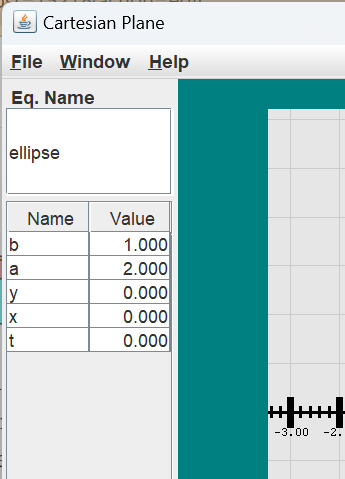
The CPFrame GUI consists of a content pane with a BorderLayout. The menu bar and the Cartesian plane GUI occupy the north and center regions of the content pane layout. The south region of the layout contains the PlotPanel, which, in turn, contains the expression panel and the combo panel. The west region of the content pane contains the left panel; nested inside the leftPanel is the outerPanel, a configuration of the NamePanel, VariablePanel and ParameterPanel, as discussed below. You can examine and interact with CPFrame by running the ShowCartesianPlane application in the project’s …cartesian_plane.app package.
⏹ The Left Panel
The left panel is intended to contain the NamePanel, VariablePanel, and ParameterPanel in a vertical relationship. We put those three panels into a JPanel (the outer panel) with a y-axis BoxLayout. Unfortunately, if we put this panel directly into the WEST region of a BorderLayout, the BorderLayout will stretch the panel to its maximum height, and the BoxLayout will distribute the extra space amongst all of its child components, often yielding a non-aesthetic result.
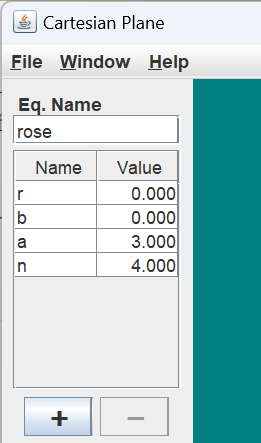
One solution is to put the JPanel with the BoxLayout (the outer panel) into another JPanel (the left panel) with a FlowLayout. Then, the left panel goes into the west region of the content pane’s layout; the stretching applied by the content pane’s BorderLayout is applied to the JPanel with the FlowLayout, which does not affect the JPanel with the BoxLayout. To summarize:
- The NamePanel, VariablePanel, and ParameterPanel go into the OuterPanel with a BoxLayout;
- The outer panel goes into the left panel, which has a FlowLayout and
- The left panel goes into the west region of the content pane’s BorderLayout.
Here’s the code.
public CPFrame()
{
    // ...
    JPanel          leftPanel   = getLeftPanel();
    contentPane.add( leftPanel, BorderLayout.WEST );
    // ...
}
private JPanel getLeftPanel()
{
    JPanel      outer   = new JPanel();
    BoxLayout   layout  = new BoxLayout( outer, BoxLayout.Y_AXIS );
    outer.setLayout( layout );

    outer.add( namePanel );
    outer.add( varPanel );
    outer.add( paramPanel );

    JPanel      left    = new JPanel();
    left.add( outer );
    return left;
}
Class CPFrame
⏹ Class and Instance Fields
Below is an annotated list of the class and instance variables used by the CPFrame class. You should recognize most of them from past discussions.
1 2 3 4 5 6 7 8 9 10 11 12 13 | public class CPFrame extends JFrame { private static final long serialVersionUID = -3943393354749039355L; private static final String title = "Cartesian Plane"; private final CartesianPlane cartPlane = new CartesianPlane(); private final VariablePanel varPanel = new VariablePanel(); private final ParameterPanel paramPanel = new ParameterPanel(); private final PlotPanel plotPanel = new PlotPanel(); private final NamePanel namePanel = new NamePanel(); private Equation equation = null; // ... } |
- Line 3: This is the serial version UID for the CPFrame class. It’s here because the JFrame superclass is declared serializable; therefore, CPFrame is serializable. Java believes every serializable class should have a serial version UID and issues a warning if it’s missing. Instead of declaring the serial version UID, we could have ignored the warning or added a @SuppressWarnings declaration to the class:
    @SuppressWarnings("serial")
    public class CPFrame extends JFrame
In this case, I let Eclipse generate the serialVersionUID for us. - Line 5: The frame’s title.
- Line 6: This is the CartesianPlane object incorporated into the GUI.
- Lines 7-10: These are the NamePanel, VariablePanel, ParameterPanel, and PlotPanel objects incorporated into the GUI.
- Line 11: The currently open equation, null if no equation is open. It is set in the loadEquation() method.
⏹ Constructor
There’s nothing in the constructor that we haven’t seen before; it merely builds the GUI. Here’s the code.
public CPFrame()
{
    super( title );

    CPMenuBar       menuBar     = new CPMenuBar( this );
    setDefaultCloseOperation( JFrame.EXIT_ON_CLOSE );
    JPanel  contentPane = new JPanel( new BorderLayout() );
    contentPane.add( cartPlane, BorderLayout.CENTER );
    JPanel          leftPanel   = getLeftPanel();
    contentPane.add( leftPanel, BorderLayout.WEST );
    contentPane.add( plotPanel, BorderLayout.SOUTH );
    setContentPane( contentPane );
    GUIUtils.center( this );
    pack();
    setVisible( true );
}
⏹ Helper Methods
This class has one helper method, getLeftPanel, which we saw above.
⏹ Public Methods
We have three public methods: getters for the cartesianPlane and equation instance variables and loadEquation(Equation equation), which sets the currently open equation. If there is no currently open equation, it is set to null. Outside of testing, this method is used exclusively by the menubar operations that open and close equations. The getCartesianPlane() and getEquation() methods are in the GitHub repository. Here’s the code for loadEquation().
public void loadEquation(Equation equation)
{
    this.equation = equation;
    varPanel.load( equation );
    paramPanel.load( equation );
    plotPanel.load( equation );
    namePanel.load( equation );
}
Testing
Test implementation for the CPFrame class is split between a traditional JUnit Test class and a GUI manager, which displays a CPFrame and provides interaction with it. We’ll discuss the GUI manager first.
Class CPFrameTestGUI
This class displays a CPFrame, simulates operator interaction with it, and provides access to component properties via the EDT. Below, we’ll list the class’s fields, helper methods, and constructor and public methods. First, let’s examine our general strategy for testing the relationship between the CPFrame and its constituent panels.
⏹ Testing CPFrame’s Subpanels
When the equation changes, CPFrame is informed, and CPFrame must synchronize the new state with its subpanels, NamePanel, VariablePanel, ParameterPanel, and PlotPanel. When the current equation changes, we do not need to verify that the various subpanels are perfectly in sync with the new state; that is the job of the panels’ individual JUnit tests. However, we must verify that synchronization in each subpanel has been initiated. We can do that by identifying a sample component in each panel and verifying that the state of that component has been correctly updated. For example, for the NamePanel we will use the text field as the sample component. When a new equation is loaded, we can verify that the NamePanel has been synchronized by verifying that the text field is enabled and contains the name of the currently loaded equation. If the current equation is closed, we can verify that the text field has been disabled. The sample components for each subpanel will be:
- NamePanel: the panel’s sole text field.
- VariablePanel: the JTable.
- ParameterPanel: the text field associated with the start value property. This component was chosen because it’s the first text field in the ParameterPanel.
- PlotPanel: the text field associated with the x expression property. This component was chosen because it’s the first text field in the PlotPanel.
⏹ Fields
An annotated list of the class and instance variables used in the test GUI follows.
1 2 3 4 5 6 7 8 9 10 | public class CPFrameTestGUI { private final CPFrame cpFrame = new CPFrame(); private final Map<Class<? extends JPanel>,JComponent> sampleMap = new HashMap<>(); private Object adHocObject1; // ... } |
- Lines 3: This is the CPFrame under test.
- Lines 5,6: This map encodes the sample components described in Testing CPFrame’s Subpanels above. The key to the map is the class class of a subpanel. The value is the sample component. If the current equation is closed and I want to verify that the components in VariablePanel have been disabled, I could write:
    JComponent comp = sampleMap.get( VariablePanel.class );
    assertFalse( comp.isEnabled() );
The map is initialized in the constructor; see public CPFrameTestGUI() below. - Line 7: The currently open equation.
- Line 8: Convenient variable for temporary use in lambdas.
⏹ Helper Methods
Here’s a list of the private methods used in NamePanelTestGUI.
🟦 private double getVarValueEDT( String varName )
This is a helper method for the public getVarValue(String varName) method. It must be called on the EDT. It obtains, from the VariablePanel’s JTable, the value of the variable with the given name. Here is the annotated code.
1 2 3 4 5 6 7 8 9 10 11 12 13 14 15 16 17 18 19 20 21 | private double getVarValueEDT( String varName ) { JComponent comp = sampleMap.get( VariablePanel.class ); assertNotNull( comp ); assertTrue( comp instanceof JTable ); TableModel model = ((JTable)comp).getModel(); int rows = model.getRowCount(); assertEquals( 2, model.getColumnCount() ); int row = IntStream.range( 0, rows ) .filter( r -> varName.equals( model.getValueAt( r, 0 ) ) ) .findFirst() .orElse( -1 ); assertTrue( row >= 0 ); Object oVal = model.getValueAt( row, 1 ); assertTrue( oVal instanceof Double ); double dVal = (double)oVal; return dVal; } |
- Line 3: Get the sample JComponent for the VariablePanel. By design, this is assumed to be the panel’s JTable.
- Lines 4,5: Sanity check; make sure the sample component exists and is the expected type.
- Line 6: Get the table model from the JTable.
- Line 7: Get the number of rows in the table model.
- Line 8: Sanity check; verify that the table model has the expected number of columns.
- Lines 10,11: Stream the rows from the table model.
- Line 12: Filter for the row with the given variable name.
- Line 13: Find the first row that passes the filter.
- Line 14: Return the number of the first row to pass the filter, or -1 if no row passes the filter.
- Line 16: Sanity check; verify that a row with the given variable name was found.
- Line 17: Get the value from the row.
- Line 18: Sanity check; verify that the value is type double.
- Line 19: Cast the value to type double.
- Line 20: Return the value of the variable.
🟦 private Object getProperty( Supplier<Object> supplier )
Utility method to interrogate the GUI within the scope of the EDT. One use of this method might be: boolean result = (boolean)getProperty( () -> textField.isEnabled() );
Here’s the code for this method.
private Object getProperty( Supplier<Object> supplier )
{
    GUIUtils.schedEDTAndWait( () -> adHocObject1 = supplier.get() );
    return adHocObject1;
}
🟦 private void mapComponent( Class clazz )
🟦 private JTable getTable( JPanel source )
🟦 private JFormattedTextField getTextField( JPanel source )
The mapComponent method finds the sample component for the given class and enters it into the sampleMap. If the given class is VariablePanel, it looks for a JTable; otherwise, it finds the first JFormattedTextField in the panel. The getTable method is the helper method that looks for a JTable, and getTextField is the helper method that finds the first JFormattedTextField in a panel. The code looks like this:
private void mapComponent( Class<? extends JPanel> clazz )
{
    JPanel                  panel   = getPanel( clazz );
    JComponent              comp    = null;
    if ( clazz == VariablePanel.class )
        comp = getTable( panel );
    else
        comp = getTextField( panel );
    sampleMap.put( clazz, comp );
}
private JTable getTable( JPanel source )
{
    Predicate<JComponent>   pred    =
        c -> (c instanceof JTable );
    JComponent  comp    = ComponentFinder.find( source, pred );
    assertTrue( comp instanceof JTable );
    return (JTable)comp;
}
private JFormattedTextField getTextField( JPanel source )
{
    Predicate<JComponent>   pred    =
        c -> (c instanceof JFormattedTextField );
    JComponent  comp    = ComponentFinder.find( source, pred );
    assertTrue( comp instanceof JFormattedTextField );
    return (JFormattedTextField)comp;
}
🟦 private JPanel getPanel( Class clazz )
Finds the panel that is the given subclass of JPanel. This will be one of NamePanel, VariablePanel, ParameterPanel, or PlotPanel. Here’s the code.
private JPanel getPanel( Class<? extends JPanel> clazz )
{
    Predicate<JComponent>   pred    = c -> c.getClass() == clazz;
    JComponent              comp    =
        ComponentFinder.find( cpFrame, pred );
    assertNotNull( comp );
    assertTrue( comp instanceof JPanel );
    return (JPanel)comp;
}
⏹ Constructor and Public Methods
A discussion of the constructor and public methods for the NamePanelTestGUI class follows.
🟦 public CPFrameTestGUI()
Constructor. Builds the GUI and makes it visible. Note that “builds the GUI and makes it visible” is fully encapsulated in the declaration of cpFrame; see Fields above. The main work of the constructor is to initialize sampleMap. The code follows.
public CPFrameTestGUI()
{
    Stream.of(
        NamePanel.class,
        VariablePanel.class,
        ParameterPanel.class,
        PlotPanel.class
    ).forEach( this::mapComponent );
}
🟦 public void newEquation( Equation equation )
🟦 public Equation getEquation()
🟦 public CartesianPlane getCartesianPlane()
These methods load a new equation into the CPFrame under test and return the values of the frame’s current equation and CartesianPlane properties, respectively. Here’s a listing of the code for these methods.
public void newEquation( Equation equation )
{
    cpFrame.loadEquation( equation );
}
public Equation getEquation()
{
    Object  obj = getProperty( () -> cpFrame.getEquation() );
    assertTrue( obj instanceof Equation );
    return (Equation)obj;
}
public CartesianPlane getCartesianPlane()
{
    Object  obj = getProperty( () -> cpFrame.getCartesianPlane() );
    assertTrue( obj instanceof CartesianPlane );
    return (CartesianPlane)obj;
}
🟦 public boolean isEnabled()
🟦 public boolean isDisabled()
These methods indicate whether the subpanels of the CPFrame are configured as enabled or disabled. Note that this is not a simple Boolean operation. The method isEnabled returns true if all subpanels are configured as enabled; isDisabled returns true if all subpanels are configured as disabled. The code for these methods follows.
public boolean isEnabled()
{
    boolean result  = sampleMap.values().stream()
        .map( this::isEnabled )
        .filter( b -> !b )
        .findFirst().orElse( true );
    return result;
}
public boolean isDisabled()
{
    boolean result  = sampleMap.values().stream()
        .map( this::isEnabled )
        .filter( b -> b )
        .findFirst().orElse( true );
    return result;
}
🟦 public String getText( Class clazz )
🟦 public double getVarValue( String varName )
The method getText() gets the text from the sample text field for the given class. The given class must be one of NamePanel, ParameterPanel, or PlotPanel. The getVarValue() method returns the given variable’s value from the VariablePanel’s JTable. Here’s the code.
public String getText( Class<? extends JPanel> clazz )
{
    JComponent          comp        = sampleMap.get( clazz );
    assertNotNull( comp );
    assertTrue( comp instanceof JFormattedTextField );
    JFormattedTextField textField   = (JFormattedTextField)comp;
    Object  obj = getProperty( () -> textField.getText() );
    assertTrue( obj instanceof String );
    return (String)obj;
}
public double getVarValue( String varName )
{
    Object  prop    = getProperty( () -> getVarValueEDT( varName ) );
    assertTrue( prop instanceof Double );
    return (double)prop;
}
🟦 public boolean isEnabled( JComponent comp )
This method returns true or false depending on whether or not the given component is enabled. It looks like this:
public boolean isEnabled( JComponent comp )
{
    Object      obj     = getProperty( () -> comp.isEnabled() );
    assertTrue( obj instanceof Boolean );
    return (boolean)obj;
}
Class CPFrameTest
This is the JUnit test class for CPFrame. This test is quite short. It has only a few test methods and no helper methods. Our principal goals are to verify the following:
- When a new equation is opened, do all the frame’s subpanels appear enabled? Do they appear to be initialized with the correct values? We use “appear” here because it is unnecessary to completely validate each subpanel; that’s the job of each subpanel’s JUnit test. We need only examine a sample component from each panel to verify that CPFrame has initiated synchronization. See Testing CPFrame’s Subpanels above.
- If all equations are closed, do all subpanels appear to be disabled?
- When an equation is open, do all subpanels appear to reflect the values of the properties encapsulated in the equation?
Following is a discussion of this class.
⏹ Fields and Initialization
This class has a handful of fields, a BeforeAll method, and a BeforeEach method. Here is an annotated listing.
1 2 3 4 5 6 7 8 9 10 11 12 13 14 15 16 17 18 19 20 21 22 23 24 25 26 27 28 | class CPFrameTest { private static final String sampleEquationName = "Equation Name"; private static final String sampleVarName = "a"; private static final double sampleVarDValue = 200; private static final String sampleStartValue = "1000"; private static final String sampleXExpr = "13"; private static CPFrameTestGUI testGUI; @BeforeAll static void setUpBeforeClass() throws Exception { GUIUtils.schedEDTAndWait( () -> testGUI = new CPFrameTestGUI() ); } @BeforeEach void setUp() throws Exception { Equation equation = new Exp4jEquation(); equation.setName( sampleEquationName ); equation.setVar( sampleVarName, sampleVarDValue ); equation.setRangeStart( sampleStartValue ); equation.setXExpression( sampleXExpr ); testGUI.newEquation( equation ); } // ... } |
- Line 3: The name of the equation under test. It is used to validate synchronization with the NamePanel. It’s set in the BeforeEach method.
- Line 4: Sample variable name; used to test synchronization with the VariablePanel. It’s set in the BeforeEach method.
- Line 5: Expected value of the sample variable. It’s set in the BeforeEach method.
- Line 7: Expected value of the start property of the equation under test. Used to verify synchronization with the ParameterPanel. It’s set in the BeforeEach method.
- Line 8: Expected value of the x-expression property of the equation under test. Used to verify synchronization with the PlotPanel. It’s set in the BeforeEach method.
- Line 9: Reference to the test GUI. Initialized in the BeforeAll method.
- Lines 11-15: BeforeAll method. Instantiates the test GUI in the context of the EDT.
- Lines 17-26: BeforeEach method. This method instantiates an equation to test against, initializes it with expected values for testing each subpanel, and loads it into the test GUI.
⏹ Test Methods
Following is a summary of the test class’s test methods.
🟦 public void testEnabled()
Verifies that, with an equation open, the CPFrame’s subpanels appear to be enabled. Then it closes the equation and verifies that the subpanels appear to be disabled. The code looks like this.
@Test
public void testEnabled()
{
    assertTrue( testGUI.isEnabled() );
    testGUI.newEquation( null );
    assertTrue( testGUI.isDisabled() );
}
🟦 public void testInitValues()
Verifies that the subpanels appear to reflect the property values of the currently open equation. The annotated code follows.
1 2 3 4 5 6 7 8 9 10 11 12 13 14 15 16 17 | @Test public void testInitValues() { assertEquals( sampleEquationName, testGUI.getText( NamePanel.class ) ); assertEquals( sampleVarValue, testGUI.getVarValue( sampleVarName ) ); assertEquals( sampleStartValue, testGUI.getText( ParameterPanel.class ) ); assertEquals( sampleXExpr, testGUI.getText( PlotPanel.class ) ); } |
- Lines 4-7: Compares the expected equation name to the actual equation name stored in the NamePanel.
- Line 6: The class class of the NamePanel class is passed to the test GUI’s getText method. The getText method uses this value as a key to the test GUI’s sampleMap to obtain the text field component from the NamePanel and return the component’s text. See public String getText( Class clazz ) above.
- Lines 8-11: Compares the expected value of the sample variable to the actual value obtained from the VariablePanel’s JTable.
- Lines 12-15: Compares the expected value of the equation’s start property to the value obtained from the first text field in the ParameterPanel. The first text field in the ParameterPanel is assumed to be associated with the equation’s start property.
- Lines 16: Compares the expected value of the equation’s x-expression property to the value obtained from the first text field in the PlotPanel. The first text field in the PlotPanel is assumed to be associated with the equation’s x-expression property.
🟦 public void testGetEquation()
🟦 public void testGetCartesianPlane()
These methods exercise the getters for the equation and CartesianPlane properties of the CPFrame. Here’s the code.
@Test
public void testGetEquation()
{
    Equation    equation    = new Exp4jEquation();
    testGUI.newEquation( equation );
    assertEquals( equation, testGUI.getEquation() );
}

@Test
public void testGetCartesianPlane()
{
    CartesianPlane  plane   = testGUI.getCartesianPlane();
    assertNotNull( plane );
}
Summary
On this page, we developed and tested the CPFrame class, which serves as the main frame for our application GUI. Our last remaining tasks for this lesson are to complete and test the operations from the File menu of our application menubar. As part of that task, we will learn how to create test suites for JUnit test classes.