On this page, we’ll develop a GUI for managing our application’s control parameters: start, end, step, precision, radius name, theta name, and parameter name.
GitHub repository: Cartesian Plane Part 17
Previous lesson: Cartesian Plane Lesson 17 Page 8: Data Organization, PlotPanel JUnit Test
Parameter Panel
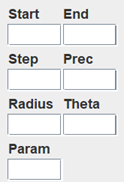
The ParameterPanel is where users will enter parameters for plotting equations, including:
- An expression controlling where to start plotting an equation.
- An expression controlling where to end plotting an equation.
- An expression controlling the size of an incremental step between plot points.
- The number of decimal points (precision) displayed in the value of a variable in the VariablePanel.
- The names of the variables used for the parameter in a parametric equation and the radius and angle of a polar equation.
You can display and interact with a sample ParameterPanel by executing the application ShowParameterPanel in the project’s sandbox.app package.
New PropertyManager Property
We have a new PropertyManager property: VP_DPRECISION_PN (VP stands for VariablePanel). This property specifies the number of decimal places to use when displaying a variable’s value. Its default value is VP_DPRECISION_DV = “4”. This property can be changed from the PatameterPanel. The new property is declared in the CPConstants class as shown below.
public class CPConstants
{
    // ...
    public static final String  VP_DPRECISION_PN = "dPrecision";
    public static final String  VP_DPRECISION_DV = "4";
    // ...
}
GUI Composition
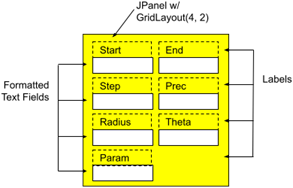
The composition of the ParameterPanel GUI is simply a JPanel with a GridLayout(4,2) (this will be at the bottom of the LeftPanel in the CPFrame component; see Introduction on page 1). The JPanel contains seven JFormattedTextFields, each preceded by a descriptive JLabel. The first three text fields must contain valid expressions, the Prec text field must contain a valid integer, and the last three text fields must contain valid variable names.
Class ParameterPanel extends JPanel
Let’s start by discussing the infrastructure of the ParameterPanel class: the nested classes, the class and instance variables, and the helper methods.
⏹ Nested Classes
We have three nested classes to implement: FieldVerifier extends InputVerifier and FieldFormatter extends DefaultFormatter are for validating and formatting JFormattedTextFields. The TextFieldDescriptor nested class organizes text field configuration. Similar classes were seen in previously discussed demos and in the PlotPanel class.
🟦 Class TextFieldDescriptor
This class contains configuration parameters for an associated JFormattedTextField. Here’s an annotated list of the class’s instance variables.
1 2 3 4 5 6 7 8 | private class TextFieldDescriptor { public final Supplier<Object> getter; public final Consumer<Object> setter; public final String label; public final JFormattedTextField textField; // ... } |
- Line 3: This supplier is used to obtain the value of a property from the currently open equation. The supplier for the Start and text fields, for example, look like this:
() -> getEquation().getRangeStartExpr()() -> getEquation().getRangeEndExpr() - Line 4: This consumer is used to set the value of a property in the currently open equation when the value of the associated text field is committed. The consumer for the Start text field, for example, looks like this:
e -> getEquation().setRangeStart( (String)e ) - Line 5: This is the descriptive label for the associated text field.
- Line 6: This is the associated text field. It is instantiated in the constructor of this class.
∎ PropertyChangeListener
Each text field gets a PropertyChangeListener, which is invoked when the text field’s value property changes (i.e. when the value is committed). The property change event is handled in the class’s propertyChange method; an annotated listing of this method follows.
1 2 3 4 5 6 7 8 9 10 11 12 13 14 15 16 17 | private void propertyChange( PropertyChangeEvent evt ) { Object value = evt.getNewValue(); Object src = evt.getSource(); if ( value == null ) ; else if ( !evt.getPropertyName().equals( "value" ) ) ; else if ( src instanceof JFormattedTextField ) { JFormattedTextField comp = (JFormattedTextField)src; comp.setFont( committedFont ); pmgr.setProperty( CPConstants.DM_MODIFIED_PN, true ); if ( equation != null ) setter.accept( value ); } } |
- Lines 5,6: During initialization, the value property will occasionally be set to null; we should ignore this.
- Lines 7,8: Sanity check; we only want to consider changes to the value property. If we get an event for any other property, ignore it.
- Lines 9: Sanity check; we want to ignore events that come from anywhere except a JFormattedTextField.
- Line 11: Cast the event source to type JFormattedTextField.
- Line 12: Set the text field’s font to indicate committed.
- Lines 13: Configure the DM_MODIFIED_PN to indicate that the currently open equation has changed.
- Lines 14,15: Update the corresponding property in the currently open equation.
∎ Constructor
The constructor for this class initializes the object properties. It creates and configures the necessary JFormattedTextField. Here is an annotated listing.
1 2 3 4 5 6 7 8 9 10 11 12 13 14 15 16 17 18 19 | public TextFieldDescriptor( Supplier<Object> getter, Consumer<Object> setter, Function<String, Object> validator, String label ) { super(); this.getter = getter; this.setter = setter; this.label = label; AbstractFormatter formatter = new FieldFormatter( validator ); textField = new JFormattedTextField( formatter ); textField.setColumns( 5 ); textField.setInputVerifier( new FieldVerifier() ); textField.addPropertyChangeListener( this::propertyChange ); } |
- Lines 9-11: Initializes the supplier, consumer, and label properties. See Class TextFieldDescriptor above.
- Lines 13,14: Creates a FieldFormatter. See Class FieldFormatter below.
- Line 15: Creates the necessary JFormattedTextField and installs the formatter in it. (Recall that a formatter can’t be set on a JFormattedTextField after it’s instantiated. It must be set in the constructor.)
- Line 16: Sets the number of columns of the text field.
- Line 17: Adds an InputVerifier to the text field.
- Line 18: Adds a PropertyChangeListener to the text field.
🟦 Class FieldVerifier extends InputVerifier
Like other InputVerifier subclasses we’ve discussed, an object of this type overrides the verify(JComponent comp) method, returning true when the associated text field contains a valid value and false otherwise. Validation is performed by obtaining the Formatter from the text field and invoking its stringToValue(String text) method. The class’s source code follows.
private static class ExprVerifier extends InputVerifier
{
    @Override
    public boolean verify( JComponent comp )
    {
        JFormattedTextField textField   = (JFormattedTextField)comp;
        AbstractFormatter   formatter   = textField.getFormatter();
        String              text        = textField.getText();
        boolean             status      = true;
        try
        {
            formatter.stringToValue( text );
        }
        catch ( ParseException exc )
        {
            status = false;
        }
        return status;
    }
}
🟦 Class FieldFormatter extends DefaultFormatter
The Formatter for the text fields in this class encapsulates a validator, type Function<String text,Object value>, which attempts to convert text to the text field’s value’s type. It throws an IllegalArgumentException if the conversion cannot be performed. For example, the validator for the Prec text field calls the parseInt helper method, which in turn calls Integer.parseInt(String text). Remember that if the text is not a valid integer, Integer.parseInt will throw NumberFormatException, which is a subclass of IllegalArgumentException.
FieldFormatter overrides the stringToValue(String text) method, which uses the validator to convert the given text. If the conversion fails, it throws a ParseException. It sets the font style of the associated text field depending on its state of commitment and the text color depending on whether or not the text is valid (the same way the Formatter for the PlotPanel works). The validator is established in the class’s constructor. The constructor also changes the overwriteMode property to false. A complete listing for this class follows.
private static final Font       committedFont   =
    UIManager.getFont( "FormattedTextField.font" );
private static final Font       uncommittedFont =
    committedFont.deriveFont( Font.ITALIC );
private static final Color      validColor      =
    UIManager.getColor( "FormattedTextField.foreground" );
private static final Color      invalidColor    = Color.RED;
// ...
private static class FieldFormatter extends DefaultFormatter
{
    private final Function<String,Object>   validator;

    public FieldFormatter( Function<String,Object> validator )
    {
        this.validator = validator;
        setOverwriteMode( false );
    }

    @Override
    public Object stringToValue( String str )
        throws ParseException
    {
        JFormattedTextField fmtField    = getFormattedTextField();
        Object              value       = null;
        if ( !str.isEmpty() )
        {
            try
            {
                value = validator.apply( str );
                fmtField.setForeground( validColor );
                if ( value.equals( fmtField.getValue() ) )
                    fmtField.setFont( committedFont );
                else
                    fmtField.setFont( uncommittedFont );
            }
            catch ( IllegalArgumentException exc )
            {
                fmtField.setFont( uncommittedFont );
                fmtField.setForeground( invalidColor );
                throw new ParseException( "Invalid name", 0 );
            }
        }
        return value;
    }
}
⏹ Class and Instance Variables
Here is an annotated list of the class and instance variables for the ParameterPanel class.
1 2 3 4 5 6 7 8 9 10 11 12 13 14 15 16 17 18 19 20 21 22 23 | public class ParameterPanel extends JPanel { private static final PropertyManager pmgr = PropertyManager.INSTANCE; private static final Font committedFont = UIManager.getFont( "FormattedTextField.font" ); private static final Font uncommittedFont = committedFont.deriveFont( Font.ITALIC ); private static final Color validColor = UIManager.getColor( "FormattedTextField.foreground" ); private static final Color invalidColor = Color.RED; private Equation equation = null; private TextFieldDescriptor[] descArray = new TextFieldDescriptor[] { // ... } private final Map<String,TextFieldDescriptor> fieldMap = new HashMap<>(); // ... } |
- Lines 3,4: Convenient declaration of the PropertyManager singleton.
- Lines 6-12: The fonts for displaying committed/uncommitted values and colors for displaying valid/invalid values.*
- Lines 16-19: Initialization values for the TextFieldDescriptors. The array is traversed once to create the fieldMap (line 17) and is ignored thereafter. We’ll discuss this array in more detail below when we discuss the parser methods.
- Line 20,21: A map of Strings to TextFieldDescriptors. It is initialized in the constructor below. The constructor uses it to lay out the ParameterPanel, and the load method traverses it to configure the text fields when a new equation is loaded.
*Note: These constants are starting to pop up in multiple places. In a future refactoring exercise, we should put their declarations in a common place, probably in the PropertyManager.
⏹ Helper Methods
This class has helper methods discussed below.
🟦 The getEquation Method
The getEquation method returns the currently open Equation or null if none. It looks like this:
private Equation getEquation()
{
    return equation;
}
🟦 Parsers
These methods are used in the TextFieldDescriptor validators (below). They all throw IllegalArgumentException if their input is invalid. The parseExpression(String str) method verifies that its input is a valid expression in the context of an Equation and then returns the input; parseName(String str) verifies that its input is a valid variable name and returns it; and parseInt( String str ) converts its input to an integer and returns the integer. The code looks like this:
private String parseExpression( String str )
    throws IllegalArgumentException
{
    if ( equation == null )
        throw new IllegalArgumentException( "Invalid equation" );
    Optional<Double>    opt     = equation.evaluate( str );
    if ( opt.isEmpty() )
        throw new IllegalArgumentException( "Invalid expression" );
    return str;
}
private String parseName( String str )
{
    if ( !NameValidator.isIdentifier( str ) )
        throw new IllegalArgumentException( "not a valid name" );
    return str;
}
private Integer parseInt( String str )
    throws IllegalArgumentException
{
    int iValue  = Integer.parseInt( str );
    return iValue;
}
As mentioned, the parsers are used as validators in the TextFieldDescriptors. Following is an annotated listing of a part of the TextFieldDescriptor array; the complete listing can be found in the GitHub repository.
1 2 3 4 5 6 7 8 9 10 11 12 13 14 15 16 17 | private TextFieldDescriptor[] descArray = new TextFieldDescriptor[] { new TextFieldDescriptor( () -> getEquation().getRangeStartExpr(), e -> getEquation().setRangeStart( (String)e ), s -> parseExpression( s ), "Start" ), // ... new TextFieldDescriptor( () -> getEquation().getPrecision(), e -> getEquation().setPrecision( (Integer)e ), s -> parseInt( s ), "Prec" ), // ... }; |
- Lines 3-8: Initializer for the Start text field descriptor:
- Line 4: Supplier to read the range-start property from the currently open equation.
- Line 5: Consumer to write the range-start property to the currently open equation.
- Line 6: Parser/validator for the range-start property.
- Line 7: Label to place on the Start text field.
- Lines 10-15: Initializer for the Prec text field descriptor:
- Line 4: Supplier to read the precision property from the currently open equation.
- Line 5: Consumer to write the precision property to the currently open equation.
- Line 6: Parser/validator for the precision property.
- Line 7: Label to place on the Prec text field.
⏹ Constructor, Public Methods
The ParameterPanel class has one public constructor and one public method. They are discussed below.
🟦 Constructor
The constructor performs all initialization tasks for a ParameterPanel object. This includes initialization of the fieldMap, layout of the ParameterPanel components, and fine-tuning the text field configuration. An annotated listing of the constructor follows.
1 2 3 4 5 6 7 8 9 10 11 12 13 14 15 16 17 18 19 20 21 22 23 24 25 26 27 28 29 30 31 32 33 34 35 36 37 38 39 40 41 | public ParameterPanel() { super( new GridLayout( 8, 2 ) ); Stream.of( descArray ) .forEach( d -> fieldMap.put( d.label, d ) ); Border border = BorderFactory.createEmptyBorder( 3, 3, 3, 3 ); setBorder( border ); add( new JLabel( "Start" ) ); add( new JLabel( "End" ) ); add( fieldMap.get( "Start" ).textField ); add( fieldMap.get( "End" ).textField ); add( new JLabel( "Step" ) ); add( new JLabel( "Prec" ) ); add( fieldMap.get( "Step" ).textField ); add( fieldMap.get( "Prec" ).textField ); add( new JLabel( "Radius" ) ); add( new JLabel( "Theta" ) ); add( fieldMap.get( "Radius" ).textField ); add( fieldMap.get( "Theta" ).textField ); add( new JLabel( "Param" ) ); add( new JLabel( "" ) ); add( fieldMap.get( "Param" ).textField ); add( new JLabel( "" ) ); int right = SwingConstants.RIGHT; PIListener keyListener = new PIListener(); Stream.of( "Start", "End", "Step" ) .map( fieldMap::get ) .map( d -> d.textField ) .peek( tf -> tf.setHorizontalAlignment( right ) ) .forEach( tf -> tf.addKeyListener( keyListener ) ); JFormattedTextField prec = fieldMap.get( "Prec" ).textField; prec.setHorizontalAlignment( right ); prec.addPropertyChangeListener( "value", e -> { int dPrec = (Integer)e.getNewValue(); pmgr.setProperty( CPConstants.VP_DPRECSION_PN, dPrec ); }); } |
- Line 3: Invokes the superclass constructor, creating a JPanel with a GridLayout layout manager, eight rows with two columns each.
- Lines 4,5: Creates the text field map, with the label of a text field for the key and a TextFieldDescriptor for the value.
- Lines 10-13: Adds the first two rows of the GridLayout (see GUI Composition above).
- Lines 10,11: Adds two labels to the first row.
- Lines 12,13: Uses the labels to obtain the associated JFormattedTextFields from the textFieldMap and adds them to the second row.
- Lines 14-25: Repeats the pattern used in lines 10-13 to add the remaining rows to the GridLayout. Note that column 2 of the last two rows is filled with placeholders.
- Line 27: This is a convenient declaration to simplify the subsequent code; it allows us to write setHorizontalAlignment( right ) instead of setHorizontalAlignment( SwingConstants.RIGHT ).
- Lines 29-33: Right-justifies and adds a PIListener to the Start, End, and Step text fields.
- Lines 35-40: Completes initialization of the precision field.
- Line 35: Gets the Prec text field.
- Line 36: Sets the horizontal alignment of the text field.
- Lines 37-40: Adds a PropertyChangeListener to the Prec text field that updates the PropertyManager VP_DPRECSION_PN property every time the text field’s value changes.
🟦 The load(Equation equation) Method
This method establishes a new Equation for the ParameterPanel. The input may be null, indicating that no equation is currently open. Each text field is enabled and loaded with the appropriate property value from a newly opened equation. If there is no open equation, every text field is disabled. Here’s the annotated listing for this method.
1 2 3 4 5 6 7 8 9 10 11 12 13 14 | public void load( Equation equation ) { this.equation = equation; boolean newState = equation != null; Collection<TextFieldDescriptor> values = fieldMap.values(); if ( newState ) values.forEach( f -> f.textField.setValue( f.getter.get() ) ); values.stream() .map( f -> f.textField ) .forEach( tf -> tf.setEnabled( newState ) ); pmgr.setProperty( CPConstants.DM_MODIFIED_PN, false ); } |
- Line 3: Initializes the equation instance variable.
- Line 4: Determines whether or not an equation is open.
- Line 5: Obtains all the TextFieldDescriptors from the fieldMap.
- Lines 6-9: If an equation is open, initialize all the text fields in the ParameterPanel.
- Lines 10-12: Enables or disables, as indicated, each text field in the GUI.
- Line 13: Modifying text fields, as above, may have changed the value of DM_MODIFIED_PN. This line ensures that it is set to false.
Summary
On this page, we developed a panel for managing our application’s control parameters: start, end, step, precision, radius name, theta name, and parameter name. On the next page, we’ll develop a JUnit test for this panel.