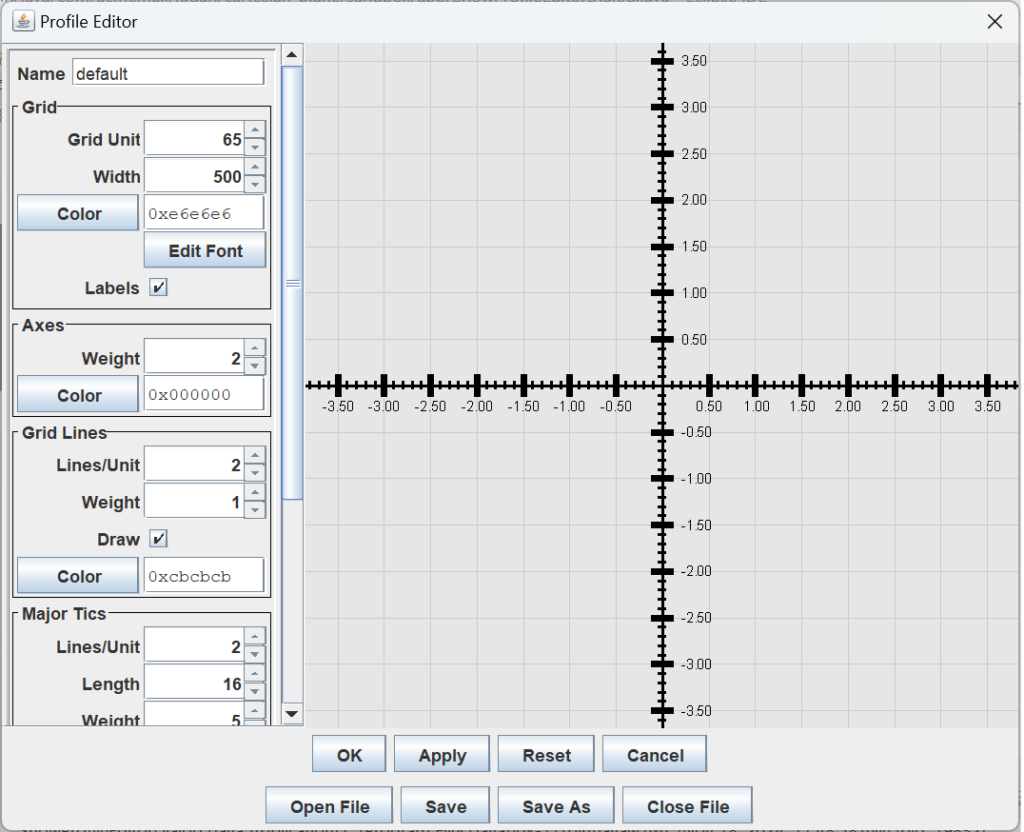
In this lesson, we will develop the Profile class, a repository of all the properties we can use to configure the appearance of our graph window. For example, the length, weight (stroke), and color of the axes, grid lines, and tic marks; the background color of the window; the font properties of the labels on the major tic marks; and the grid unit, the number of pixels used to express the length of one unit on the graph. We’ll also develop the ProfileEditor for modifying properties, the FontEditorDialog, which the ProfileEditor will employ to edit font properties. The ProfileEditorDialog, accessible from the application menubar, will allow the operator to display the ProfileEditor. You can display and interact with the ProfileEditorDialog and its constituent ProfileEditor by runnning application ShowProfileEditorDialog, which can be found in the …app package of the project sandbox.
As shown in the figure above, the ProfileEditorDialog will display a graph window, giving the operator immediate feedback reflecting modifications to graph properties. The window is encapsulated in a small class, ProfileEditorFeedback, and is responsible for responding to events delegated to the window’s paintComponent method. You’ll notice in the figure above that our feedback window looks identical to the main window managed by the CartesianPlane class, suggesting that our feedback window will require a lot of the same logic. To accommodate this and to avoid duplicate code, we will remove the drawing logic from CarteisanPlane and place it in a new class, GraphManager, which can be shared by the CartesianPlane and the ProfileEditorFeedback window. We want the operator to be able to save property configurations to a file and restore them on request. To that end, we will develop the ProfileParser and ProfileFileManager classes.
To test the above, we will integrate a new library, Tess4J, which allows Java programs to access the Tesseract engine for optical character recognition (OCR). Although I won’t list them all here, we will develop several additional classes for test support, including managing GUI components and ensuring that GUI access is performed on the EDT.
Following is a summary of the pages composing this lesson.
- Cartesian Plane Lesson 18 Page 2: Refactoring: This page discusses changes to some of the existing code we will need to implement the new features.
- Cartesian Plane Lesson 18 Page 3: Profiles: This page contains the implementation and JUnit test for the new Profile class.
- Cartesian Plane Lesson 18 Page 4: ProfileParser: This class will facilitate parsing a Profile object so it can be saved in a file and restored as needed.
- Cartesian Plane Lesson 18 Page 5: ProfileParser JUnit Test: A JUnit test class for the ProfileParser
- Cartesian Plane Lesson 18 Page 6: ProfileFileManager: A file manager for storing and retrieving Profile data.
- Cartesian Plane Lesson 18 Page 7: ProfileFileManager JUnitTest: A JUnit test for the ProfileFileManager class.
- Cartesian Plane Lesson 18 Page 8: GraphManager, ProfileEditorFeedback Window (DRAFT): Implement a window to display Profile property changes as they occur.
- Cartesian Plane Lesson 18 Page 9: Optical Character Recognition: Introduction to Optical Character Recognition.
- Cartesian Plane Lesson 18 Page 10: The LineSegment Class (DRAFT): The LineSegment class will assist us in developing JUnit tests for the GraphManager and ProfileEditorFeedback classes.
- Cartesian Plane Lesson 18 Page 11: GraphManager JUnit Test (DRAFT): JUnit test for the GraphManager class.
- Cartesian Plane Lesson 18 Page 12: ProfileEditorFeedback JUnit Test: JUnit test for the ProfileEditorFeedback class.
- Cartesian Plane Lesson 18 Page 13: The FontEditorDialog Class: A dialog encapsulating the FontEditor. Primarily for use in the Profileditor.
- Cartesian Plane Lesson 18 Page 14: The FontEditorDialog JUnit Test: A JUnit test for the FontEditorDialog.
- Cartesian Plane Lesson 18 Page 15: Profile Editor: Implementation of the ProfileEditor, a facility for assisting the operator in configuring the values of the Profile class properties.
- Cartesian Plane Lesson 18 Page 16: ProfileEditorTestBase: A base class for the ProfileEditorTest and ProfileEditorDialogTest GUI support classes.
- Cartesian Plane Lesson 18 Page 17: ProfileEditor JUnit Test: A JUnit test for the ProfileEditor class.
- Cartesian Plane Lesson 18 Page 18: The ProfileEditorDialog: A dialog for displaying and managing the ProfileEditor.
- Cartesian Plane Lesson 18 Page 19: ProfileEditorDialog Test GUI: A GUI to support testing of the ProfileEditorDialog class.
- Cartesian Plane Lesson 18 Page 20: ProfileEditorDialog JUnit Test: A JUnit test for the ProfileEditorDialog class.
- Cartesian Plane Lesson 18 Page 21: Completing the Application Menubar: Integrating the ProfileEditorDialog with the application menubar.
GitHub repository: Cartesian Plane Part 18
Previous lesson: Cartesian Plane Lesson 17 Page 17: Testing the Application Menubar
On the next page, we’ll discuss some adjustments to the functions and features we implemented in previous lessons.