Our next task is to write an abstract class, ProfileEditorTestBase, which will be the superclass of the ProfileEditor and ProfileEditorDialog test GUIs, ProfileEditorTestGUI and ProfileEditorDialogTestGUI. It will encapsulate the major features required by both subclasses, such as locating GUI components and limiting GUI operations to the EDT. The base test class’s largest task is locating, organizing, and managing GUI components. It is located in the …test_utils package on the test source branch.
GitHub repository: Cartesian Plane Lesson 18
Previous lesson: Cartesian Plane Lesson 18 Page 15: Profile Editor
Managing GUI Components
Our test GUI base class has a large facility for locating, organizing, and managing GUI components. The facility extends to:
- Fields such as the propSetPanelMap, which establishes a correlation between the GraphPropertySetMW object and the four LinePropertySet objects encapsulated in the profile, and the JPanels that contain the GUI components for managing them;
- Three static nested classes for organizing components according to function:
- FontDialogComponents for organizing the components contained in the integrated FontDialog, such as font name and size;
- GraphPropertyComponents for organizing components contained in the panel that maps to graph properties, such as grid unit and grid color;
- LinePropertyComponents for organizing components related to the four LinePropertySet objects encapsulated in the Profile;
- Static methods in the main class used by the nested classes to locate components, such as getSpinnerByName(String name, JComponent source), which looks for a JSpinner with the given name in the component tree rooted in source. Other static methods in the main class provide additional support to the nested classes (see below).
We’ll start by examining the static methods for locating GUI components.
⬛ Static Methods for Locating GUI Components
The following methods are located in the main class.
🟦 private static JComponent getComponentByName(String name, JComponent source)
This method searches the tree rooted in source for a JComponent with the given name. It looks like this.
private static JComponent
getComponentByName( String name, JComponent source )
{
    Predicate<JComponent>   pred    =
        jc -> name.equals( jc.getName() );
    JComponent              comp    =
        ComponentFinder.find( source, pred );
    assertNotNull( comp );
    return comp;
}
🟦 private static JCheckBox getCheckBox( JComponent source )
🟦 private static JComboBox<String> getComboBox( JComponent source )
These methods get the first component of type JCheckBox or JComboBox in the given component tree. The code for getCheckBox follows; the code for getComboBox is similar and is in the GitHub repository.
private static JCheckBox getCheckBox( JComponent source )
{
    JComponent  comp    =
        ComponentFinder.find( source, c -> (c instanceof JCheckBox) );
    assertNotNull( comp );
    assertTrue( comp instanceof JCheckBox );
    return (JCheckBox)comp;
}
🟦 private static JSpinner getSpinnerByName( String name, JComponent source )
🟦 private static JCheckBox getCheckBoxByName( String name, JComponent source )
🟦 private static JTextField getTextFieldByName( String name, JComponent source )
🟦 private static JButton getJButtonByName( String name, JComponent source )
These methods return a JSpinner, JCheckBox, JTestField, or JButton component with the given component name in the given component tree. The code for getSpinnerByName is shown below. The code for the other methods is directly analogous and is in the GitHub repository.
private static
JSpinner getSpinnerByName( String name, JComponent source )
{
    JComponent  comp    = getComponentByName( name, source );
    assertTrue( comp instanceof JSpinner );
    return (JSpinner)comp;
}
⏹ Other Static Methods in the Main Class
Here, we will discuss additional static methods in the main class intended to support the nested classes.
🟦 private static String toHexString( int value )
🟦 private static int getColor( JTextField colorComponent )
🟦 private static float getFloat( JSpinner spinner )
The method toHexString takes an integer value and formats it as a hexadecimal string with leading 0x. The getColor method interprets the value of the given text field as an integer, possibly encoded as hexadecimal using 0x or #, and returns the integer value; if the text field’s value is not a valid integer, -1 is returned. The getFloat method takes a JSpinner backed by a SpinnerNumberModel and returns its value as type float. If the JSpinner is not backed by a SpinnerNumberModel, an assertion is fired. Here’s the code for these methods.
private static String toHexString( int value )
{
    String  hex = String.format( "0x%x", value );
    return hex;
}
private static int getColor( JTextField colorComponent )
{
    int iColor  = -1;
    try
    {
        iColor = Integer.decode( colorComponent.getText() );
    }
    catch ( NumberFormatException exc )
    {
        // ignore
    }
    return iColor;
}
private static float getFloat( JSpinner spinner )
{
    SpinnerModel        model       = spinner.getModel();
    assertTrue( model instanceof SpinnerNumberModel );
    SpinnerNumberModel  numberModel = (SpinnerNumberModel)model;
    float           val             =
        numberModel.getNumber().floatValue();
    return val;
}
⏹ Property Set Class Name-to-JPanel Map
In the main class, we have a static field that maps the class name of a property set (GraphPropertySetMW, LinePropertySetAxes, etc.) to the JPanel containing the GUI
components that manage the properties in the set: 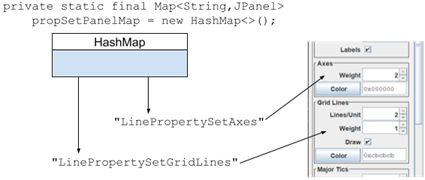
private static final Map<String,JPanel> propSetPanelMap = new HashMap<>();
The map is initialized in the getAllTitledPanels method.
Nested Classes
Following is a discussion of the static nested classes in the ProfileEditorTestBase class.
This class has three static nested classes for organizing GUI components: FontDialogComponents, GraphPropertyComponents, and LinePropertyComponents. Reference to members and methods of these classes must occur in the context of the EDT. We’ll discuss these next.
⬛ private static class FontDialogComponents
This nested class organizes and manages those GUI components associated with the FontEditor and FontEditorDialog. Access to the fields of this class must be executed in the context of the EDT. Below is a discussion of its fields, constructors, and methods.
🟦 FontDialogComponents Fields
Here’s an annotated listing of the fields declared in the FontDialogComponents class.
1 2 3 4 5 6 7 8 9 10 11 12 13 | private static class FontDialogComponents { private final JDialog fontDialog; private final JComboBox<String> nameComponent; private final JSpinner sizeComponent; private final JTextField colorComponent; private final JCheckBox boldComponent; private final JCheckBox italicComponent; private final JButton okButton; private final JButton resetButton; private final JButton cancelButton; // ... } |
- Line 3: The FontEditorDialog, provided in the constructor.
- Lines 4-6: The font name, size, and color selectors.
- Lines 7,8: The JCheckBoxes for the bold and italic selectors.
- Lines 9-11: The control buttons from the FontEditorDialog.
🟦 FontDialogComponents Constructor
The FontDialogComponents constructor takes the dialog containing the FontEditor as an argument (see also the GraphPropertyComponents Constructor). Using the dialog’s content pane as the root of the component tree, it locates all required components by name. The component names come from the FontEditor class except for the encapsulated color components, whose names are supplied by the ColorEditor. The constructor must be invoked in the context of the EDT. Here’s the code for the constructor.
public FontDialogComponents( JDialog fontDialog )
{
    this.fontDialog = fontDialog;
    Container   comp    = fontDialog.getContentPane();
    assertTrue( comp instanceof JComponent );
    JComponent  pane    = (JComponent)comp;

    nameComponent = getComboBox( pane );
    boldComponent =
        getCheckBoxByName( FontEditor.BOLD_LABEL, pane );
    italicComponent =
        getCheckBoxByName( FontEditor.ITALIC_LABEL, pane );
    sizeComponent =
        getSpinnerByName( FontEditor.SIZE_LABEL, pane );
    colorComponent =
        getTextFieldByName( ColorEditor.TEXT_EDITOR_NAME, pane );
    okButton =
        getJButtonByName( FontEditorDialog.OK_LABEL, pane );
    resetButton =
        getJButtonByName( FontEditorDialog.RESET_LABEL, pane );
    cancelButton =
        getJButtonByName( FontEditorDialog.CANCEL_LABEL, pane );
}
🟦 FontDialogComponents Private and Public Methods
The FontDialogComponents has no methods. Access to the data stored in a FontDialogComponents object is provided via the GraphPropertyComponents class.
⬛ private static class GraphPropertyComponents
The GraphPropertyComponents nested class organizes and manages the GUI components associated with the grid unit and the GraphPropertySetMW object contained in the Profile. Access to the methods and fields of this class must be executed in the context of the EDT. Below is a discussion of its fields, constructors, and methods.
🟦 GraphPropertyComponents Fields
Following is an annotated list of the fields declared in the GraphPropertyComponents class.
1 2 3 4 5 6 7 8 9 10 | private static class GraphPropertyComponents { private final FontDialogComponents fontComponents; private final JSpinner gridUnitComponent; private final JSpinner widthComponent; private final JTextField colorComponent; private final JCheckBox labelsComponent; private final JButton editFontComponent; // ... } |
- Line 3: Collection of components associated with fonts.
- Line 4: Grid unit selector.
- Line 5: Grid width selector.
- Line 6: Text field from the encapsulated ColorEditor.
- Line 7: Checkbox that controls whether or not labels are displayed on the x- and y-axes.
- Line 8: The button from the Grid panel used to post the FontEditorDialog.
🟦 GraphPropertyComponents Constructor
The constructor for this class initializes the class’s fields. For most of the fields, this is a simple lookup operation. To get the FontEditorDialog, which is required to initialize the fontComponents field, we must search for a top-level window with the title provided by the FontEditorDialog class. The constructor must be invoked in the context of the EDT. Here is the annotated listing.
1 2 3 4 5 6 7 8 9 10 11 12 13 14 15 16 17 18 19 20 21 22 23 24 25 26 27 28 29 30 31 32 | public GraphPropertyComponents() { JPanel panel = propSetPanelMap.get( graphSet ); gridUnitComponent = getSpinnerByName( ProfileEditor.GRID_UNIT_LABEL, panel ); widthComponent = getSpinnerByName( ProfileEditor.WIDTH_LABEL, panel ); colorComponent = getTextFieldByName( ColorEditor.TEXT_EDITOR_NAME, panel ); editFontComponent = getJButtonByName( ProfileEditor.EDIT_FONT_LABEL, panel ); labelsComponent = getCheckBoxByName( ProfileEditor.DRAW_FONT_LABEL, panel ); boolean canBeDialog = true; boolean canBeFrame = false; boolean mustBeVisible = false; ComponentFinder finder = new ComponentFinder( canBeDialog, canBeFrame, mustBeVisible ); String dialogTitle = FontEditorDialog.DIALOG_TITLE; Predicate<Window> pred = w -> dialogTitle.equals( ((JDialog)w).getTitle() ); Window window = finder.findWindow( pred ); assertNotNull( window ); assertTrue( window instanceof JDialog ); fontComponents = new FontDialogComponents( (JDialog)window ); } |
- Line 4: Get the JPanel that hosts the components for editing the grid properties; graphSet is a constant in the outer initialized class like this:
    private static final String graphSet =
GraphPropertySetMW.class.getSimpleName(); - Lines 5-14: Search the JPanel for the components that edit the grid unit and the properties in GraphPropertySetMW.
- Lines 16-23: Instantiate a ComponentFinder to search for a top-level window that:
- Can be a dialog.
- Cannot be a frame.
- May or may not be visible.
- Lines 24-27: Search for the top-level window that satisfies the above requirements and has the title provided by the FontEditorDialog.
- Lines 29,30: Sanity check; verify that a component of type JDialog was found.
- Line 31: Initialize the fontComponents instance variable.
🟦 GraphPropertyComponents Public Methods
Following is a discussion of the public methods contained in the GraphPropertyComponents class. All methods must be invoked in the context of the EDT.
⏹ public float getGridUnit()
⏹ public float getWidth()
⏹ public int getBGColor()
⏹ public boolean getFontDraw()
The methods getGridUnit and getWidth get the grid unit and grid width from the JSpinners in the Grid panel; getFontDraw gets the Labels boolean value from the Grid panel; getBGColor gets the grid color from the JTextField provided by the encapsulated ColorEditor. Here is the code for getGridUnit and getBGColor; all the code is in the GitHub Repository.
public float getGridUnit()
{
    float   val = getFloat( gridUnitComponent );
    return val;
}
public int getBGColor()
{
    int iColor  = getColor( colorComponent );
    return iColor;
}
⏹ public String getFontName()
⏹ public float getFontSize()
⏹ public boolean getBold()
⏹ public boolean getItalic()
⏹ public int getFGColor()
These methods get the named property from the associated component in the graph panel (getFGColor gets the color that the text of the labels is drawn in). Here’s the code for the first three; all the code is in the GitHub Repository.
public String getFontName()
{
    String  val     =
        (String)fontComponents.nameComponent.getSelectedItem();
    return val;
}
public float getFontSize()
{
    float   val     = getFloat( fontComponents.sizeComponent );
    return val;
}
public boolean getBold()
{
    boolean value   = fontComponents.boldComponent.isSelected();
    return value;
}
⏹ public void setGridUnit( float val )
⏹ public void setWidth( float width )
⏹ public void setFontDraw( boolean draw )
⏹ public void setBGColor( int iColor )
The methods setGridUnit and setWidth set the grid unit and grid width in the JSpinners in the graph panel; setBGColor sets the grid color in the JTextField provided by the encapsulated ColorEditor and posts an action event notifying the ColorEditor of the change. Here is the code for setGridUnit and setBGColor; all the code is in the GitHub repository.
public void setGridUnit( float val )
{
    gridUnitComponent.setValue( val );
}
public void setBGColor( int iColor )
{
    colorComponent.setText( toHexString( iColor ) );
    colorComponent.postActionEvent();
}
⏹ public void setFontName( String name )
⏹ public void setFontSize( float size )
⏹ public void setBold( boolean value )
⏹ public void setItalic( boolean value )
⏹ public void setFGColor( int iColor )
These methods set the named property in the associated component in the graph panel (setFGColor sets the color in which the labels’ text is drawn). Here’s the code for the first three; all the code is in the GitHub Repository.
public void setFontName( String name )
{
    fontComponents.nameComponent.setSelectedItem( name );
}
public void setFontSize( float size )
{
    fontComponents.sizeComponent.setValue( size );
}
public void setBold( boolean value )
{
    fontComponents.boldComponent.setSelected( value );
}
⏹ public Thread startFontEditor()
This method starts a thread that selects the Edit Font button in the graph panel, posting the font editor in a modal dialog. It waits until the dialog becomes visible, then returns the thread ID to the caller. The thread will terminate when the dialog’s OK or Cancel buttons are pushed; see selectOK and selectCancel. The code for startFontEditor follows.
public Thread startFontEditor()
{
    Thread  thread  = new Thread( () ->
        editFontComponent.doClick()
    );
    thread.start();
    while ( !fontComponents.fontDialog.isVisible() )
        Utils.pause( 1 );
    return thread;
}
⏹ public void selectOK()
⏹ public void selectReset()
⏹ public void selectCancel()
These methods select the OK, Reset, and Cancel buttons in the FontEditorDialog. The code looks like this.
public void selectOK()
{
    fontComponents.okButton.doClick();
}
public void selectReset()
{
    fontComponents.resetButton.doClick();
}
public void selectCancel()
{
    fontComponents.cancelButton.doClick();
}
⏹ public void getComponentValues( Profile profile )
The getComponentValues method transfers to the given Profile the values of the components corresponding to the grid unit and the properties encapsulated in the GraphPropertySetMW object. The code looks like this:
public void getComponentValues( Profile profile )
{
    GraphPropertySet    props   =
        profile.getMainWindow();
    profile.setGridUnit( getGridUnit() );
    props.setWidth( getWidth() );
    props.setBGColor( new Color( getBGColor() ) );
    props.setBold( getBold() );
    props.setItalic( getItalic() );
    props.setFGColor( new Color( getFGColor() ) );
    props.setFontDraw( getFontDraw() );
    props.setFontName( getFontName() );
    props.setFontSize( getFontSize() );
}
⬛ private static class LinePropertyComponents
Our test GUI has an object of this type for each of the four concrete subclasses of LinePropertySet encapsulated in the Profile. Each object is mapped to a JPanel containing the components used to manage the properties in a LinePropertySet: spacing, stroke, length, color, and draw. Access to the members and methods of this class must occur in the context of the EDT. Below is a discussion of its fields, constructors, and methods.
🟦 LinePropertyComponents Fields
The following is a list of the fields declared in the LinePropertyComponents class. The first field is the name of the specific LinePropertySet subclass being managed, such as LinePropertySetGridLines. The other fields are references to components that manage the named properties.
private static class LinePropertyComponents
{
    private final String        propSetName;
    private final JSpinner      spacingComponent;
    private final JSpinner      strokeComponent;
    private final JSpinner      lengthComponent;
    private final JCheckBox     drawComponent;
    private final JTextField    colorComponent;
    // ...
}
🟦 LinePropertyComponents Constructor
The constructor for this class initializes the class’s fields using a simple search operation with the class’s associated JPanel as the root of the component tree to search. For a LinePropertySet subclass, only components corresponding to supported properties are initialized; for example, LinePropertSetAxes doesn’t support the spacing property, so its spacingComponent field is not initialized. The constructor must be invoked in the context of the EDT. Here is the code for the constructor.
public LinePropertyComponents( LinePropertySet propSet)
{
    propSetName = propSet.getClass().getSimpleName();
    JPanel  panel   = propSetPanelMap.get( propSetName );
    assertNotNull( panel );
    spacingComponent = propSet.hasSpacing() ?
        getSpinnerByName( ProfileEditor.SPACING_LABEL, panel ) :
        null;
    strokeComponent = propSet.hasStroke() ?
        getSpinnerByName( ProfileEditor.STROKE_LABEL, panel ) :
        null;
    lengthComponent = propSet.hasLength() ?
        getSpinnerByName( ProfileEditor.LENGTH_LABEL, panel ) :
        null;
    drawComponent = propSet.hasDraw() ?
        getCheckBox( panel ) :
        null;
    colorComponent = propSet.hasColor() ?
        getTextFieldByName( ColorEditor.TEXT_EDITOR_NAME, panel ) :
        null;
}
🟦 LinePropertyComponents Public Methods
Following is a discussion of the public methods contained in the LinePropertyComponents class. All methods must be invoked in the context of the EDT.
⏹ LinePropertyComponents Setters and Getters
This class has a setter and getter for each property in a LinePropertySet object:
- public float getSpacing()
- public void setSpacing( float val )
- public float getStroke()
- public void setStroke( float val )
- public float getLength()
- public void setLength( float val )
- public boolean getDraw()
- public void setDraw( boolean val )
- public int getLineColor()
- public void setLineColor( int iColor )
Following is the code for getLength, setLength, getLineColor, and setLineColor. Implementation of the remaining methods is an exercise for the student. The solution is in the GitHub repository.
public float getLength()
{
    float   val = getFloat( lengthComponent );
    return val;
}
public void setLength( float val )
{
    lengthComponent.setValue( val );
}
public int getLineColor()
{
    int iColor  = getColor( colorComponent );
    return iColor;
}
public void setLineColor( int iColor )
{
    colorComponent.setText( toHexString( iColor ) );
    colorComponent.postActionEvent();
}
⏹ public void getComponentValues( Profile profile )
The getComponentValues method transfers to the given Profile the values of the components corresponding to the properties encapsulated in a LinePropertySet object. If a particular LinePropertySet does not support a property, it is skipped. The code looks like this:
public void getComponentValues( Profile profile )
{
    LinePropertySet props   =
        profile.getLinePropertySet( propSetName );
    if ( props.hasSpacing() )
        props.setSpacing( getSpacing() );
    if ( props.hasLength() )
        props.setLength( getLength() );
    if ( props.hasStroke() )
        props.setStroke( getStroke() );
    if ( props.hasDraw() )
        props.setDraw( getDraw() );
    if ( props.hasColor() )
        props.setColor( new Color( getLineColor() ) );
}
Class ProfileEditorTestBase
In addition to the GUI-centric facilities discussed above (see Managing GUI Components), the ProfileEditorTestBase class has the following fields, helper methods, constructors, and public methods.
⬛ ProfileEditorTestBase Fields
Following is an annotated list of the ProfileEditorTestBase class’s fields. See also Property Set Class Name-to-JPanel Map above.
1 2 3 4 5 6 7 8 9 10 11 12 13 14 15 16 17 18 19 20 21 22 23 24 | public abstract class ProfileEditorTestBase { private static final String graphSet = GraphPropertySetMW.class.getSimpleName(); private static final String axesSet = LinePropertySetAxes.class.getSimpleName(); private static final String gridLinesSet = LinePropertySetGridLines.class.getSimpleName(); private static final String ticMajorSet = LinePropertySetTicMajor.class.getSimpleName(); private static final String ticMinorSet = LinePropertySetTicMinor.class.getSimpleName(); private final ProfileEditor profileEditor; private final GraphPropertyComponents graphPropComps; private static final Map<String,JPanel> propSetPanelMap = new HashMap<>(); private final Map<String, LinePropertyComponents> propSetToCompMap = new HashMap<>(); private final JTextField nameComponent; private Object adHocObject = null; // ... } |
- Lines 3-12: The simple class names of the GraphPropertySet and LinePropertySet objects encapsulated in a Profile object.
- Line 14: The ProfileEditor under test; initialized in the constructor.
- Line 15: Reference to the GraphPropertyComponents object that encapsulates the GUI components associated with the grid unit and GraphPropertySetMW properties, initialized in the constructor.
- Lines 16,17: Map of property set names to JPanels. For example, graphSet (line 3) maps to the JPanel that manages the grid unit and background color, and gridLinesSet (line 7) maps to the JPanel that manages the stroke and spacing for the grid line properties. Initialized in getAllTitledPanels.
- Lines 18,19: Map of LinePropertySet names to LinePropertyComponents objects. There is one LinePropertyComponents object for each LinePropertySet concrete subclass. Initialized in getAllLinePropertyComponents.
- Line 20: The GUI component that manages the profile name.
- Line 22: Convenient object for transient use in lambdas.
⬛ ProfileEditorTestBase Helper Methods
Following is a discussion of those helper methods in the ProfileEditorTestBase that are not strictly for use in the nested classes. See also Other Static Methods in the Main Class.
🟦 private Object getValue( Supplier<Object> supplier)
Uses the given supplier to obtain and return a value. The supplier is invoked in the context of the EDT. Here is the code.
private Object getValue( Supplier<Object> supplier )
{
    GUIUtils.schedEDTAndWait( () ->
        adHocObject = supplier.get()
    );
    assertNotNull( adHocObject );
    return adHocObject;
}
🟦 private boolean getBooleanValue( Supplier<Object> supplier )
🟦 private float getFloatValue( Supplier<Object> supplier )
🟦 private int getIntValue( Supplier<Object> supplier )
🟦 private String getStringValue( Supplier<Object> supplier )
Uses the given supplier to obtain and return a value of the named type. The supplier is invoked in the context of the EDT. The type of the Supplier is Object for convenience; if the object returned is not the expected type, an assertion is fired. The implementation of the getBooleanValue method follows; all the code is in the GitHub repository. See also getValue( Supplier<Object>).
private boolean getBooleanValue( Supplier<Object> supplier )
{
    Object  oVal    = getValue( supplier );
    assertTrue( oVal instanceof Boolean );
    return (boolean)oVal;
}
🟦 private JPanel getPanelByName( String name )
Starting with ProfileEditor as the component tree root, locate the JPanel with the given component name. The listing for this method follows. See also getComponentByName.
private JPanel getPanelByName( String name )
{
    JComponent  comp    = getComponentByName( name, profileEditor );
    assertTrue( comp instanceof JPanel);
    return (JPanel)comp;
}
🟦 private void getAllTitledPanels( Container source )
Using source as the component tree root, locate all the JPanels corresponding to a property set encapsulated in the Profile (GraphPropertySetMW, LinePropertySetAxes, etc.). A map from each property set name to the corresponding JPanel is established in propSetPanelMap (see Property Set Class Name-to-JPanel Map). An annotated listing of this method follows.
1 2 3 4 5 6 7 8 9 10 11 12 13 14 15 16 17 18 19 20 21 22 23 | private void getAllTitledPanels( Container source ) { Map<String,String> titlePropSetMap = Map.of( ProfileEditor.GRID_TITLE, graphSet, ProfileEditor.AXES_TITLE, axesSet, ProfileEditor.GRID_LINES_TITLE, gridLinesSet, ProfileEditor.MAJOR_TICS_TITLE, ticMajorSet, ProfileEditor.MINOR_TICS_TITLE, ticMinorSet ); Stream.of( ProfileEditor.GRID_TITLE, ProfileEditor.AXES_TITLE, ProfileEditor.GRID_LINES_TITLE, ProfileEditor.MAJOR_TICS_TITLE, ProfileEditor.MINOR_TICS_TITLE ).forEach( title -> { JPanel panel = getPanelByName( title ); String propSet = titlePropSetMap.get( title ); assertNotNull( propSet ); propSetPanelMap.put( propSet, panel ); }); } |
- Lines 3-10: In a temporary variable, establish a map from the component name of a JPanel in the GUI that manages a property set to the name of the property set it manages. For example, the JPanel with the component name Axes will be mapped to the simple name of the LinePropertySetAxes class.
- Lines 11-16: Stream the names of the target JPanels.
- Lines 17-21: For each JPanel component name:
- Line 18: Locate the JPanel with the given component name.
- Line 19: Get the name of the property set managed by the JPanel.
- Line 20: Sanity check; verify that the property set name was found.
- Line 21: Add to the propSetPanelMap a mapping from the property set name to the associated JPanel.
🟦 private void getAllLinePropertyComponents()
This method performs as follows for each concrete subclass of LinePropertySet:
- Create an instance of the LinePropertySet.
- Create an instance of a LinePropertyComponents object that encapsulates the LinePropertySet object.
- Map the name of the LinePropertySet subclass to the LinePropertyComponents object; see also ProfileEditorTestBase Fields.
A listing of this method follows.
private void getAllLinePropertyComponents()
{
    Stream.of(
        new LinePropertySetAxes(),
        new LinePropertySetGridLines(),
        new LinePropertySetTicMajor(),
        new LinePropertySetTicMinor()
    )
    .map( LinePropertyComponents::new )
    .forEach( s -> propSetToCompMap.put( s.propSetName, s ) );
}
⏹ ProfileEditorTestBase Constructor
The ProfileEditorTestBase class has one constructor, which must be invoked in the context of the EDT. It performs basic initialization operations. An annotated listing for the constructor follows.
1 2 3 4 5 6 7 8 9 10 | public ProfileEditorTestBase( ProfileEditor profileEditor ) { this.profileEditor = profileEditor; getAllTitledPanels( profileEditor ); getAllLinePropertyComponents(); graphPropComps = new GraphPropertyComponents(); nameComponent = getTextFieldByName( ProfileEditor.NAME_LABEL, profileEditor ); } |
- Line 3: Establish the ProfileEditor under test.
- Line 5: Locate the JPanels in the GUI corresponding to property sets in the Profile. For each LinePropertySet concrete subclass, instantiate the subclass and map its name to its instance.
- Line 6: For each LinePropertySet concrete subclass, create a LinePropertyComponents object that encapsulates the LinePropertySet. Map the property set name to the LinePropertyComponents object.
- Line 7: Create a GraphPropertyComponents object.
- Lines 8,9: Locate the JTextField used to edit the Profile name.
⏹ ProfileEditorTestBase Public Methods
Below is a discussion of the public methods of ProfileEditorTestBase class.
🟦 public ProfileEditor getProfileEditor()
As shown below, this is a simple getter for the ProfileEditor under test.
public ProfileEditor getProfileEditor()
{
    return profileEditor;
}
🟦 public void setName( String name )
🟦 public String getName()
These methods set and get the value of the component that is used to edit the Profile name. The operations are executed in the context of the EDT. They look like this:
public void setName( String name )
{
    GUIUtils.schedEDTAndWait( () -> nameComponent.setText( name ) );
}
public String getName()
{
    String  name    = getStringValue( () -> nameComponent.getText() );
    return name;
}
🟦 public void setGridUnit( float value )
🟦 public void setGridWidth( float value )
🟦 public void setFontName( String value )
🟦 public void setFontSize( float value )
🟦 public void setFontBold( boolean value )
🟦 public void setFontItalic( boolean value )
🟦 public void setFontDraw( boolean value )
🟦 public void setFGColor( int value )
🟦 public void setBGColor( int value )
These methods set the value of the component associated with a property in the GraphPropertiesSetMW object. All operations are conducted in the context of the EDT. The implementations of a few of the methods are shown below. Implementations of all methods follow a similar pattern and are in the GitHub repository. See also GraphPropertyComponents.
public void setGridUnit( float value )
{
    GUIUtils.schedEDTAndWait( () ->
        graphPropComps.setGridUnit( value )
    );
}
public void setFontSize( float value )
{
    GUIUtils.schedEDTAndWait( () ->
        graphPropComps.setFontSize( value )
    );
}
public void setFontBold( boolean value )
{
    GUIUtils.schedEDTAndWait( () ->
        graphPropComps.setBold( value )
    );
}
🟦 public float getGridUnit()
🟦 public float getGridWidth()
🟦 public String getFontName()
🟦 public float getFontSize()
🟦 public boolean getFontBold()
🟦 public boolean getFontItalic()
🟦 public boolean getFontDraw()
🟦 public int getFGColor()
🟦 public int getBGColor()
These methods get the value of the component associated with a property in the GraphPropertiesSetMW object. All operations are conducted in the context of the EDT. The implementation of a few of the methods is shown below. Implementations of all methods follow a similar pattern and are in the GitHub repository. See also GraphPropertyComponents.
public float getGridUnit()
{
    float   value   = getFloatValue( () ->
        graphPropComps.getGridUnit()
    );
    return value;
}
public float getFontSize()
{
    float   value   = getFloatValue( () ->
        graphPropComps.getFontSize()
    );
    return value;
}
🟦 public void setSpacing( String setName, float value )
🟦 public void setLength( String setName, float value )
🟦 public void setStroke( String setName, float value )
🟦 public void setColor( String setName, int value )
🟦 public void setDraw( String setName, boolean value )
These methods set the value of the component associated with a property in the LineProperties subclass object with the given name. All operations are conducted in the context of the EDT. The implementation of setSpacing follows. Implementations of all methods follow a similar pattern and are in the GitHub repository. See also LinePropertyComponents.
public void setSpacing( String setName, float value )
{
    LinePropertyComponents  propComps   =
        propSetToCompMap.get( setName );
    GUIUtils.schedEDTAndWait( () -> propComps.setSpacing( value ) );
}
🟦 public float getSpacing( String setName )
🟦 public float getLength( String setName )
🟦 public float getStroke( String setName )
🟦 public int getColor( String setName )
🟦public boolean getDraw( String setName )
These methods get the value of the component associated with a property in the LinePropertiesSet subclass object with the given name. All operations are conducted in the context of the EDT. The implementation of getSpacing follows. Implementations of all methods follow a similar pattern and are in the GitHub repository. See also LinePropertyComponents.
public float getSpacing( String setName )
{
    LinePropertyComponents  propComps   =
        propSetToCompMap.get( setName );
    float   value   = getFloatValue( () -> propComps.getSpacing() );
    return value;
}
🟦 public Thread editFont()
🟦 public void selectFDOK()
🟦 public void selectFDReset()
🟦 public void selectFDCancel()
The editFont method starts a new thread that clicks the EditFont button in the Grid panel, posting a modal dialog containing the FontEditor. After the dialog becomes visible, the thread ID is returned to the caller. The other methods click the OK, Reset, and Cancel buttons in the FontEditorDialog. See also startFontEditor, selectOK, selectReset, and selectCancel in the GraphPropertyComponents class. See also cancelFontDialog. Here’s the code for editFont and selectFDOK. Implementing the remaining methods is an exercise for the student; the solution is in the GitHub repository.
public Thread editFont()
{
    Thread  thread  = graphPropComps.startFontEditor();
    return thread;
}
public void selectFDOK()
{
    graphPropComps.selectOK();
}
🟦 public void cancelFontDialog()
This is a cleanup method and must not be confused with selectFDCancel. If a test fails while the FontEditorDialog is posted, this method will dismiss the dialog and wait for it to become invisible. Client JUnit test classes should invoke this method in their @AfterEach method. The code looks like this.
public void cancelFontDialog()
{
    JDialog dialog  = graphPropComps.fontComponents.fontDialog;
    if ( dialog.isVisible() )
    {
        selectFDCancel();
        while ( dialog.isVisible() )
            Utils.pause( 2 );
    }
}
🟦 public void apply()
🟦 public void reset()
These methods invoke the apply and reset methods in the ProfileEditor under test. Operations are conducted in the context of the EDT. Here’s the code.
public void apply()
{
    GUIUtils.schedEDTAndWait( () -> profileEditor.apply() );
}
public void reset()
{
    GUIUtils.schedEDTAndWait( () -> profileEditor.reset() );
}
Summary
On this page, we implemented ProfileEditorTestBase, an abstract class that serves as the base for classes that support JUnit tests for the ProfileEditor and ProfileEditorDialog classes. Next, we will write ProfileEditorTest, a JUnit test for the ProfileEditor, and the ProfileEditorTestGUI class, which extends ProfileEditorTestBase and supports the ProfileEditorTest class.